
Virtual Kitchen Software: A Guide for UAE Restaurants
What if your virtual kitchen’s biggest bottleneck isn’t the cooking line, but the handoff between apps? When orders, menus, and stock information sit in separate systems, staff may need to re-enter details or resolve avoidable errors. The right virtual kitchen management software helps each tool do its job and moves operational information between them.
For UAE restaurant operators, the challenge is knowing which capabilities belong in order management, menu control, and POS-to-aggregator connectivity. These categories can overlap, but one platform may not handle every part of the workflow. This guide explains the different layers, shows how to compare them against daily operations, and outlines a practical way to connect systems without adding unnecessary complexity.
You’ll learn what to assess across order routing, menu updates, inventory workflows, and reporting, with a focus on reducing manual handoffs. You’ll also see how TableCompass.ai tools such as OmniSync and Universal Bridge connect POS and aggregator workflows, while Atlas Menu Management supports coordinated digital menus. The goal is a clearer operating picture and systems that work together around your kitchen team.
Key Takeaways
- Map how orders, menu availability, stock information, and kitchen preparation move through your current setup before choosing new tools.
- Assess virtual kitchen management software against distinct workflow needs: POS and aggregator connectivity, menu control, kitchen execution, and reporting.
- Trace a delivery order from the digital channel to the kitchen to find handoffs where rekeying or outdated availability can cause problems.
- Roll out changes in phases: begin with a focused pilot, test exceptions, train the team, then expand to other brands or channels.
- Use connected systems such as OmniSync and Universal Bridge for POS-to-aggregator order workflows, with centralized menu control as a related layer.
What Does Virtual Kitchen Management Software Actually Manage?
A virtual brand can sell through delivery channels while relying on a physical kitchen, a POS system, digital menus, and staff who prepare and pack each order. These parts may sit in separate tools, even though they support the same meal from listing to handoff. Define your operating model before comparing software, because “virtual kitchen” can describe several different setups.
Virtual kitchen management software is a set of tools that coordinates digital orders, menus, kitchen handling, and operational information across a restaurant’s workflows. The term describes a software layer, not a promise that one application replaces every system or task.
Virtual brand, cloud kitchen, or central kitchen?
A virtual brand describes the sales concept: a distinct food brand sold through digital channels, which may operate from an existing restaurant kitchen. A cloud kitchen describes an operating model built around preparing orders for delivery, often without traditional dine-in service. The terms can overlap, but they aren’t interchangeable. A central kitchen has another role: producing or supplying food for multiple outlets.
For example, a Dubai restaurant might use its existing kitchen to run a separate delivery-focused menu. Another operator might prepare orders from a dedicated cloud-kitchen space. A group with several UAE outlets could use a central kitchen to prepare components for supply across locations.
These distinctions matter because each model has different coordination needs. A virtual brand may need consistent digital listings, while a central kitchen may need to coordinate production and supply between sites. A virtual restaurant is commonly associated with delivery-only food service, but the actual kitchen arrangement can vary.
Which workflows belong in the software picture?
Think of the operation as connected workflow areas, not as a single all-purpose product. A restaurant may use separate applications for each area, or connect selected systems so information can move between them.
- Ordering: Orders arrive through delivery platforms or a restaurant’s direct-ordering channel.
- POS connectivity: Order details pass between digital channels and the restaurant’s POS, reducing the need to re-enter them by hand.
- Menu control: Teams maintain item details and availability across relevant digital channels. Centralized menu management can help keep listings aligned.
- Kitchen execution: Staff receive and organize accepted orders for preparation, cooking, packing, and handoff.
- Inventory: Stock information helps teams understand what is available and avoid accepting orders for unavailable items.
These functions are related, but they aren’t identical. A POS records and processes sales; kitchen tools support preparation; inventory tools track stock; and connectivity software helps systems exchange information. List which tool owns each task in your operation, then mark where staff copy details, update availability, or resolve mismatches. This simple map shows where better coordination could help without assuming one platform must replace every part of the kitchen.
How Virtual Kitchen Software Connects Orders to Kitchen Operations
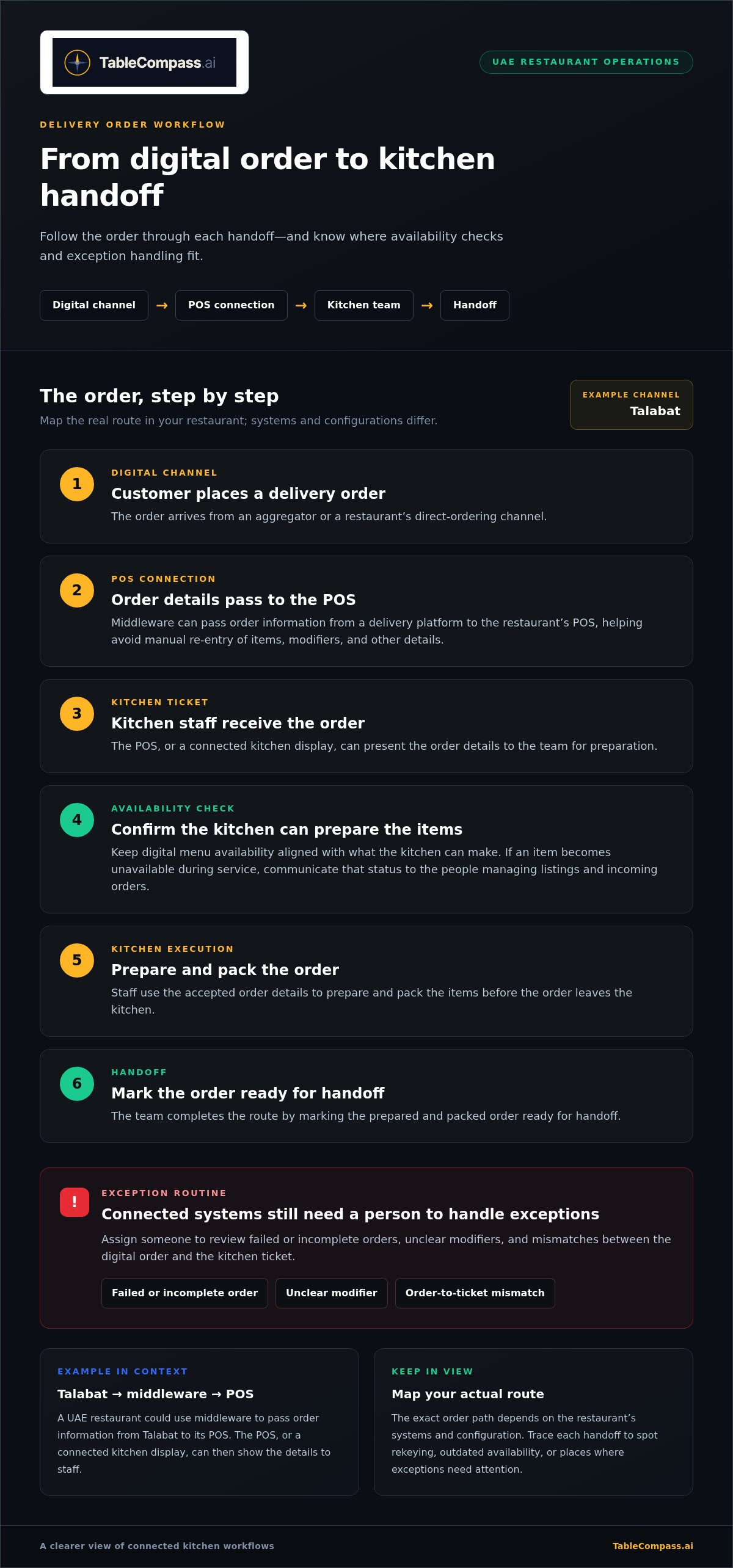
A delivery order passes through several handoffs before it reaches the guest. A customer places an order on an aggregator, the restaurant receives the details, the team prepares and packs the items, and staff mark the order ready for handoff. If those details are copied manually between screens, the process creates extra work and more chances for mistakes.
Order workflow: receive the digital order, pass it through the POS connection, send it to kitchen staff, check availability, prepare and pack, then hand it off. The exact route depends on the restaurant’s systems and configuration. Map what happens at each step instead of assuming every tool connects in the same way.
From delivery order to kitchen ticket
For example, a UAE restaurant accepting orders through Talabat could use middleware to pass order information to its POS. The POS, or a connected kitchen display, can then present the order details to the team. Oracle MICROS is one example of a POS platform in the market; naming it here doesn’t imply a specific integration or setup.
When an order moves through connected systems, staff may avoid retyping items, modifiers, and other details. That can reduce manual handling, but it doesn’t remove the need to manage exceptions. Assign someone to review failed or incomplete orders, unclear modifiers, and mismatches between the digital order and kitchen ticket. A clear exception routine helps the team keep orders moving when the normal route breaks.
Keep menu and stock information aligned
Availability affects the order journey before cooking begins. If a digital menu shows an item the kitchen can’t prepare, the restaurant may need to cancel or change the order, creating rework and guest frustration. When an item becomes unavailable during service, staff need a reliable way to communicate that status to the people managing listings and incoming orders.
Keep three responsibilities distinct:
- Menu control: Manage item descriptions and channel listings. Centralized menu management can help keep digital menus consistent.
- Inventory visibility: Track stock information that helps the team understand which ingredients or items are available.
- Kitchen preparation: Organize accepted orders and guide staff through preparation and packing.
One update doesn’t automatically complete all three jobs. A menu change may need to be reflected across channels, while stock tracking and kitchen decisions follow their own processes. Assign an owner to each task, then test a common exception, such as an unavailable ingredient, from menu status through order acceptance and preparation. For more on coordinating digital listings, see Centralized Menu Management: 2026 UAE Restaurant Guide.
Virtual kitchen management software is most useful when it connects handoffs without obscuring who owns each decision. Restaurants looking to connect POS and aggregator workflows can explore TableCompass.ai’s order connectivity tools.
How to Compare Virtual Kitchen Management Software by Capability
Feature lists can make different systems look interchangeable. A better comparison starts with your actual service flow: what information needs to move, where it goes next, and who handles it if something goes wrong. Assess whether information reaches the next workflow without repeated staff re-entry. This keeps the focus on operational fit, not just the number of features on a product page.
Before comparing options, list your current POS, ordering channels, kitchen tools, and any systems that hold menu or stock information. Then note what needs to pass between them, such as order details, item changes, or order status. This gives your team a practical basis for understanding middleware architecture, explored further in POS Middleware for UAE Hospitality: 2026 Integration Guide.
| Workflow need | Capability to assess | Practical question for the team |
|---|---|---|
| POS and aggregator connectivity | How order details move between ordering channels and the POS, and which information is carried across | Which details do staff currently re-enter, and where do order mismatches occur? |
| Menu control | How teams manage menu information across the digital channels they use | Can the person responsible identify where to make an update and how to check affected listings? |
| Inventory visibility | Whether relevant stock information can inform availability and operational decisions | How does the team communicate an unavailable ingredient or item during service? |
| Kitchen execution | How accepted orders reach the staff preparing and packing them | Can kitchen staff see the details they need without switching between avoidable screens or messages? |
| Reporting | Whether the available reports help managers review orders and identify workflow issues | Which information would help us spot repeated errors or bottlenecks? |
Assess integration fit before feature volume
Use the table to separate current essentials from future options. For one virtual brand, a clear order path and manageable menu updates may matter more than a broad collection of extra tools. Test ordinary orders as well as exceptions, such as a changed item or an order that needs staff attention. Record which steps happen automatically and which still require a person.
For multi-brand or multi-outlet operations, assess whether teams can follow repeatable workflows while maintaining the right level of central oversight. Don’t assume every outlet needs the same setup. Compare the work each location actually performs, then prioritize capabilities that address recurring operational needs.
Keep the first decision focused. Mark each capability as essential now or potentially useful later. Food safety logs, recipe costing, or staff task tools may matter to a particular operation, but they’re separate evaluation criteria, not automatic measures of whether virtual kitchen management software fits. Choose around the workflows your team needs to coordinate today, with room to expand if the operating model changes.
A Practical UAE Rollout Plan for Virtual Kitchen Software
A successful rollout starts with the people and handoffs already running the kitchen, not with switching on every feature at once. For a UAE delivery-led brand, the first step might be connecting one ordering channel to the restaurant’s existing POS and kitchen process. For a restaurant handling dine-in, direct orders, and delivery, the pilot should reflect those channels without trying to change the whole operation at once.
Before changing workflows, document three things: who owns menu updates, who handles order exceptions, and which staff member is responsible at each handoff. This gives the team a shared reference when a test order doesn’t follow the expected path.
Start with one clear operating workflow
Map how an order moves from each selected channel into the POS and on to kitchen staff. Record where staff copy information, how they identify an unavailable item, and what they do when order details are incomplete. Then choose a pilot with a limited scope, such as one delivery-led brand or one location. Keep the scope narrow, but include enough real service conditions to reveal practical gaps.
- Map: Note each channel, system, handoff, and staff owner involved in the pilot.
- Choose: Select a representative brand or location rather than combining every menu and channel at once.
- Record: Write down recurring exceptions and the current steps staff take to resolve them.
Test, train, and expand with control
Before relying on the new workflow during service, run test orders through each relevant channel. Include ordinary orders and exceptions, such as an unavailable item or missing detail. Check what appears in the POS and what reaches the kitchen team. A useful test records what worked, what required manual intervention, and what needs clarification.
Train front-of-house and kitchen staff on both the normal path and the exception routine. Explain who reviews an issue, who communicates a menu change, and how staff should keep the order moving. Keep instructions close to the workflow so the team can refer to them during service.
Use a simple pilot scorecard to guide the review:
- Manual re-entry: Where did staff still need to copy or retype order information?
- Order accuracy: Did the order details reaching the kitchen match what was submitted?
- Staff feedback: Which step felt clearer, and where did the process create friction?
Review the scorecard with the team before expanding to another brand or location. If an issue remains unresolved, improve the workflow first, then repeat the test. This controlled approach helps virtual kitchen management software support the operation without forcing staff to adapt to unclear processes. To plan connected restaurant workflows around your rollout, explore TableCompass.ai’s restaurant software.
Connect Virtual Kitchen Workflows with TableCompass.ai
Virtual kitchen management software works best when each system has a defined role and the information needed for the next step can move between tools. TableCompass.ai supports this connective layer for UAE restaurants by linking POS systems with food aggregators and supporting centralized digital menu control. It works alongside the other systems involved in kitchen operations.
Where OmniSync and Universal Bridge fit
OmniSync synchronizes restaurant POS systems with third-party food delivery aggregators. By connecting these parts of the order workflow, it automates order processing and inventory management, reducing the need for repeated manual entry and fragmented handling. Staff remain responsible for exceptions, while order information can follow a more connected route through the systems a restaurant uses.
Universal Bridge is middleware for restaurant technology connections. It provides a connection layer within the wider system environment, while the specific workflow depends on the tools and processes in place. For a closer look at aggregator connectivity strategy for UAE food and beverage groups, consult The Definitive Restaurant Aggregator Integration Solution: A 2026 Strategy for UAE F&B Groups.
Build the next step around your current stack
Start with a simple map of your existing POS, aggregators, and menu workflows. Note where staff re-enter order details, where menu information is maintained, and who resolves order issues. This gives your team a practical basis for planning how POS synchronization and middleware fit, rather than beginning with an abstract feature list. The Seamless Restaurant POS Synchronization: The 2026 Executive Guide to Integrated Operations offers further context on connected operations.
Menu control is a related but distinct part of the picture. Atlas Menu Management centralizes menu control across digital channels, helping teams manage menu information from a coordinated point. It complements order connectivity: one layer supports the movement of order information, while the other supports consistency across digital menus.
Before planning a solution, record the systems you use, the information staff need to pass between them, and the manual steps you want to reduce. That map helps focus the discussion on your restaurant’s real workflow, whether you operate a delivery-led brand or manage multiple channels.
Explore connected restaurant operations with TableCompass.ai and take the next step towards a more connected virtual kitchen workflow.
Make Your Next Workflow Easier to Run
The next step isn’t adding more technology for its own sake. Choose one recurring handoff that creates extra work, then decide how your team wants that handoff to work instead. Use that goal to assess virtual kitchen management software, keeping the focus on a clear operational improvement rather than an expanding feature list.
Bring a simple map of your current systems, the people responsible for each step, and the points where orders or menu information need attention. A focused starting point makes it easier to plan a connected setup for your restaurant, whether you’re refining one brand or preparing for a broader operation.
Explore connected restaurant operations with TableCompass.ai and take a practical next step towards a workflow your team can manage with confidence.
Frequently Asked Questions
What is virtual kitchen management software?
Virtual kitchen management software helps coordinate the digital and operational tasks involved in preparing orders sold through virtual brands or delivery-focused channels. It may connect ordering, POS, menu, kitchen, or inventory workflows, but its exact scope varies. To assess a tool, choose one order and trace the information it needs from customer checkout through kitchen preparation. This reveals which tasks the software supports and which remain with staff.
Is virtual kitchen software the same as cloud kitchen software?
Not always. “Virtual kitchen” software can refer broadly to tools supporting delivery-led brands and their workflows, while “cloud kitchen software” usually emphasizes operations for a kitchen set up primarily to prepare delivery orders. Vendors may use the labels differently, so compare actual functions rather than relying on the category name. Check whether the system supports your brand’s sales channels, kitchen workflow, and management structure.
Can virtual kitchen management software connect a POS to food delivery apps?
Yes. Middleware can connect restaurant POS systems with food delivery aggregators, helping order information pass between them instead of being entered again manually. TableCompass.ai’s OmniSync synchronizes POS systems with third-party food delivery aggregators. Identify the order details your team needs and how staff will handle changes or exceptions, then test the intended workflow before relying on it during service.
Does virtual kitchen software include inventory management?
Sometimes. Inventory management may be built into a broader system, handled by a separate application, or supported through connections between tools. TableCompass.ai’s middleware automates order processing and inventory management, but restaurants should distinguish inventory information from menu availability and kitchen preparation. As a practical check, select a frequently used ingredient and establish where staff record its stock status, who updates availability, and how that information informs order decisions.
How do I choose virtual kitchen management software for a UAE restaurant?
Start with your UAE restaurant’s service model and current systems. List your POS, delivery channels, menu tools, and kitchen workflow, then prioritize the handoffs that create the most staff effort or confusion. Consider whether you operate one delivery-led brand or manage several brands or outlets, since their coordination needs can differ. Compare systems against a real order scenario, including a menu change or unavailable item, rather than selecting by feature count alone.
How can a restaurant introduce virtual kitchen software without disrupting service?
Keep the change controlled: assign a rollout owner, agree on a fallback process, and introduce the new workflow to a limited part of the operation first. Make sure staff know when to use the fallback and who decides when it can be retired. Avoid changing several core processes at once. After the initial transition, review staff-reported issues and clarify responsibilities before extending the setup to other channels or locations.