Simphony POS Aggregator Sync: UAE Restaurant Guide
A busy UAE service shouldn’t depend on staff copying every delivery order into the POS. A dependable Simphony POS aggregator sync routes orders through a middleware layer, reducing duplicate entry so teams can focus on preparing orders accurately.
If staff are re-entering tickets while menu availability and order details drift across channels, the problem is familiar. Integration can coordinate Simphony and aggregator workflows, but reliable results depend on accurate mappings, clear ownership, and a process for exceptions.
This guide explains how orders move between Simphony and delivery platforms, which menu, availability, inventory, order, and status details may need mapping, and what to prepare before rollout. You’ll also learn what to test and how to make issues visible to the right people. TableCompass.ai’s OmniSync provides middleware that connects restaurant POS systems with food delivery aggregators and helps automate order processing and inventory management. The aim is a clearer view across channels without adding avoidable work to the shift.
Key Takeaways
- Map the route from aggregator order to POS and kitchen workflow so each team knows where an order should appear.
- Plan order synchronization separately from menu and availability synchronization, then identify which fields matter to your operation.
- Compare manual entry, separate direct connections, and middleware by staff workload, channel visibility, and maintenance responsibility.
- Prepare your Simphony POS aggregator sync by documenting your systems, channels, menu structure, and staff responsibilities.
- Test routine orders and exceptions before relying on the setup during service, and show the team how to spot issues.
Simphony POS aggregator sync: what it solves in a UAE restaurant
Delivery orders can arrive through separate aggregator channels while the restaurant team is managing dine-in guests, takeaway, and kitchen tickets. When staff must re-enter each order into Simphony, they take on extra work at the busiest point in the shift. A connected workflow routes incoming orders into POS handling and gives teams a clearer path from digital order to kitchen preparation.
Simphony POS aggregator sync is the exchange of relevant order and operational data between Simphony and food delivery aggregator systems. A connector links systems; synchronization is the broader workflow that determines what information moves, where it goes, and how teams handle exceptions. POS systems support sales and service operations, including hospitality, as outlined in this overview of Point of Sale (POS) systems.
What changes when aggregator orders connect to Simphony?
With manual entry, a staff member reads an aggregator ticket and recreates it in the POS. In a connected workflow, the order passes from the aggregator through an integration layer to Simphony, then into the restaurant’s kitchen process as configured. This can reduce duplicate entry during busy meal periods in the UAE, leaving staff more time to prepare and coordinate orders.
The fields that synchronize depend on the configuration. Before rollout, document which order details, menu information, availability, inventory, or status updates are included. Also agree on what staff should do when information doesn’t flow as expected.
Which restaurant teams benefit from a connected workflow?
Owners get a more consolidated view of delivery-channel activity and how online orders fit into the wider operation. Managers can coordinate front-of-house, kitchen, and aggregator orders through a consistent process rather than separate manual routines. For multi-branch operators, documenting shared steps helps locations work consistently while making local differences easier to identify.
The value comes from more than moving a ticket. Assign responsibility for monitoring orders and resolving mismatches, and show staff how to identify a ticket that needs attention. A simple shift procedure could include checking that the order appears in the intended POS workflow, confirming that the kitchen receives the required details, and following the agreed fallback process if something goes wrong. This improves operational visibility without assuming every integration behaves identically or prevents every service issue.
How Simphony POS aggregator synchronization moves restaurant data
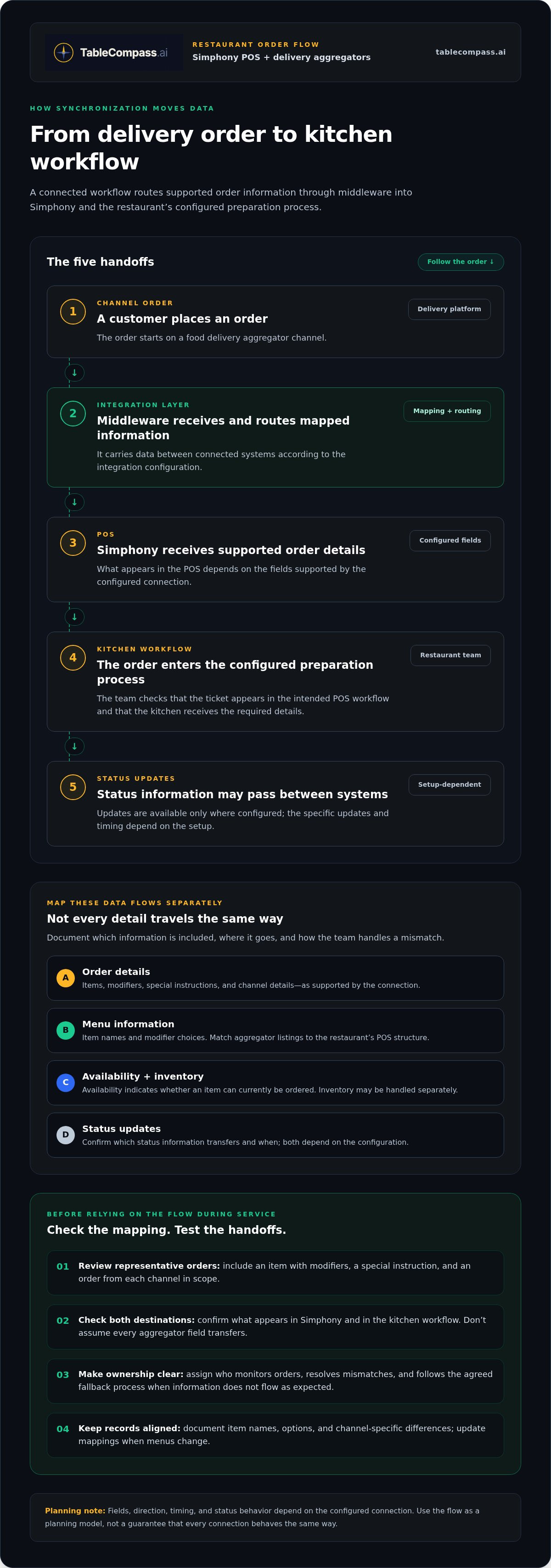
A connected workflow has several handoffs, each with a clear role. Middleware carries data between connected systems, translating and routing information according to the integration configuration. In a Simphony POS aggregator sync, the fields, timing, and status updates depend on the setup. Use this sequence as a planning model, not as a guarantee that every connection behaves the same way.
- Channel order: A customer places an order through a delivery aggregator.
- Integration layer: Middleware receives the order and passes its mapped information between systems.
- POS: Simphony receives the order information supported by the configured connection.
- Kitchen workflow: The order enters the restaurant’s configured process for preparation.
- Status updates: Where configured, status information can pass between systems. Available updates and timing depend on the setup.
How an aggregator order reaches the POS
Consider an order for a main dish with a side and a requested modification. The integration must match the aggregator’s item and modifier details to the restaurant’s POS structure. When those mappings are in place, supported details can appear in Simphony for staff and kitchen handling. Configured order information can also help staff identify the channel, making delivery tickets easier to distinguish from other service types.
Before rollout, review representative orders with the team: an item with modifiers, a special instruction, and an order from each channel in scope. Check what appears in the POS and kitchen workflow. Don’t assume a field or status transfers just because it appears in the aggregator.
How menus and availability fit into the sync
Order synchronization and menu synchronization are separate data flows. Menu content describes what customers can order, including item names and modifier choices. Availability indicates whether an item can currently be ordered. Inventory is related, but may be handled separately. Which data types synchronize, and in which direction, depends on the configuration.
Inconsistent names or modifier structures make it harder to match an aggregator listing to its POS item. For example, a side offered as a standalone item on one channel but as a modifier on another needs a deliberate mapping. Document item names, options, and channel-specific differences, and update those records when menus change. For a deeper look at organizing menu details, see the published Centralized Menu Management: 2026 UAE Restaurant Guide.
TableCompass.ai’s OmniSync middleware connects restaurant POS systems with food delivery aggregators and supports order processing and inventory management. Explore restaurant POS and aggregator middleware as you plan a coordinated data flow.
Simphony aggregator integration options: direct links, middleware, or manual entry
There’s no single setup for every UAE restaurant. The right approach depends on your systems, number of order channels, branch structure, and how your team manages menus and exceptions. Compare the day-to-day workflow, not just whether two systems can connect.
| Approach | Workflow centralization | Staff workload | Channel visibility | Maintenance responsibility |
|---|---|---|---|---|
| Manual entry | Orders are handled separately before being entered into the POS. | Staff re-enter order details and may need to check more than one interface. | Order information remains distributed across channel tools and the POS. | Restaurant staff maintain the manual steps and channel routines. |
| Separate direct connections | Each connection links systems individually, so workflows may differ by channel. | Some re-entry may be reduced, depending on each connection’s configuration. | Visibility can vary across connections and channels. | Teams coordinate the setup and upkeep of each individual connection. |
| Middleware-based synchronization | A coordination layer supports connected workflows between POS and aggregator systems. | Order processing can be automated, reducing duplicate handling where configured. | A centralized process can help teams oversee multiple channels. | Integration mappings and exception procedures need clear ownership. |
When manual entry becomes an operational bottleneck
Manual entry asks staff to switch attention between the aggregator screen, POS, and kitchen process. During a busy meal period, duplicate handling competes with guest service and order coordination. Updating several channel interfaces separately can also lead to inconsistent item availability or order details. Automation can reduce repetitive work, but teams still need oversight and a clear process for exceptions.
What middleware adds between Simphony and aggregators
Middleware coordinates workflows between connected POS and aggregator systems. Depending on the configured integration, it can support centralized order processing and inventory synchronization. For a Simphony POS aggregator sync, assign owners for mappings, exception monitoring, and workflow changes. TableCompass.ai’s OmniSync provides middleware that connects restaurant POS systems with food delivery aggregators. For broader architecture context, see POS Middleware for UAE Hospitality: 2026 Integration Guide and The Definitive Restaurant Aggregator Integration Solution: A 2026 Strategy for UAE F&B Groups.
Use the comparison to pinpoint where work currently happens: in the channel, in Simphony, or with the person reconciling the two. Document the preferred order path and assign responsibility for changes. A centralized approach can make coordination clearer, but the right fit is one your team can operate and maintain consistently.
A practical UAE restaurant checklist for planning a Simphony sync
A dependable rollout starts with a clear picture of how orders move through your operation today. Map the Simphony environment, delivery channels, branches, and kitchen workflows before configuring a connection. This reveals where locations share processes and where local menu or service practices call for different handling.
What to prepare before configuring the connection
Bring these operational details together before planning the connection:
- Systems and channels: Record the Simphony setup, aggregator channels, and current route from each channel to the kitchen.
- Branches: List the locations in scope and note differences in menus, order routing, or staff responsibilities.
- Menu structure: Review item names, modifier groups, and channel-specific variations. Decide where menu changes originate and who keeps them aligned.
- Availability and inventory: Document how unavailable items are handled and identify which system or team maintains relevant updates. These are related but distinct data flows.
- People and ownership: Assign owners for menu maintenance, order monitoring, and issue escalation. Make sure each shift knows who takes over these responsibilities.
For UAE operators, account for high-volume meal periods and coordination across branches. A workflow that is clear during a quiet test can still cause confusion during a rush if staff don’t know where to look or who handles an exception.
What to test before the team relies on synchronization
Test the full order journey with examples that reflect your actual menu and service process. Include routine and exception scenarios: a smooth standard order alone won’t show how the team responds when details change or a handoff fails.
- Place a representative order with modifiers and confirm the mapped details appear in the intended POS and kitchen workflow.
- Check whether staff can identify the originating channel using the configured order information.
- Test an unavailable item and a menu change to see how each is reflected across the systems in scope.
- Simulate a failed or delayed handoff where practical, then follow the agreed exception process rather than assuming automatic recovery.
Use test results to clarify what staff should monitor, how to record an issue, and who escalates it. Train the team on both the normal workflow and the fallback procedure before relying on synchronization during service. Repeat relevant checks when menus, processes, or branch setups change.
Planning a connected workflow for your restaurant? Explore POS and aggregator synchronization with TableCompass.ai.
Connect Simphony aggregator workflows with TableCompass OmniSync
A connected setup needs more than a route for orders. It needs clear mappings, named owners, and a shared understanding of what happens when an order or menu update needs attention. TableCompass.ai’s OmniSync is middleware that connects restaurant POS systems with food delivery aggregators, helping coordinate digital workflows across channels and restaurant operations.
How OmniSync supports a unified restaurant workflow
OmniSync provides a coordination layer between POS systems and third-party aggregator channels. It automates order processing and supports inventory management, helping restaurant teams manage connected workflows with less reliance on duplicate handling. The fields and processes depend on the integration configuration, so define what should pass between systems and who monitors exceptions in your project plan.
This is a software connection, not delivery logistics. It supports the movement of order and operational information between connected platforms; fulfilment remains a separate part of restaurant service. When planning a Simphony POS aggregator sync, keep the goal clear: coordinate incoming digital orders with POS and kitchen processes, and make responsibilities visible to the team.
Next steps for a Simphony-connected restaurant
Turn your checklist into a practical integration brief. Document the Simphony environment, aggregator channels, branch workflows, menu and modifier mappings, availability practices, and the staff responsible for maintaining each area. Define representative test orders and exceptions, such as a changed menu item, an unavailable product, or a handoff that needs staff attention.
Use the brief to align the technology workflow with real service conditions across UAE locations. A manager should be able to explain where an order appears, how staff identify its source, and what to do if expected information is missing. Clear ownership gives the setup an operational backbone, while testing helps the team learn the process before relying on it during a busy meal period.
For a wider view of connected restaurant operations, explore Seamless Restaurant POS Synchronization: The 2026 Executive Guide to Integrated Operations. To coordinate POS and aggregator workflows, explore TableCompass.ai’s OmniSync solution.
Build a more connected restaurant workflow
A dependable Simphony POS aggregator sync starts with clear data mappings, ownership, and testing. Decide which order, menu, availability, and inventory details need to move between systems. Then assign staff to monitor the workflow and handle exceptions. Test routine orders and less common scenarios before relying on the process during a busy UAE service.
Middleware provides a coordination layer between POS systems and food delivery aggregators, helping reduce duplicate order handling while keeping operational oversight in view. TableCompass.ai’s OmniSync connects restaurant POS systems with third-party food delivery aggregators and supports automated order processing and inventory management. It supports restaurant technology workflows in the UAE.
Give your team a clearer foundation for managing orders across channels. Explore TableCompass.ai OmniSync and take the next step toward a more coordinated operation.
Frequently Asked Questions
What is Simphony POS aggregator sync?
Simphony POS aggregator sync is the exchange of relevant order and operational information between Oracle MICROS Simphony and food delivery aggregator systems. A connected workflow can route supported order details into the restaurant’s POS process, while menu, availability, inventory, and status data may be handled separately. The information exchanged depends on the integration configuration. For UAE restaurants, clear mappings and staff responsibilities make the workflow easier to manage during service.
Can food delivery aggregator orders sync directly into Oracle MICROS Simphony?
Orders can enter Simphony through a configured integration, but the path and supported details depend on the systems and connection in use. Some workflows use middleware between the aggregator and POS rather than a direct system-to-system link. Before rollout, map a representative order, including modifiers, and confirm where it appears for POS and kitchen handling. Decide how staff will identify its source and manage an order that needs attention.
How does middleware connect Simphony with food aggregators?
Middleware coordinates data between connected POS and aggregator systems. An incoming aggregator order can pass through this layer for processing before reaching the POS according to the configured mappings. TableCompass.ai’s OmniSync connects restaurant POS systems with food delivery aggregators and supports automated order processing and inventory management. Field coverage, timing, and exception handling depend on the integration setup.
Does Simphony aggregator sync include menus and item availability?
It may, but menu content and item availability are distinct from order synchronization, and their inclusion depends on configuration. Menu content can include item names and modifiers; availability indicates whether an item can currently be ordered. Inventory is related but is a separate operational data area. Document where menu changes originate and who updates them. Consistent item names and modifier structures across channels make mappings easier to maintain.
What should a UAE restaurant test before launching Simphony aggregator integration?
Test the full order path before relying on it during service. Use a routine order with modifiers, check channel identification where supported, and verify that the information reaches the intended POS and kitchen workflow. Also test an unavailable item, a menu change, and a failed or delayed handoff. Have UAE staff who coordinate orders during busy meal periods practise the process, and agree on who handles exceptions.
Can one Simphony setup synchronize orders from multiple aggregators?
A setup can be planned for multiple aggregator channels when the relevant connections and mappings are configured. Each channel may represent items, modifiers, and order details differently, so don’t assume one mapping fits every source. Document each channel’s workflow, how staff identify its orders, and who maintains its mappings. Test orders from each channel in scope before using the process across branches or during service.
Will aggregator synchronization eliminate manual order entry completely?
Synchronization can automate supported order processing and reduce the need to re-enter routine order details, but it doesn’t mean there will be no manual work. Exceptions, mismatches, or handoff issues may still need staff attention, depending on the configuration. Define a fallback process, train the team to recognize when an order needs review, and assign responsibility for resolving it. Automation should support oversight, not replace it.