
Restaurant tech stack costs and what a small restaurant needs
A restaurant’s tech stack is the connected set of digital tools it uses to take orders, process payments, manage stock, and engage guests. A useful restaurant tech stack cost analysis looks beyond individual subscriptions: consider what each system does, how it shares information, and which costs are already included in existing contracts. The goal is not to buy the most software. It is to equip the restaurant with the tools it needs without paying for overlapping features or relying on staff to bridge system gaps manually.
It is easy to focus on monthly fees and miss the operational picture. Systems that do not connect smoothly can add steps for staff, while tools that fit the workflow can keep information aligned throughout service. For a small restaurant in the UAE, the right setup depends on its service model, ordering channels, and immediate priorities. This article explains what belongs in a restaurant tech stack, how the main systems connect, how to review current contracts, and how to decide what is essential now and what can wait.
Key Takeaways
- Map the tools behind ordering, payments, inventory, and guest engagement to see how your restaurant’s systems fit together.
- Assess the full operating cost by reviewing subscriptions, integration fees, marketplace commissions, and staff time spent on manual tasks.
- Use existing contracts, renewal dates, and required integrations to identify overlap and plan changes without disrupting service.
- Choose day-one technology around your restaurant’s actual operational pain points, prioritizing ease of use and systems that share data.
- When orders and menu information need to move between platforms, connected tools such as OmniSync and Atlas Menu Management can help support a more coordinated setup.
What is a Restaurant Tech Stack?
A restaurant tech stack is the connected set of systems used to manage ordering, payments, staffing, inventory, and guest service. For a UAE restaurant, assess each tool by its role, usability, integrations, support, and total operating cost.
Subscription and Usage Costs
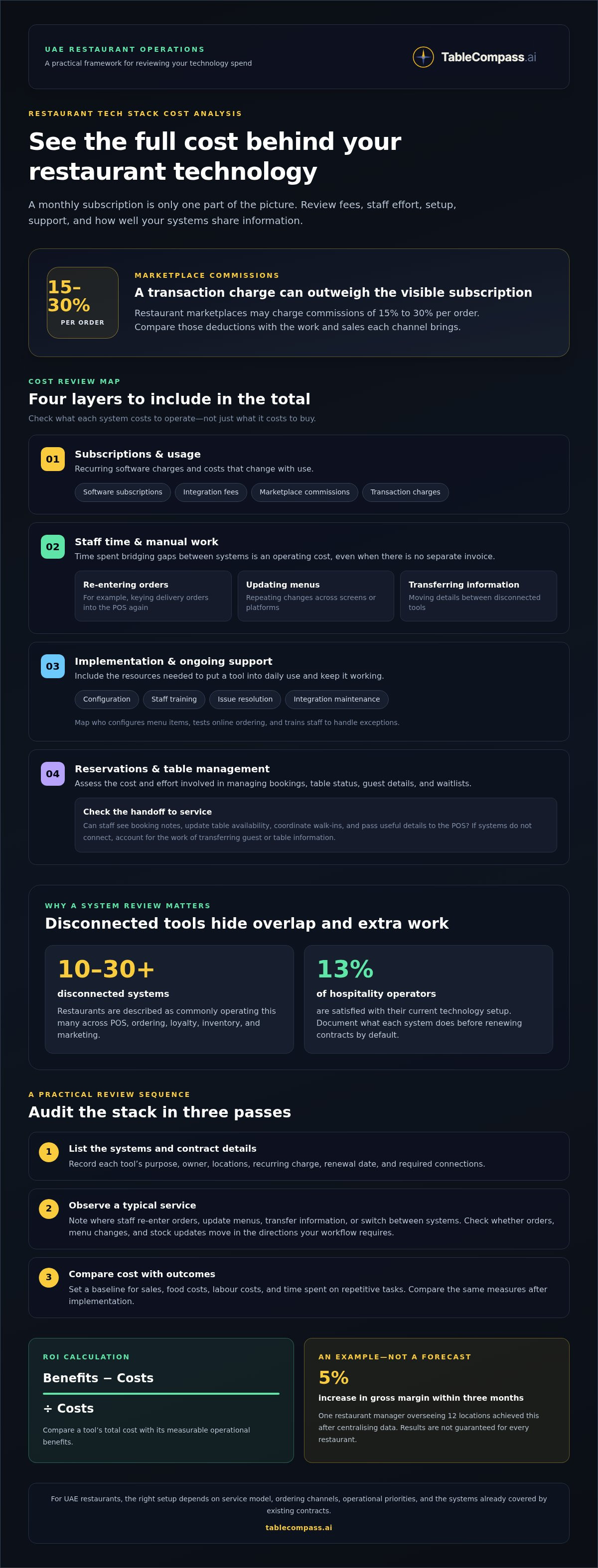
Subscription and usage costs include recurring software charges, integration fees, marketplace commissions, and staff time spent on manual tasks. Reviewing these together shows the full cost of keeping a system in operation, not just its advertised fee. Restaurant marketplaces may charge commissions of 15% to 30% per order, so compare those deductions with the work and sales each channel brings.
Start with a simple audit: list every subscription, what it supports, which integrations it requires, and any transaction-based charges. Then observe a typical service and note where staff re-enter orders, update menus, or transfer information between screens. These manual steps have an operational cost, even without a separate invoice. For example, compare an aggregated delivery order that flows into the POS with one that a staff member has to key in again.
Implementation and Ongoing Support Costs
Implementation and ongoing support costs cover system configuration, staff training, issue resolution, and integration maintenance. They matter because a software fee alone does not show the resources required to put a tool into daily use. A practical comparison should include setup tasks, training time for relevant roles, support arrangements, and maintenance when menus or workflows change.
For a UAE restaurant, map implementation to service routines: who configures menu items, tests online ordering, and trains staff to handle exceptions? Check whether support covers the systems that need to connect, such as the POS and delivery ordering flow. A feature-rich tool may be a poor fit if setup adds steps a small team cannot sustain.
Reservation and Table Management Costs
Reservation and table management costs relate to tools for bookings, table status, guest details, and waitlists. Their value depends on whether they help staff manage seating and pass useful information to the POS. When reservation notes and guest details sync with service records, teams can avoid maintaining separate, incomplete records.
Assess the workflow before choosing a tool: can staff see booking notes, update table availability, and coordinate walk-ins in one process? Compare these tasks with the system’s usability and support requirements instead of judging by features alone. If a reservation platform cannot connect to the POS, account for the staff effort needed to transfer guest or table information between systems.
Integration is the connective layer of a tech stack. A POS may connect with online ordering, loyalty, inventory, and scheduling tools. Inventory data can help teams track stock, costs, and ordering needs across the front and back of house. Delivery aggregation can route orders into the POS and send them to the kitchen in a consistent format, reducing tablet switching and manual re-entry.
Check the data flow, not just the integration label. Confirm that orders, menu changes, and stock updates move in the directions your workflow requires. Employee scheduling can connect with the POS to streamline staff management; payroll connections may also reduce repeated entry when transferring hours and records. Compare features, ease of use, integration fit, support, and price against the task each system needs to solve.
Reviewing existing restaurant technology systems and contracts
Technology costs vary with restaurant size, number of locations, and sales volume. More locations may require shared systems and reporting, while higher order volumes can affect usage and transaction charges. A restaurant tech stack cost analysis helps UAE operators compare expenses with the workflows and business needs those systems support.
Investment Efficiency and Margins
Investment efficiency compares a technology tool’s total cost with its measurable operational benefits. This matters because rising food costs can make avoidable fees and inefficient processes more consequential to margins. Compare spending with outcomes such as clearer reporting or less duplicate work. To calculate ROI, subtract costs from benefits, then divide the result by costs.
Set a baseline before changing systems. Record sales, food costs, labour costs, and time spent on repetitive tasks, then compare the same measures after implementation. One restaurant manager overseeing 12 locations achieved a 5% increase in gross margin within three months after centralising data. Treat this as an example, not a forecast for every restaurant.
Consolidating Disconnected Systems
Consolidation means reducing unnecessary overlap and connecting tools that need to exchange information. It matters because restaurants are described as commonly operating 10-30 or more disconnected systems for POS, ordering, loyalty, inventory, and marketing. Start an inventory of each system’s purpose, owner, locations, recurring charge, renewal date, and required connections.
Then identify duplicated functions and gaps between essential workflows. For example, map how sales data moves from the POS to inventory and reporting tools. Keep systems with distinct roles, and consider where an integration could remove repeated transfers. Only 13% of hospitality operators are satisfied with their current technology setup, making a documented review more useful than renewing every contract by default.
Matching Technology to Needs and Budget
Matching technology to business needs means choosing capabilities that support the restaurant’s service model and priorities. Feature-heavy software can add cost and complexity without solving an everyday problem. A counter-service venue may prioritise order flow and payments, while a full-service restaurant may need stronger coordination across tables, stock, and reporting.
Use the budget as a decision boundary, not the sole selection test. Rank operational problems by their effect on service, staff workload, and food-cost visibility. Then compare each tool’s purpose, usability, integration needs, and recurring charges. For a useful restaurant tech stack cost analysis, assess each system against the task it must solve and the resources available.
Stack Layers and Cost Factors
A restaurant tech stack has layers for guest ordering, POS and payments, kitchen operations, inventory, staffing, and management reporting. Each layer serves a different function, while integrations move information between them. Costs depend on which layers the restaurant uses, how the systems connect, and how much activity they handle.
Use 90 days of bank and card statements to identify software, hardware leases, and platform charges. Match each charge to your system inventory, then note location coverage and sales-related fees. A small venue may need fewer connections; multiple locations may call for shared reporting and consistent workflows. For restaurants reviewing system alignment, connected restaurant operations can be considered against a specific integration gap.
What technology does a small restaurant need on day one?
Start with tools that solve a real service problem, not a long feature list. For a small UAE restaurant, the day-one foundation usually centres on orders, payments, and clear operating records.
UAE requirements can affect tax invoices and records, payment processing, and the collection and handling of customer data. Map each workflow, including online and dine-in orders, so the POS and related systems support the restaurant’s applicable obligations.
Efficiency and Customer Experience
Operational efficiency means completing service tasks with fewer repeated steps; customer experience reflects how smoothly guests can order and pay. Both matter from opening day: a confusing checkout can slow staff and frustrate customers. Trace a dine-in order from the guest’s choice through kitchen preparation and payment, then note every manual handoff.
If guests often wait to place orders, prioritise a clear ordering flow. If staff repeatedly re-enter delivery orders, prioritise a POS connection that routes orders consistently to the kitchen. A vendor’s feature list matters less than whether a feature removes a specific service bottleneck.
Operational and Financial Visibility
Operational and financial visibility means seeing current sales, food costs, labour costs, and service activity in useful reports. This matters because decisions based on outdated summaries can miss shifts in demand or spending. Choose a POS with reporting that lets the owner review key performance indicators daily, rather than waiting for delayed reports.
Inventory software connected to the POS can help track stock movement and ordering needs. For example, compare sales of a menu item with its recorded stock before placing the next supplier order. Keep the opening setup focused: clear daily reporting is more useful than dashboards nobody checks.
Finance, Operations, and IT Alignment
Alignment means finance, operations, and the person managing technology agree on the workflow and measures of success. This matters because a POS choice affects payments, kitchen routines, reporting, and staff training. Before choosing a vendor, have each function describe its essential day-one task and the information it needs from the system.
Finance may need consistent sales and invoice records; operations may need accurate orders and stock visibility; the person handling IT may need systems that integrate. Write these needs in plain language, then compare vendors against them. For example, test whether a menu change reaches the ordering channel and POS without duplicate entry.
Keep the opening stack lean: POS and payment capability, reliable order handling, and access to daily sales and cost information. Add reservations, table management, loyalty, or automated inventory when a clear operating need justifies them. A cloud-based POS can provide data access across devices, while real-time operational information helps owners act without waiting for reports.
Choose tools to match the restaurant’s service model and locations. A takeaway-focused venue may prioritise online ordering and delivery order accuracy; a dine-in restaurant may need table and reservation coordination. Review the process before automating it, keep configurations simple, and make ease of use and integration central to your decision.
Restaurant tech stack definition
For an operator, a restaurant tech stack includes the digital decisions that shape daily work. It covers who owns each record, who can change it, and what staff do when information is incomplete. This broader view helps a UAE restaurant distinguish a tool’s advertised functions from the operating rules needed to use it consistently.
Start with data ownership. For each important record, identify the approved source and the person responsible for its accuracy. A menu item, for example, needs a consistent name and availability status wherever staff use that information. If one team calls an item a “family meal” and another uses a different label for the same item, reports and operational decisions can become harder to interpret.
Definitions matter too. Agree on what the restaurant means by a cancelled order, a void, a refund, and a completed sale. These terms affect how staff record service events and how managers interpret reports. Write the agreed meanings in plain language, then use the same terms in training and routine procedures.
Access rules are another part of the stack’s operating design. A restaurant can assign permissions according to job responsibilities, allowing staff to complete their tasks without giving every user access to sensitive settings. For example, a cashier may need to process a payment adjustment, while a manager approves changes to prices or reporting settings.
Exception handling matters just as much. Define what staff should do if an order is duplicated, a payment needs correction, or an item becomes unavailable after a guest has ordered. A short procedure with a clear owner helps the team respond consistently during a busy UAE service, rather than relying on whoever happens to be on shift.
Configuration also shapes how well technology fits the restaurant. Keep a record of the menu naming conventions, tax categories, staff roles, and report definitions used in the system. When a manager changes a setting, note why it changed and who approved it. This gives the next shift a useful reference and reduces confusion during staff handovers.
A practical definition of a tech stack therefore goes beyond software names. It includes responsibilities, shared terms, permissions, and exception procedures that make digital tools usable during service. To assess a proposed system, ask staff how they would handle a common exception, such as a mistaken payment entry. Their answers reveal whether the operating design is clear before the restaurant depends on it.
What are typical restaurant technology installation, training, support, and maintenance costs?
A restaurant technology budget includes more than software subscriptions. For a UAE restaurant, installation, staff training, support, maintenance, and ongoing operating expenses all contribute to the total. Compare the complete project cost with the work it will support, not just the purchase price.
Installation costs depend on setup complexity. A basic POS configuration may involve entering menu items, setting user permissions, and connecting payment processing. A project involving online ordering, inventory, and delivery channels can require additional menu mapping and integration testing. List each setup task and identify who will complete it before comparing proposals.
Training is another practical cost. Staff need to learn routine tasks such as entering orders, handling payment adjustments, and managing menu availability. Managers may also need training in reporting and user permissions. Plan training around actual roles and service workflows; a practice session using sample orders can reveal gaps before opening or changing systems.
Support and maintenance cover the work needed to keep systems usable as operations change. Menu updates, new user access, software changes, and integration issues can all require attention. Review what support covers, how staff report issues, and whether connected systems are included. For example, if a POS and online ordering channel stop sharing menu updates, resolving the issue may involve both systems.
Ongoing operating expenses can include subscriptions, hardware leases, platform charges, and marketplace commissions. A full-service restaurant example in the market research shows how marketplace commissions can materially change a monthly technology total. Treat the example as a reminder to separate software expenses from channel costs, not as a UAE price benchmark. Use bank and card statements to match recurring charges to their systems.
Compare projects using a like-for-like cost sheet. Include setup work, staff training time, support arrangements, maintenance, hardware, recurring software, and platform charges. Then record the expected operational benefit, such as fewer manual order entries or clearer inventory records. A lower purchase price may not mean a lower operating cost if staff have to bridge disconnected systems every day.
For a pilot, agree on the baseline, measurement period, and records used to assess results. Track relevant measures such as order accuracy, staff time spent on repeated entry, and reporting completeness. Include finance, operations, and the system owner in the review so the team can see implementation effort and ongoing expenses.
To assess where connected systems could reduce manual work, review restaurant technology options against your setup and workflows.
TableCompass.ai: OmniSync
TableCompass.ai offers OmniSync, middleware that connects restaurant POS systems with food aggregators. It can help when delivery orders arrive through separate platforms and staff need a more coordinated route into the POS. Review which systems exchange order and menu information, where staff still re-enter data, and which contract or workflow the connection would address.
For UAE restaurants managing menu information across channels, Atlas Menu Management centralises menu control. GuestConnect AI supports voice ordering, while the White-Label Mobile App supports direct ordering. Choose the tools that match defined operational needs and consider how they fit your existing stack.
To discuss how OmniSync or related tools could fit your restaurant’s technology setup, contact TableCompass.ai or visit tablecompass.ai.
Build a stack that can grow with your service
Set a clear trigger for reviewing your technology setup. A new ordering channel, a menu change, or a shift in how guests are served can change what staff need from their systems. Assign an owner to notice these changes and decide whether the current setup still supports the restaurant’s priorities.
A restaurant tech stack cost analysis can turn that review into a decision rather than a routine exercise. Define the next operational outcome you want, such as smoother order handling or more useful management information, then document what success would look like. This keeps future technology choices tied to the restaurant’s direction, not feature lists or assumptions.
If you’re ready to discuss your restaurant’s setup and next steps, contact TableCompass.ai about your tech stack. A focused conversation can help you consider the right path for your operation. Build deliberately, and let each decision support the service you want to deliver.
Frequently Asked Questions
Which systems are truly mission-critical?
Mission-critical systems are those whose failure stops a core service or prevents the restaurant from recording a transaction accurately. Test this by imagining a busy shift without each tool: could staff still accept orders, send them to preparation, and reconcile sales? Define a manual fallback for short interruptions. For example, document who records orders and how the team later reconciles them with system records.
What technology systems does a restaurant need, including POS, payment processing, online ordering, reservations, and inventory?
The right combination depends on how guests order and how the restaurant manages service. A delivery-led café may need digital ordering and a way to track stock, while a reservation-focused dining room may benefit more from booking and table tools. Before choosing software, map a guest’s journey from discovery to payment, then identify which system supports each step and where staff need information.
How much do restaurant online ordering, delivery integration, and commission fees cost?
The total depends on the channel, transaction terms, integration work, and the volume of orders processed. Separate any recurring software charges from per-order commissions, payment processing, and setup work when estimating the expense. TableCompass.ai states that OmniSync has 0% commission fees. Compare the terms for each channel with its role in your sales mix, and account for staff effort where orders require manual handling.
How do restaurant tech stack costs compare across all-in-one platforms and separate vendors?
An all-in-one platform may simplify administration, while separate vendors can let a restaurant select tools for distinct needs. Compare the full contract picture: recurring charges, setup, support, renewal dates, and the work required to keep information consistent. Consider the practical impact of changing systems later, including staff retraining and transferring essential records. The lower initial quote may not represent the simpler long-term arrangement.
How can a restaurant estimate total technology costs and return on investment?
List direct expenses and internal effort over the same review period, then compare them with measurable outcomes. For example, estimate the time staff spend correcting orders and compare it with the time needed after a workflow change. Calculate ROI by subtracting costs from benefits, then dividing the result by costs. Keep the baseline, calculation period, and supporting records consistent to make the comparison meaningful.
What hidden costs and risks should restaurants consider when choosing a technology stack?
Consider costs that show up in daily work, such as repeated data entry, staff retraining, overlapping subscriptions, and time spent resolving integration issues. Operational risks include unclear system ownership, inconsistent menu records, and workflows that depend on one person’s knowledge. Before committing, document who manages each system, how staff handle exceptions, and which records the restaurant needs for its own reporting.