Restaurant Digital Transformation in the UAE: A Practical 2026 Guide
Restaurant digital transformation UAE operators can put into practice starts with the work behind each service: how an order reaches the team, how menu details stay consistent, and how staff coordinate across dine-in and delivery. When POS, delivery, menu and guest-ordering workflows are disconnected, routine service can mean repeated data entry and avoidable confusion.
It’s understandable to be cautious: digital upgrades should simplify service, not add another layer of complexity. Start by identifying where orders, menus and guest interactions break between systems, then prioritise the fixes with the greatest operational value. TableCompass.ai's OmniSync and Universal Bridge connect restaurant POS systems with food aggregators, while Atlas Menu Management and direct-ordering tools support other parts of the operation.
This guide will help you choose high-impact workflows to improve first, understand how connected systems can support everyday restaurant operations, and build a phased roadmap suited to your UAE business. You’ll see how to move from mapping current pain points to connecting essential channels, including dine-in and delivery, without trying to transform everything at once.
Key Takeaways
- Start your restaurant digital transformation UAE plan by mapping where information is re-entered, delayed, or inconsistent across channels.
- Assess each potential change by its operational need, systems involved, workflow owner, and a clear measure of success.
- Build momentum with a focused pilot, practical team training, and a review of results before expanding the change.
- See how middleware such as OmniSync can connect POS workflows with food aggregators as part of a broader digital setup.
Restaurant digital transformation in the UAE starts with workflow, not software
Adding an app or dashboard can digitise one task without making service run more smoothly. The real test is whether information moves cleanly from the guest’s order to the people preparing it, managing it, and following up. For restaurant digital transformation in the UAE, begin with that working flow, then decide which technology can support it.
Restaurant digital transformation is the redesign of connected workflows so people, processes, and systems can share the information needed to serve guests and run the operation. This builds on the wider idea of Digital Transformation: using digital technology to change how an organisation works, not simply replacing a manual tool with a digital one.
What restaurant digital transformation means in daily operations
Consider an order placed through a delivery channel. If a team member must re-enter it into the restaurant’s POS, or point-of-sale system, the order has been captured digitally but the handoff remains manual. Staff may need to check details twice, while the kitchen works from information that was copied or passed along separately.
Now consider the same journey when the relevant systems exchange information. The order can reach the POS workflow without the same repeated entry, and the kitchen team can work from the order details passed through that process. The goal is not to remove staff from hospitality. It’s to reduce avoidable handoffs so they can focus on accurate preparation and guest care.
Digitising a task might mean replacing a paper order pad with a screen. Connecting a workflow means considering how order capture relates to the POS, kitchen process, menu information, and guest communication. Middleware is software that acts as a bridge, helping separate systems exchange information. The practical question is whether a change improves the whole handoff, not just one screen.
Why UAE restaurant operations need a context-aware approach
There isn’t one operating model for restaurants across the UAE. An independent venue may need to simplify a small number of ordering channels, while a multi-location group may need consistent processes alongside location-specific needs. A restaurant focused on dine-in service will have different priorities from one balancing table service with delivery and takeaway.
Before choosing a tool, write down how your operation actually works:
- Which ordering channels do your guests use, and where do staff repeat information?
- How does an order move from the front of house or a digital channel to the kitchen?
- Which details must stay consistent across locations, shifts, or service types?
Use the answers to identify one workflow worth improving first. For example, if staff re-enter aggregator orders but menu updates are already easy to manage, prioritise the order handoff. That keeps the transformation grounded in your guests, your channels, and your team’s daily work, rather than in a software feature list.
How connected restaurant systems create a more coherent operation
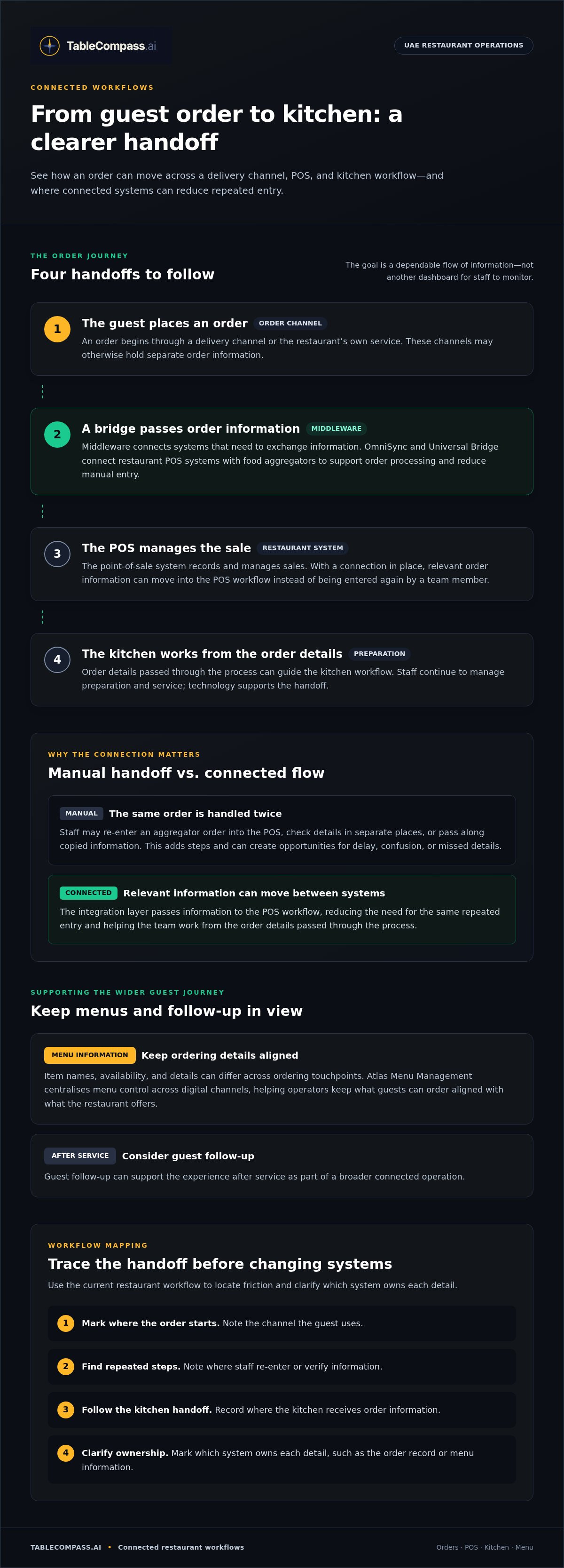
A connected operation gives each part of an order journey a clear handoff. A guest places an order through a delivery channel; the restaurant’s integration layer passes relevant information to the POS, where staff manage the sale. From there, the order details can guide the kitchen workflow. Menu information helps keep what guests can order aligned with what the restaurant offers, while guest follow-up can support the experience after service.
The integration layer, often called middleware, acts as a bridge between systems that need to exchange information. Without that connection, a team member may need to re-enter an order or check details in separate places. During a busy service, every extra handoff adds a chance of delay, confusion, or inconsistent information. The aim is a dependable flow, not another dashboard for staff to monitor.
Where POS, delivery channels, and restaurant data meet
Picture a UAE restaurant receiving orders through its own service and food aggregators. The POS is where the restaurant records and manages sales; the aggregators provide separate ordering channels; middleware connects those systems so relevant order information can move between them. The restaurant still manages preparation and service. Technology supports the handoff rather than replacing the team’s operating decisions.
If a staff member has to enter an aggregator order into the POS manually, the same order is handled twice. That can mean extra steps at the counter and another opportunity for order details to be mistyped or missed. OmniSync and Universal Bridge connect restaurant POS systems with food aggregators to support order processing and reduce manual entry. Operators assessing these connections can explore this POS middleware integration guide for more context.
Map the handoffs before changing anything: note where an order starts, where staff re-enter or verify it, and where the kitchen receives the information. Then mark which system owns each detail, such as the order record or menu information. This trace helps show whether the main friction lies in the channel connection, the internal process, or unclear ownership.
How connected workflows support consistent menus and guest journeys
Menu information is part of the order flow. If item names, availability, or details differ across ordering touchpoints, guests and staff may be working from different versions. Atlas Menu Management centralises menu control across digital channels, helping operators manage menu information without treating every channel as an isolated task. Centralised menu management can be part of the wider connection between ordering and operations.
Guest-facing tools can also fit into that flow. QR table ordering, a branded mobile app, or automated guest interactions may support particular touchpoints, but adding one channel alone doesn’t connect the whole operation. In a restaurant digital transformation UAE plan, assess how each tool fits with order handling, menu information, and the team’s service routine. TableCompass brings together connected restaurant workflows across POS and aggregator integration, menu management, and digital guest interactions.
How to assess restaurant tech before making changes
Start with the operational bottleneck, not a list of features. For restaurant digital transformation in the UAE, operators need a clear view of what slows service, where information breaks down, and who feels the impact. A useful assessment connects each problem to the current process, the systems involved, and a measure the team can compare before and after a change.
Match technology decisions to a specific operational bottleneck
Choose an observable issue, such as staff re-entering delivery orders or correcting different menu details across channels. Trace who handles each step and where the handoff becomes difficult. Then record a baseline, such as how often the team rekeys orders during a defined service period or how many menu corrections it makes. Compare the same measure after implementation to understand what changed.
| Operational need | Current process | Systems involved | Success measure |
|---|---|---|---|
| Reduce repeated order entry | Staff copy orders between screens | Ordering channel and POS | Manual re-entry observed during a set service period |
| Keep menu details aligned | Updates are made separately | Menu management and digital channels | Menu corrections or mismatches recorded |
| Clarify order handoffs | Front-of-house staff relay details manually | POS and kitchen workflow | Handoffs needing staff clarification |
Use the table to separate essential requirements from desirable extras. Essentials solve the documented bottleneck, fit the systems already in use, and provide information in a form staff can act on. Desirable features may be useful later, but they shouldn’t distract from fixing the core workflow first. For example, if duplicate order entry is the problem, prioritise the POS and aggregator connection before adding a separate guest-facing channel.
Evaluate integration and team adoption together
A system can connect technically yet still create friction if the workflow is unclear or staff find it difficult to use. Identify who owns the process, which roles need training, and how the team will handle exceptions. Include the quality of information exchanged in your assessment: incomplete or inconsistent data can carry confusion into a newly connected workflow.
Check integration fit across the restaurant’s actual setup, including the POS and relevant ordering or menu systems. For a closer look at the role of POS connections, use this restaurant POS synchronization guide. Before rollout, agree on the baseline and the review point. Compare like with like, and gather feedback from the staff who use the process during service. This shows whether the change is helping without assuming a particular return.
For restaurants planning connected workflows across POS, menu, and guest-facing tools, TableCompass restaurant technology brings together relevant integration, menu management, and guest interaction capabilities.
Build a restaurant digital transformation roadmap your UAE team can use
A roadmap turns technology decisions into manageable operational changes. For restaurant digital transformation UAE teams can use, keep the sequence clear: understand the work, address the biggest friction, test a focused change, prepare staff, then review what happened. Assign an owner who can coordinate decisions and keep updates moving between managers, shifts, and locations.
- Map the workflow. Follow a process from start to finish and note who handles each step, which systems are involved, and where delays or workarounds occur.
- Prioritise the friction. Select a problem that affects daily operations and can be observed, rather than trying to change several workflows at once.
- Set a baseline and pilot. Record how the process works before the change, then test the revised workflow in a bounded setting.
- Train the team. Explain what is changing, who owns the process, and what staff should do when the workflow doesn’t go as planned.
- Review before expanding. Compare results with the baseline, gather staff feedback, and refine the process before applying it more widely.
For a restaurant group, a pilot provides a controlled way to learn before rolling a change out across UAE locations. Choose a workflow with a clear operational owner and a starting point the team can describe. Make the pilot practical for the people doing the work, not just the people selecting the technology. For example, a team testing an order connection should review how orders appear at each handoff and agree how to handle exceptions.
Pilot one workflow before scaling across locations
During the pilot, gather observations from managers, service teams, and kitchen staff. They may encounter different snags at different handoffs. Keep a simple record of questions, workarounds, missed steps, and useful adjustments. Before expanding, clarify which parts of the process should be consistent across locations and where local teams need room to adapt.
Measure adoption and operational progress without overclaiming
Choose measures that match the workflow: manual corrections, process completion, or staff-reported friction. Compare them with the restaurant’s own baseline and review the same type of service activity where practical. A change in the measure can help show progress, but it doesn’t prove that technology alone caused it. Note other relevant changes and pair the figures with team feedback.
Assign someone to share the outcome and next steps across shifts or locations. If the pilot reveals persistent confusion, refine the workflow or training before scaling. If it’s working as intended, document the process so teams have a clear reference as the change expands.
Once your priorities and pilot plan are clear, explore connected restaurant workflows with TableCompass, including POS and aggregator integration, menu management, and digital guest touchpoints.
Connect your restaurant’s digital workflow with TableCompass
Once you’ve identified the handoffs that need attention, choose technology that fits those workflows. TableCompass brings together restaurant systems and digital guest touchpoints, with components that support different parts of an operation. For restaurant digital transformation UAE operators can build around real needs, focus on how each component fits the workflow instead of how many tools are added.
Connect POS and food aggregator workflows with OmniSync
OmniSync is middleware that synchronises restaurant POS systems with third-party food delivery aggregators. It supports automated order processing and inventory management, helping reduce manual data entry and errors across these workflows.
Start by mapping how an incoming order is recorded today, where staff repeat information, and how order and inventory details move through the restaurant’s processes. This makes the purpose of integration clear and helps the team understand which system or workflow handles each step. OmniSync connects POS systems with food aggregators while supporting automated order and inventory workflows.
In practice, a manager can use that map to identify where manual order entry occurs and what information the team needs to carry through the workflow. This gives staff a clear view of how the connection fits into service and inventory processes.
Extend the workflow across menus and guest touchpoints
Orders rely on clear, consistent menu information. Atlas Menu Management centralises menu control across digital channels, giving restaurant teams a way to manage menu information across those touchpoints. Its role complements order integration: one supports menu control, while the other connects POS and aggregator systems.
GuestConnect AI supports automated customer interactions. For direct guest ordering, QR Table Ordering & Pay and white-label mobile apps provide additional ordering channels. These components address distinct parts of the guest journey; adopting one doesn’t automatically connect every workflow. Consider the sequence your restaurant wants to support, from menu information and order placement through to staff handling and guest communication.
- POS and aggregator connection: OmniSync and Universal Bridge connect restaurant POS systems with food aggregators and support order workflows.
- Digital menu control: Atlas Menu Management centralises menu management across channels.
- Guest touchpoints: GuestConnect AI supports automated interactions, while QR ordering and white-label apps support direct ordering.
Choose the component that matches the friction you’ve identified, then consider how it fits into the wider operating workflow. Explore TableCompass for restaurant operations and take a connected approach to your restaurant’s digital workflows.
Make the next improvement part of how you operate
Digital change shouldn’t end when a new workflow goes live. Treat it as an ongoing management practice: notice where service routines shift, listen to the teams doing the work, and revisit whether the systems still support the way your restaurant operates. That keeps future decisions grounded in the needs of your venue or group, rather than driven by the pressure to add another tool.
For restaurant digital transformation in the UAE, a useful next move is to choose one operational priority and explore how connected technology could support it. TableCompass brings restaurant systems and digital guest workflows together, with POS and aggregator integration, menu management, and guest-facing tools.
Explore TableCompass’s connected restaurant solutions and identify a practical next step for your operation.
Frequently Asked Questions
What does digital transformation mean for a restaurant in the UAE?
It means changing how restaurant work gets done by using connected digital systems to support the operation. For a UAE restaurant, the right setup depends on its service model, guest ordering channels, and how staff coordinate service. An independent café and a multi-location dining group may have different priorities. The practical measure is whether technology supports the team’s real workflow, rather than creating more disconnected tasks.
Where should a restaurant start its digital transformation?
Start with one recurring problem that staff can point to during a normal shift. For example, observe how a menu change is communicated to the people taking orders and preparing dishes. Note where information gets delayed or needs clarification, then identify who is responsible for that handoff. This gives you a specific improvement target and helps avoid investing in a tool before you understand the process it needs to support.
How can a restaurant connect its POS system with food delivery aggregators?
A restaurant can use middleware to connect its POS with food delivery aggregators. TableCompass provides OmniSync and Universal Bridge to synchronise restaurant POS systems with third-party aggregators. Before introducing a connection, list the ordering channels in use and the order details staff need to handle. Then test a representative order with the team, paying attention to how it moves through the workflow and where staff still need to intervene.
Can restaurant technology reduce manual work without disrupting service?
It can support less manual handling when introduced around a clearly defined task and rolled out with the team prepared. Choose a lower-risk workflow to test, explain the revised steps before staff use them, and make sure a manager can answer questions during the change. For example, if order information is being entered in more than one place, focus the test on that handoff rather than changing several service routines together.
What should UAE restaurant operators consider when choosing digital systems?
Prioritise fit with the restaurant’s existing systems, clarity about who owns the workflow, ease of use for staff, and whether information remains consistent as it moves between tools. Consider the realities of your UAE operation, including locations, service formats, and the channels your guests use. Separate must-have requirements from optional features, and assess each system against a real task your team needs to complete.
How can a restaurant measure whether a digital transformation is working?
Choose a measure tied to the change, such as how often staff correct information, whether a process is completed as intended, or how much friction employees report. Record the starting position, then compare the same measure after the change. Keep notes on factors that could affect the result, such as different service conditions or changes in staffing. Combine those observations with feedback from the people using the workflow.
Can a restaurant introduce digital tools gradually across multiple locations?
Yes. A restaurant group can introduce a change at one location, learn from the staff who use it, and refine the process before expanding. Choose a site where the workflow can be observed clearly, then document what should remain consistent and what needs to adapt locally. Share the revised instructions with managers across locations so each team understands the change, its owner, and how to raise practical issues.