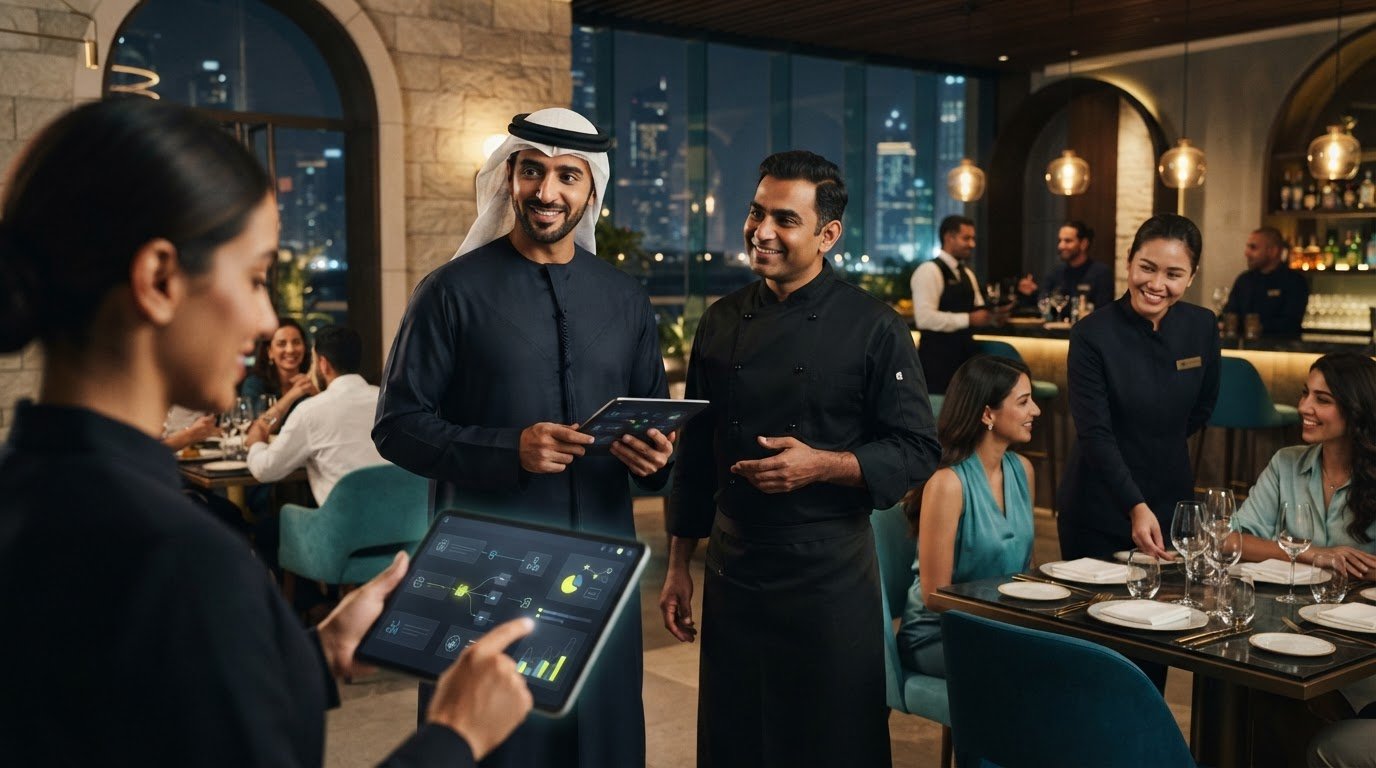
Reducing Restaurant Staff Workload: A Practical UAE Guide
What if the quickest way to give your restaurant team more time isn’t hiring more people, but removing work they shouldn’t have to repeat? In UAE restaurants, orders can arrive through dine-in service and multiple digital channels. When staff re-enter details, check separate screens, or update menu information in several places, small tasks add up during a busy shift. Reducing restaurant staff workload starts with finding where that time goes.
Efficiency only matters if hospitality stays strong. A change that speeds up one task but confuses the team or slows guests down isn’t a real improvement. The aim is to reduce avoidable repetition while keeping service clear, personal, and reliable.
This guide shows you how to spot workflows that drain your team’s time, choose manageable improvements, and assess where connected systems could remove manual steps. You’ll review order handling, menu updates, and routine tasks, then introduce changes your staff can work with. The goal is to give your team more room to focus on guests.
Key Takeaways
- Reducing restaurant staff workload means removing avoidable friction, not automatically cutting staff. Look for hidden repetition during a normal service shift.
- Trace an order from guest placement to completion to see where disconnected channels create extra checks, re-entry, or handoffs.
- Compare process changes, training, workflow integration, and guest-facing self-service by staff effort, guest impact, setup burden, and operational fit.
- Start with one workflow: observe it, map the steps, prioritize a friction point, test a change, and review the result with the staff involved.
- Assess whether aligning POS, aggregator, and menu processes could reduce repeated entry; OmniSync synchronizes POS systems with food aggregators.
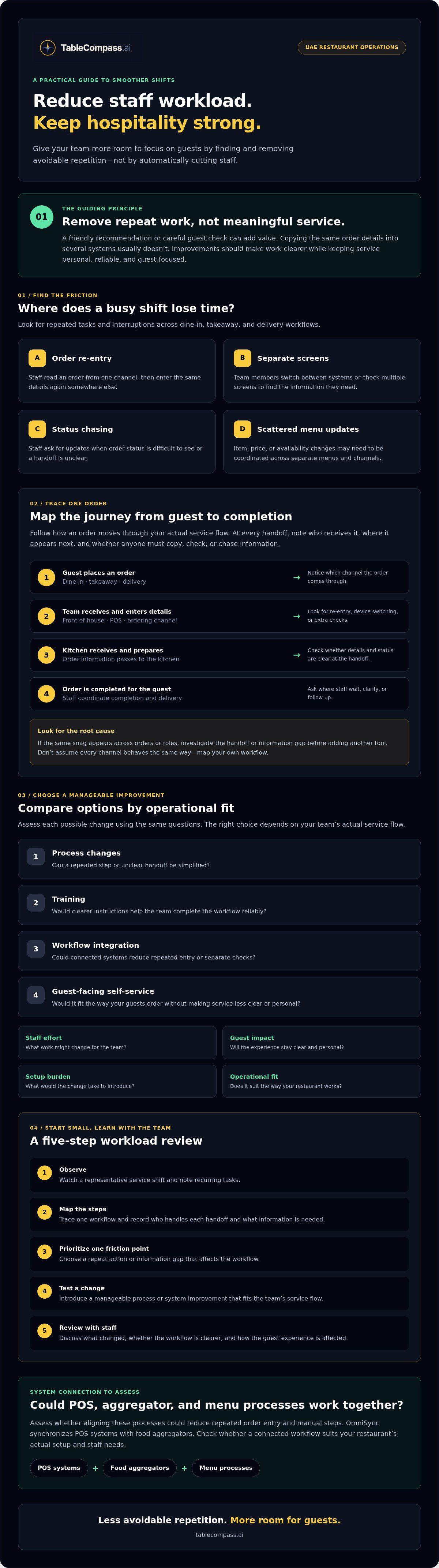
Reducing restaurant staff workload starts with finding the hidden work
A shift can look fully occupied without every task adding value for guests. A server answers a routine question while checking an order on another screen. A cashier re-enters a delivery order. A supervisor is interrupted to confirm whether the kitchen has started a dish. Each action may take only moments, but repeated interruptions and unclear handoffs fragment attention across the team.
Operational workload reduction means removing repeated steps and avoidable friction so restaurant staff can focus on accurate service and meaningful guest care. It isn’t automatically a plan to cut staff. The aim is to retain essential hospitality work while simplifying the process around it. A friendly recommendation or careful check can improve a guest’s experience; copying the same order details into several systems usually doesn’t.
Separate symptoms from root causes. Staff asking for order updates may seem to need reminders or more training. But if order status is hard to see, the underlying issue may be a workflow that forces people to ask. A service operations management perspective helps frame the process around the guest experience, not just the tasks each role completes.
Which restaurant tasks consume staff time without improving service?
Observe a representative shift before proposing a fix. Note recurring order re-entry, menu corrections, status checks, and routine guest queries. For each task, record who handles it, what information they need, and whether that information is already available elsewhere. Separate necessary service, such as confirming a guest’s request, from repeat work caused by unclear instructions or scattered information. Don’t judge individual performance; look for steps the workflow makes people repeat.
How can UAE restaurant operators spot workload bottlenecks?
Map a dine-in, takeaway, and delivery order from placement to completion. Show how it moves between the guest, front-of-house team, POS, kitchen, and relevant ordering channel. Ask staff where they wait, switch devices, chase updates, or repeat information. Their feedback can reveal friction that managers may not see in reports alone. Gather it before choosing a process or technology change, then check that the proposed fix suits the team’s actual service flow.
Keep the first review simple: watch the workflow, write down the steps, and ask why each repeat action happens. If the same snag appears across different orders or roles, investigate the handoff or information gap before adding another tool. This gives your workload-reduction plan a clear starting point and helps protect the guest experience as you improve how work gets done.
Trace restaurant workload back to disconnected ordering and service workflows
Once you’ve identified repeated tasks, follow an order through the systems and people involved. A guest places a dine-in order, a team member enters it into the POS, the kitchen receives and prepares it, and staff coordinate completion and delivery to the table. Takeaway and delivery orders may follow different routes. If a channel sits apart from the POS or kitchen workflow, staff may need to check multiple screens, transfer details manually, or confirm the same status more than once.
Every duplicate handoff adds another step for staff to manage and another point where information can become unclear. The issue isn’t simply that a team member is busy. The root cause may be that the same order information has to pass through disconnected steps. For more context on how systems can connect around order handling, see this restaurant POS synchronization guide.
Where do manual order handoffs create extra work?
Compare an order that flows into the POS with one a staff member must re-enter. In the first workflow, the team can check and prepare the order within its normal process. In the second, someone may need to read the details from one channel, enter them again, and follow up to make sure the kitchen has the information. Trace each handoff: who receives the order, where it appears next, and whether anyone has to copy or verify details. Don’t assume a particular channel behaves the same way in every setup; map your own workflow.
How do menu and guest-service tasks add to shift pressure?
A change to an item, price, or availability can create coordination work if staff must update separate menus across ordering channels. If one channel still shows an unavailable item, the team may need to clarify the order or explain the change to the guest. Map who makes the update, where it needs to appear, and how staff confirm it’s consistent. This centralized menu management guide offers more detail on coordinating menu workflows.
Routine questions, such as asking what comes with a dish, may be easier to handle when clear information is readily available. Other moments call for staff judgment: understanding a guest’s request, explaining a suitable option, or resolving a concern personally. The goal isn’t to automate hospitality. It’s to make routine information easier to access so staff can give their attention where it matters.
For a UAE restaurant serving dine-in, takeaway, and delivery guests, draw a separate route for each order type. Mark every screen check, repeated entry, menu correction, and handoff. This makes it easier to distinguish a genuine service need from a disconnected process. If you’re assessing how connected systems might fit your operation, explore TableCompass.ai restaurant technology as one option to consider.
Compare workload-reduction options by staff impact and operational fit
Once you’ve found the source of repeated work, choose a fix that addresses it without creating new steps for staff or friction for guests. Process clarification, staff training, workflow integration, and guest-facing self-service solve different problems. Compare them using the same questions: How much recurring staff effort could this remove? What changes for the guest? How much setup and adjustment will it take? Does it fit the way your restaurant operates?
- Process clarification: Makes responsibilities and handoffs clearer. It can be straightforward to introduce when staff are following different versions of a procedure, but it won’t connect separate systems.
- Staff training: Helps the team use an agreed process consistently. Consider the time needed to train staff and reinforce the steps, particularly if the process still involves repeat entry or checks.
- Workflow integration: Connects parts of an existing process, such as order transfer between POS and aggregator workflows. Setup depends on your current systems and how the connection fits your operation.
- Guest-facing self-service: Can support routine actions, such as ordering at the table. Assess whether it suits your guests and service style, and keep staff available for questions, recommendations, and situations that need judgment.
Use a simple comparison table in your planning notes, with one row for each option and columns for recurring staff effort, guest impact, setup burden, and operational fit. Describe each option concretely, such as “requires staff to check two screens” or “needs a new handoff,” rather than assigning unverified savings or performance scores. This makes trade-offs visible before you commit.
When should a restaurant improve a process before adding software?
Start with the process if ownership is unclear, procedures vary by shift, or a task passes through avoidable handoffs. Adding technology to a confusing workflow can preserve the confusion in a new form. First agree who owns each step and what information must move forward. Then choose one recurring pain point, such as repeated order transfer, and check whether clearer roles or instructions address it.
Which restaurant workflows are suitable for connected tools?
Consider workflows with predictable, repeated information: transferring orders, coordinating menu details across channels, or handling routine guest interactions. Middleware can connect existing POS and food aggregator workflows, helping reduce repeat entry without implying a change to POS hardware. Fit depends on the systems and process already in place, so map the handoffs and requirements first. For a UAE-focused discussion, read this UAE restaurant aggregator integration strategy.
Automation should handle repetition, not hospitality. Keep staff involved wherever a guest needs personal attention, context, or a considered response. For an example of technology supporting connected restaurant workflows, explore TableCompass.ai restaurant technology as one option to assess.
Build a practical plan to reduce restaurant staff workload
A clear improvement plan turns a recurring frustration into a manageable test. Start with one service workflow, such as transferring a takeaway order, and involve the staff who handle it. Their input can reveal where the process breaks down and whether a proposed change fits the pace of your restaurant.
- Observe: Watch the workflow during a representative shift. Note repeated entry, status checks, follow-up tasks, and points where work pauses.
- Map: Write down each step, who owns it, and which people or systems receive the information. Mark handoffs and duplicate actions.
- Prioritize: Rank the issues by how often they occur, how many handoffs they involve, whether they disrupt service, and how frustrating staff find them.
- Test: Make one focused change, explain the new responsibilities, and trial it with the affected team before applying it more widely.
- Review: Compare what you observed before and during the test. Ask staff what became easier, what still causes friction, and whether guests experienced any change.
This sequence keeps reducing restaurant staff workload grounded in your operation, rather than assumptions or industry averages. Use practical indicators: how often information is entered more than once, how many follow-up checks a task creates, and what the staff performing it report. Track the same indicators before and during the pilot so you can judge the change fairly.
How should managers prioritize workload problems?
Choose a problem that recurs, creates several handoffs, interrupts service, or is consistently raised by staff. Separate quick process fixes, such as clarifying who confirms an order, from changes that may require system integration or broader planning. Start with a pain point the team recognizes and can help assess after the pilot. A shared focus makes the result easier to interpret.
How can a restaurant test changes without disrupting service?
Set a baseline through observation before changing the workflow. Brief affected staff on what’s changing, who owns each step, and how to flag problems. Keep the pilot limited to a suitable team, shift, or workflow, and agree how you’ll review staff feedback and guest impact. Retain or expand the change only if it reduces friction without weakening service; otherwise, adjust it or return to the original process.
Use the review to decide the next move, not to justify a change already made. If a connected workflow is part of your plan, explore restaurant technology from TableCompass.ai as you assess what fits your operation.
Connect restaurant systems to give UAE teams more time for hospitality
After mapping a workflow, look for the joins between ordering channels, the POS, and menu processes. If staff repeatedly transfer order details, check availability in separate places, or coordinate the same menu change across channels, the cause may be a gap between systems. A connected workflow can reduce some repeated coordination if it fits the restaurant’s existing setup and is implemented clearly.
Before selecting a solution, confirm which POS and digital channels need to work together. Ask what the system handles automatically and where staff still need to review, confirm, or make a decision. Clarify onboarding responsibilities and involve the employees who will use the workflow during service. Their input can help identify practical issues before a change becomes part of daily operations.
Match the tool to the task
Choose technology based on the bottleneck you observed, not on a feature list alone. If delivery orders require repeated entry, OmniSync is TableCompass.ai middleware that synchronizes POS systems with third-party food aggregators. If teams spend time coordinating menu changes across digital channels, Atlas Menu Management centralizes menu control. For routine guest interactions, GuestConnect AI may be relevant; for table ordering and payment, consider QR Table Ordering & Pay. Each addresses a different workflow, so assess the fit against your team’s actual tasks.
Keep the human role clear. A connected process may help reduce manual transfer or repeated coordination, but staff still provide judgment, reassurance, recommendations, and personal service. Check how exceptions are handled, what information employees need to see, and whether the new workflow is understandable during a busy shift. Avoid introducing several changes at once; a focused rollout makes it easier to see what helps and what needs adjustment.
How can connected workflows support a more manageable UAE operation?
For restaurants serving dine-in, takeaway, and delivery guests, aligning relevant systems may mean fewer details for staff to re-enter and fewer separate processes to coordinate. The result depends on the restaurant’s systems, workflow, and implementation, so review the fit rather than assuming every integration will remove work. Track staff feedback and guest impact after the change, then refine the process around the service your team wants to deliver.
Reducing restaurant staff workload is ultimately about giving people more capacity for hospitality by removing avoidable friction from the work around it. Assess one workflow, identify where systems could align, and explore TableCompass restaurant solutions as an educational next step.
Give your team more room to focus on guests
Reducing restaurant staff workload starts with spotting the repeat tasks hidden inside a busy shift. Trace how orders and menu updates move across your UAE restaurant, then choose one recurring bottleneck to improve. A small, staff-informed pilot can show whether a change reduces follow-up work without disrupting service.
Connected systems may help when the root cause is repeated coordination between channels. TableCompass.ai’s OmniSync synchronizes POS systems with third-party food delivery aggregators, while Atlas Menu Management centralizes menu control across digital channels. The right fit depends on your current systems, workflows, and implementation, so assess what your team needs before choosing a solution.
Explore connected restaurant operations with TableCompass and consider where better-aligned workflows could support your operation. Start with one practical improvement, listen to the people who do the work, and build from there. Your team can spend less attention on avoidable repetition and more on the hospitality guests remember.
Frequently Asked Questions
How can restaurants reduce staff workload without cutting staff?
Reducing restaurant staff workload means removing avoidable repetition, not automatically reducing headcount. Observe a service shift and note duplicate order entry, repeated status checks, menu corrections, and unclear handoffs. Choose one recurring friction point, clarify who owns each step, and test a simpler process with the employees who perform it. Review staff feedback and guest impact before extending the change across other shifts or locations.
What tasks create the most unnecessary work for restaurant employees?
Common sources include re-entering orders from digital channels, checking statuses across separate screens, correcting menu details in multiple places, and following up after unclear handoffs. Routine guest questions can also interrupt work if information is difficult to find. Distinguish these repeatable tasks from service that needs human attention, such as tailored recommendations or resolving a guest’s concern. Observe a representative shift and ask staff which steps recur.
Can restaurant technology reduce manual order entry?
Yes, connected restaurant technology can reduce manual order entry when it links the systems involved in an order workflow. Instead of copying details from one channel into another, staff may be able to work with orders synchronized into the POS. The right fit depends on the restaurant’s existing systems and process. Before choosing a tool, confirm which channels it connects and what checks or actions employees still need to handle.
How can a UAE restaurant connect delivery orders with its POS?
A UAE restaurant can assess middleware designed to synchronize its POS with third-party food delivery aggregators. TableCompass.ai’s OmniSync provides POS and food aggregator synchronization. First, list the POS and digital ordering channels in use, then confirm that the proposed connection fits that setup. Ask how orders move through the workflow and which steps still need staff attention. This helps operators assess integration without assuming every system works the same way.
Does automating restaurant tasks reduce the quality of guest service?
Not necessarily. Automation can support service when it reduces repetitive coordination and leaves staff free to focus on guest needs. Use it for suitable routine tasks, while keeping employees involved where judgment, a personal recommendation, or a considered response matters. Making routine information easier to access may help staff answer common questions, but resolving a guest concern still benefits from human attention. Review guest feedback during any pilot.
How should a restaurant measure whether a workload change is working?
Compare observations from before and during the change, rather than relying on unsupported industry averages. Track practical signs such as repeated entries, follow-up checks, handoffs, and points where work pauses. Ask the employees using the process what has improved and what remains difficult. Also consider whether the change affected the guest experience. Use those findings to adjust the workflow before deciding whether to keep or expand it.
Should a restaurant change its workflow before investing in new software?
Yes, clarify a confusing process before automating it. If staff aren’t sure who owns a step or procedures vary between shifts, define responsibilities and agree on a consistent handoff first. Then identify which repeated actions remain and whether a connected tool could address them. Start with one pain point, involve the employees who handle it, and assess the workflow and system fit before making a wider change.