Quick Service Restaurant Automation: UAE Guide 2026
What if the best place to start with quick service restaurant automation isn’t a new kiosk, but the handoff that’s slowing your team down? In a UAE QSR, staff can lose time re-entering delivery orders, correcting menu details across channels, and switching between systems while service keeps moving. Automating one task in isolation may leave those gaps untouched.
It makes sense to want faster service without adding another complicated tool. The value comes when ordering, POS, menus, and guest communication work as connected parts of the operation. That can reduce repetitive handoffs while keeping staff in control.
This guide shows how to identify high-friction tasks worth automating, understand how core restaurant systems can connect, and plan a manageable rollout around your team’s day-to-day service. You’ll also learn how to assess automation by the operational problem it solves, so you can build a practical foundation for your UAE restaurant rather than digitising for its own sake.
Key Takeaways
- Map where orders or menu updates are manually transferred to spot workflow friction that affects accuracy and team workload.
- See how ordering channels, restaurant systems, and staff actions can connect, with middleware bridging information between systems.
- Compare automation opportunities by task frequency, order volume, staff impact, and integration needs before selecting tools.
- Use a step-by-step rollout for quick service restaurant automation: map, prioritize, connect, test, train, and review one workflow at a time.
- Explore how TableCompass.ai solutions, including OmniSync, can support connected restaurant workflows across POS systems and food delivery aggregators.
Why quick service restaurant automation matters for UAE operators
Quick service restaurant automation uses technology to coordinate repeatable service and operational tasks across restaurant systems, so information can move through a workflow with fewer manual handoffs. It’s not simply buying a kiosk, tablet, or other standalone device. The value comes from connecting the steps around an order, from how it arrives to how the team prepares and completes it.
For a UAE operator serving dine-in guests alongside takeaway and digital orders, disconnected processes can mean staff re-entering the same details, checking separate screens, or relaying changes by hand. Each transfer creates another opportunity for a missed modifier, a delayed update, or uncertainty about which order information is current. The problem is often the workflow, not an individual employee’s effort.
Where repetitive work creates operational friction
Consider a delivery order arriving during a busy service. A team member may need to review it in a digital channel, enter it again in the POS, and ensure the kitchen receives the correct items and modifiers. If a menu item becomes unavailable, someone may also need to update one channel, notify colleagues, and reconcile the change elsewhere. Each step might be handled correctly, but repeated manual transfers make consistency harder when attention is divided.
Look for patterns, not isolated mistakes. One incorrect order may be an unusual service incident. If staff regularly copy orders, chase missing updates, or compare records to resolve mismatches, the process itself may be creating friction. Track where information is entered, who transfers it, and what must be checked before preparation. A simple workflow map can show whether the problem recurs often enough to address.
For a wider view of how automation has developed in food service, see Automated restaurant. The operational distinction is that a device performs a particular task, while workflow automation coordinates information and actions across connected steps.
What restaurant automation can, and cannot, solve
Software can support staff by moving order information between connected systems, helping keep menu details aligned, or automating routine guest communications. It can reduce repetitive handling when the process and connections are designed well. It can’t decide how to respond to a guest’s unusual request, resolve every kitchen constraint, or replace the judgement and warmth that shape hospitality.
Physical service robots and self-service equipment are different categories. They may change how a task is performed, but they don’t automatically connect a digital order to the POS, kitchen workflow, or menu updates. A new device can even add another screen or handoff if it operates separately.
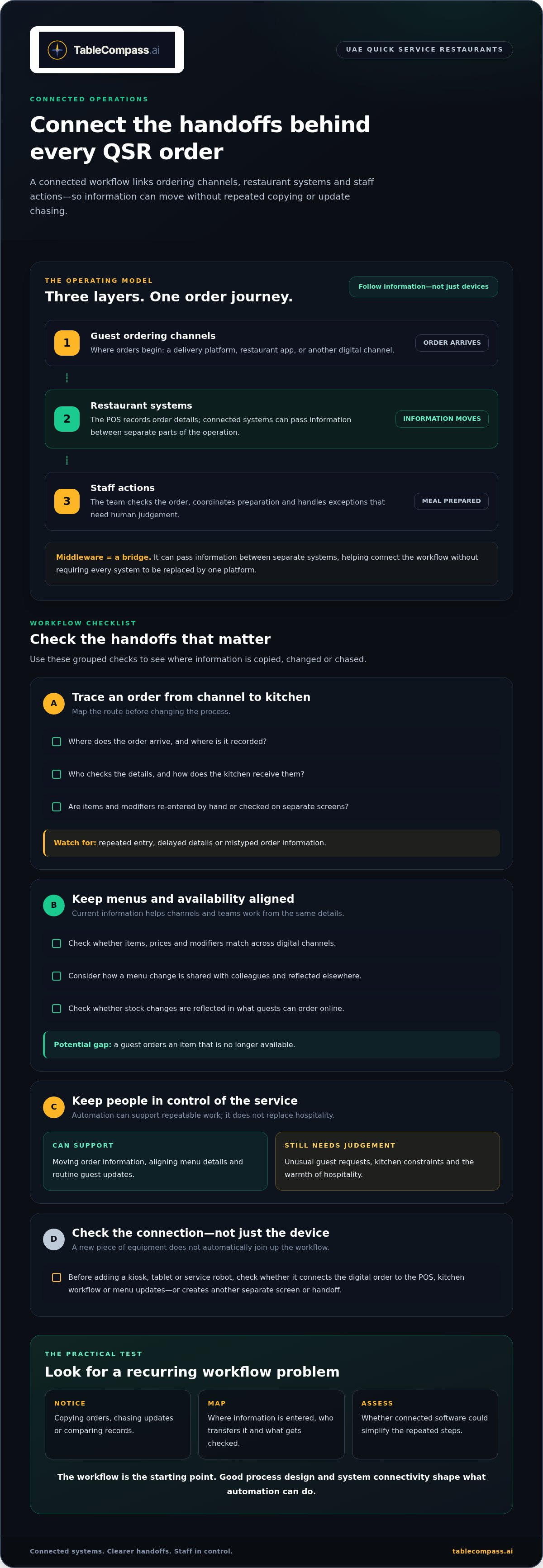
Start with a practical check: identify one repeated task, document its current steps, and note where errors, delays, or duplicate work can occur. Then assess whether connected software could simplify those steps. Results depend on sound process design and system connectivity, not on the label “automation.”
How QSR automation connects orders, menus, and guest interactions
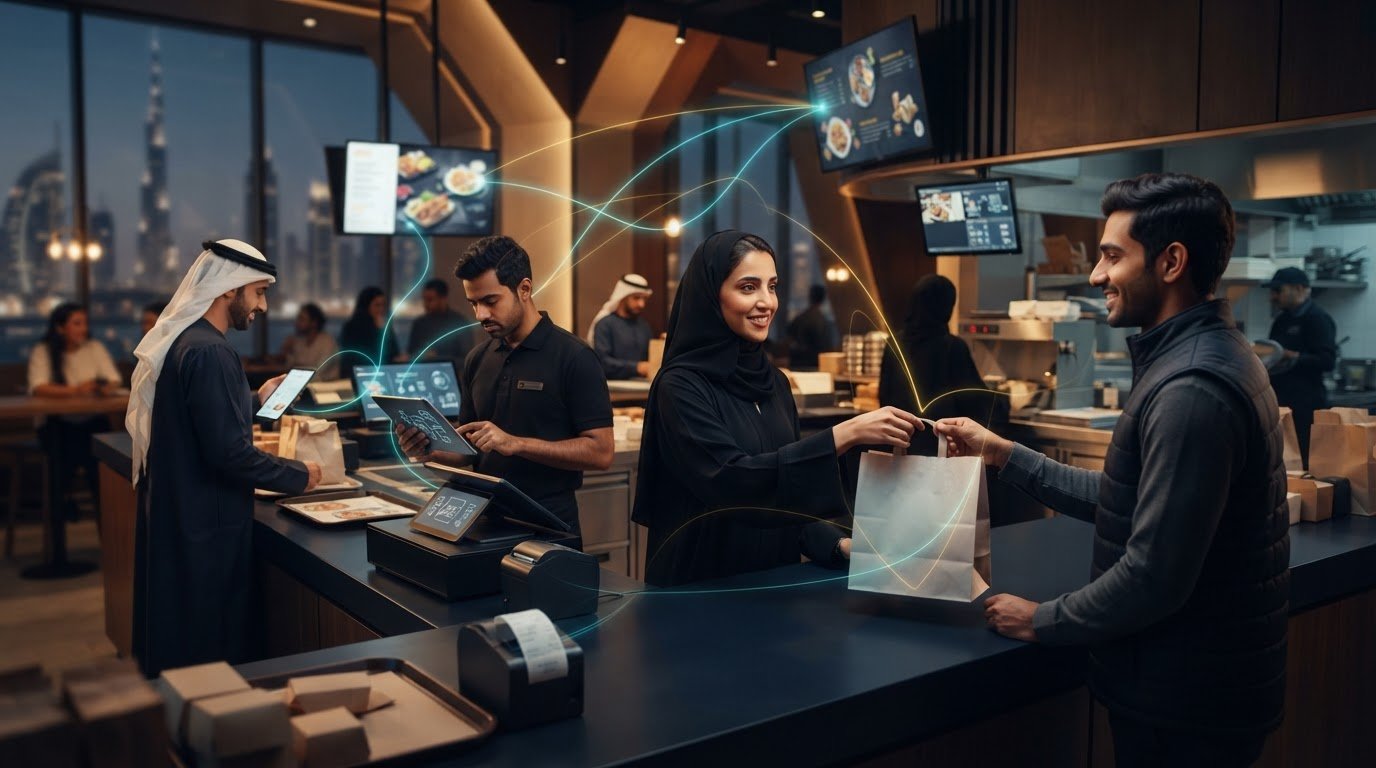
A connected workflow has three layers: the channels where guests order, the restaurant systems that manage information, and the staff actions that turn an order into a meal. A delivery platform or restaurant app can capture an order; the POS can record it; the kitchen team can prepare it; and guest communication can share relevant updates. The aim is to let information move between these steps without staff repeatedly copying it or chasing updates.
Synchronization helps every channel and team work from current order and menu information. Without it, a change made in one place may not appear elsewhere, leaving staff to spot and correct the gap manually. Middleware helps connect systems by passing information between them, much like a bridge between separate parts of an operation. It can support quick service restaurant automation without requiring every system to be replaced by one platform.
Order and POS connections as the operational backbone
Picture a guest placing a takeaway order through a digital channel. The order details, including selected items and modifiers, need to reach the restaurant’s POS and then the preparation workflow. If a team member has to re-enter the order, that’s another handoff where information can be delayed or mistyped. A connected workflow can reduce that repeated handling, while staff remain responsible for exceptions and kitchen coordination.
For a UAE restaurant receiving orders through several channels, map the order’s route before changing anything: where it arrives, where it is recorded, who checks it, and how the kitchen receives it. This makes gaps visible and gives the team a practical basis for reviewing Seamless Restaurant POS Synchronization alongside its existing process.
Menu, inventory, and guest-facing automation
Menu information shapes what a guest can order, what the POS records, and what the kitchen expects to prepare. If an item, price, or modifier differs across digital channels, the team may need to explain the discrepancy or correct the order. Central menu management helps operators maintain consistent information across channels. Atlas Menu Management supports centralized control of menu information across digital channels.
Inventory information is connected to this flow, too. If stock changes but an item remains available to order online, the restaurant may receive an order it can’t fulfil. Inventory synchronization can help reflect availability across the ordering process and reduce the risk of overselling, provided the underlying information is kept current.
Guest-service automation sits alongside these operational links. It can support routine communications, such as sharing an order update or inviting feedback, while staff handle conversations that need empathy or discretion. That’s distinct from a deeper AI system that analyzes information or recommends actions. GuestConnect AI focuses on guest engagement, while order, POS, menu, and inventory connections form the operational backbone. Sketch these connections and mark where information changes hands to identify gaps; restaurant workflow tools can help operators build a more connected setup.
How to compare QSR automation opportunities before choosing tools
Choose the workflow before you choose the technology. Quick service restaurant automation delivers practical value when it addresses a recurring operational problem, fits the way your team works, and connects with the systems already involved. A polished feature list matters less than a clear path from current friction to a simpler process.
Compare candidate workflows using the same criteria. A simple low, medium, or high rating can help reveal which task deserves attention first.
| Criterion | What to assess | Priority signal |
|---|---|---|
| Workflow friction | Repeated entry, avoidable checks, delayed updates, or manual reconciliation | Frequent handoffs interrupt the same process |
| Order volume | How often the workflow occurs during a typical service period | The task recurs throughout the day |
| Staff impact | Roles involved and time diverted from preparation or guest service | Several people repeat or chase the same information |
| Integration needs | Systems and channels that must exchange information | The change can connect existing steps rather than add another isolated tool |
Compare automation types by the problem they solve. Software workflow automation transfers or updates information between connected systems. Self-service tools let guests complete selected ordering or payment steps themselves. Robotics can perform specific physical tasks. These approaches aren’t interchangeable: a robot won’t resolve duplicate order entry, and a new ordering interface won’t necessarily keep menu information aligned.
Decision rule: prioritize a connected workflow that removes repeated handoffs before adding tools that overlap with what you already use.
Assess fit, connectivity, and team impact
Map the workflow from start to finish: list each system, channel, and staff role involved, then mark where information is entered, checked, or passed on. Separate essential connections from optional features. If the main issue is transferring delivery orders into the restaurant’s POS, prioritize that connection before adding unrelated guest-facing features. Include training and a plan to keep service running while staff learn the new process.
Choose the first workflow to automate
Score candidate tasks by repetition, avoidable handoffs, and likely guest impact. A delivery-order workflow may be a strong candidate if staff frequently re-enter orders or reconcile information across channels. A table-order workflow may be a better starting point if the recurring friction is how orders reach the team. A guest-message workflow may rank higher if staff repeatedly send the same routine updates. Use what your team observes, not assumptions about which tool is most impressive.
For aggregator-specific considerations, use The Definitive Restaurant Aggregator Integration Solution as a focused reference. Then document the selected workflow, the systems it touches, and what staff should do when an exception occurs. This gives your team a clear basis for testing the change and judging whether it solved the original problem. TableCompass.ai supports connected restaurant workflows; explore restaurant automation solutions as you shape your priorities.
A practical QSR automation rollout plan for UAE restaurants
A controlled rollout protects service while giving your team a clear way to judge whether a change helps. For quick service restaurant automation, avoid switching several workflows at once. Choose one recurring process, establish how it works today, then adjust based on what staff and operational records show.
A practical sequence keeps the work focused:
- Map: Record each handoff, system, staff role, and exception in the current workflow. A delivery order, for example, may pass through an ordering channel, the restaurant’s POS, and the preparation team.
- Prioritize: Select a repeated task with avoidable manual steps and a clear effect on service. Keep the first goal specific, such as reducing repeated entry in one order flow.
- Connect: Set up the information exchange needed for that workflow. Keep the scope narrow, and avoid adding features that don’t address the selected issue.
- Test: Run realistic scenarios before relying on the changed process in live service. Include routine orders and exceptions, such as an unavailable item or a requested modification.
- Train: Give each role concise guidance on its steps, what has changed, and how to handle exceptions.
- Review: Compare the new process with your baseline, gather staff feedback, and decide whether to refine, continue, or expand.
Map and pilot a real restaurant workflow
Start with the team that handles the task. Document where information originates, where it goes next, who acts on it, and where delays or manual workarounds appear. In a UAE outlet balancing dine-in, takeaway, and delivery service, a pilot might focus on one order channel rather than changing every route at once. Before the change, note available measures such as order corrections, repeated entries, or manual checks. Use the same measures during the pilot, and invite staff to report confusing steps.
If the pilot involves menu updates, define which channels must reflect a change and who is responsible for reviewing it. The Centralized Menu Management: 2026 UAE Restaurant Guide offers a related focus on structuring menu workflows; keep your pilot limited to the menu process you’re testing.
Train teams and measure operational results
Training should match the role. Front-of-house staff may need a simple guide to checking an order’s status, while managers may need steps for reviewing menu or inventory updates. Make the exception path just as clear as the routine one. During rollout, collect observations from the people using the workflow, not only from system records.
Review order handling, menu consistency, and how often staff still intervene manually. If the workflow works reliably and the team understands it, consider extending it to another channel or location. If not, refine the process before expanding. Explore connected restaurant operations as you plan your rollout.
Build a connected QSR automation system with TableCompass.ai
Once you’ve identified the workflow to improve and defined how you’ll assess it, choose technology that fits that plan. For quick service restaurant automation, the goal isn’t to add every available feature. It’s to connect the channels and systems involved in your priority workflow, then extend the setup when the first process is working for your team.
TableCompass.ai brings together restaurant middleware, menu management, and guest-facing tools. Each has a different role. An operator handling dine-in, takeaway, and delivery orders in the UAE can begin with the connection that addresses a current handoff, then consider how menu or guest workflows might fit into the wider system.
Connect restaurant systems through OmniSync
OmniSync is middleware that synchronizes restaurant POS systems with third-party food delivery aggregators. Rather than asking staff to transfer each order manually between separate systems, it automates order processing. It also automates inventory management, helping operators coordinate order and stock information as part of restaurant operations.
Use your rollout criteria to shape the starting point: identify the POS and ordering channels in the workflow, map how an order should move, and define the exceptions staff still need to handle. Connections depend on the systems in use, so don’t assume every POS or aggregator connection is identical. For a deeper explanation of this connective layer, POS Middleware for UAE Hospitality explores middleware’s role in restaurant operations.
The value is in the handoff. An order can move through the connected workflow while staff focus on preparation, guest needs, and exceptions that require judgement. The technology supports the process; clear steps and team training remain essential.
Extend automation across menus and guest channels
Once the core order flow is defined, consider which adjacent workflows would benefit from a consistent source of information. Atlas Menu Management centralizes menu control across digital channels, helping operators manage menu information without treating each channel as a separate update task. When a restaurant changes availability or menu details, this helps connect the management process to the guest-facing channels where those details appear.
GuestConnect AI supports guest engagement, while QR table ordering and payment give dine-in guests a digital route to place and pay for an order. A White-Label Mobile App provides another restaurant-owned digital channel. These tools address different parts of the guest journey, so select them according to the workflow you’ve prioritized rather than layering them in by default.
Build the system around a clear operational sequence: orders move through the appropriate channel, menu information stays centrally managed, and guest interactions have a defined place in the workflow. TableCompass.ai connects these capabilities across restaurant operations. Explore TableCompass.ai restaurant automation to shape a connected setup for your restaurant.
Make your next move count
Think of quick service restaurant automation as an operating capability you can develop, not a one-time technology decision. As your restaurant’s channels, menu, and service needs evolve, keep asking whether the workflow still helps staff serve guests clearly and consistently. That habit makes it easier to spot when a process needs refinement instead of adding tools by default.
Choose a practical next step: identify the workflow you most want to improve, involve the people who handle it, and set a clear reason to review the change. Small, deliberate decisions can build a more adaptable operation without losing sight of the guest experience.
Explore connected restaurant automation with TableCompass.ai and identify how a coordinated system can support your restaurant’s next stage of growth. Start with the opportunity that matters most to your team, then build from there.
Frequently Asked Questions
Is quick service restaurant automation only useful for large chains?
No. A single UAE restaurant can use automation to address one recurring task, while a chain may use it to coordinate shared processes across branches. For an independent outlet, a useful starting point might be a routine information handoff that keeps interrupting service. Define the problem and the staff involved first. Expand to more workflows or locations only after the initial process works reliably for your team.
Can restaurant automation work with an existing POS system?
It can, depending on the POS and the integration available for the restaurant. Middleware can pass information between systems, but it doesn’t make every POS automatically compatible with every channel. Before choosing a product, list the information your workflow needs to exchange, such as item modifiers, cancellations, or availability updates. Check the specific systems involved against those needs rather than relying on a general integration claim.
Does restaurant automation replace staff in a QSR?
No. Software can coordinate routine information tasks, but staff remain essential for hospitality, judgement, and situations that don’t follow the usual process. For example, an employee may need to clarify a guest’s request or resolve an unusual order detail. A practical rollout explains which steps are automated, when staff should intervene, and who can help if the workflow behaves unexpectedly. Clear guidance helps teams use automation confidently.
What should a QSR automate first?
Start with a task that happens repeatedly, involves avoidable handoffs, and creates friction for staff or guests. For example, if a team regularly checks whether an online order’s requested changes reached preparation, map that process before selecting a tool. Quick service restaurant automation should respond to an observed operational need, not a trend. Choose one workflow to examine, then use what staff experience to decide whether it merits a pilot.
What happens when an automated restaurant workflow encounters an exception?
Staff should have a clear way to recognize and resolve exceptions before a workflow goes live. If an order arrives with incomplete information, for example, define who checks the original request and how the team records the resolution. For a system interruption, establish a fallback process that keeps orders visible to the right staff. Review exceptions after the pilot to see whether they were unusual or point to a recurring process gap.
How can a restaurant keep automation consistent across multiple branches?
Consistency starts with clear ownership, not an assumption that every branch will operate identically. Decide which procedures and menu details should be shared, who approves changes, and what local teams manage themselves. For example, a group could standardize how menu updates are reviewed while giving each branch written instructions for handling local availability. Suitable centralized tools can help coordinate information, but teams still need defined responsibilities and operating guidance.
How should a restaurant measure whether automation is helping?
Compare records from before and after rollout for the same defined workflow. Track measures your restaurant can observe, such as manual interventions, order corrections, or staff time spent resolving a recurring issue. Keep the comparison relevant to your own service conditions rather than using a generic benchmark. Ask employees whether the process is clearer, and consider guest-facing service quality alongside operational measures. Together, these signals give a more useful view than speed alone.