QR Code Ordering: A Practical Guide for UAE Restaurants
What if a QR code ordering system could make ordering easier without making hospitality feel less personal? For UAE restaurants, success depends on more than placing a code on each table. Guests need a clear route from scanning the code to choosing and submitting an order, while staff need to know where that order goes next. If either step feels confusing, convenience can quickly turn into friction.
It’s reasonable to ask whether guests will welcome a digital option, how orders reach the team and kitchen, and whether another tool will add to an already fragmented setup. The key is to design the guest journey and restaurant workflow as one process. This guide explains how QR ordering works, what to assess before adopting it, and how to choose an approach that supports your service style. It also covers what to consider when connecting table ordering with the systems that manage menus and restaurant operations, so the experience feels straightforward for guests and workable for your team.
Key Takeaways
- Map the guest journey from scanning the table code to submitting an order, and make each step clear and easy to follow.
- Choose a QR code ordering system that fits your service style and gives staff a clear order-handling process.
- Compare options by guest usability, order flow, menu upkeep, and the visibility they provide to your team.
- Start with one defined use case, then prepare accurate menu content, simple instructions, and an easy way for guests to get help.
- Treat QR ordering as part of a connected restaurant workflow, not a standalone code, and assess how it fits alongside your existing systems.
What a QR Code Ordering System Changes in a Restaurant
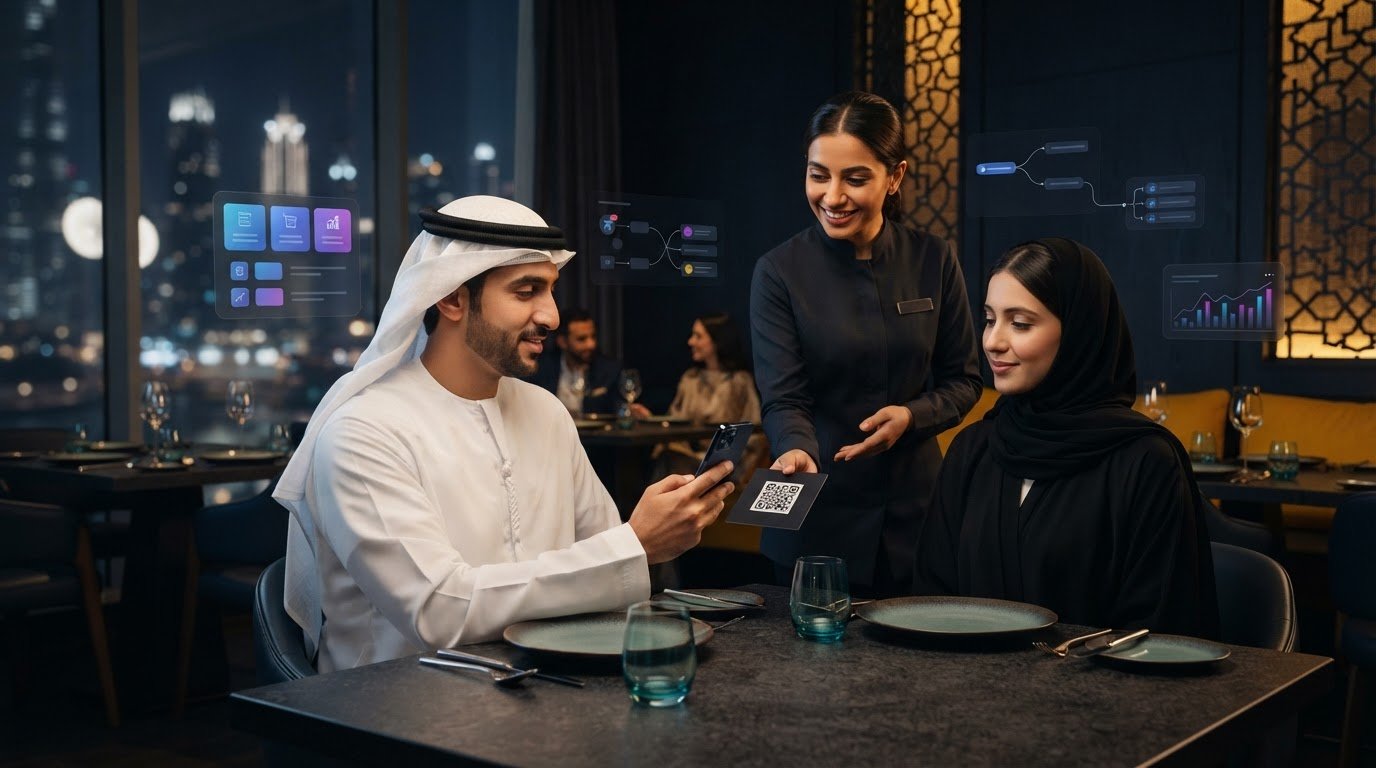
A QR code ordering system creates a digital route from a code at the table to a guest’s menu and ordering experience. Instead of relying only on a printed menu and a conversation with a server to start an order, guests can use a smartphone to browse and, when ordering is enabled, submit their choices digitally. The QR code is the entry point; the system determines what happens after the scan.
A printed menu displays choices; QR ordering gives guests a digital path to browse and, when ordering is enabled, send their selections to the restaurant. Opening a digital menu alone does not mean an order has been placed. For background on the technology behind this entry point, see QR code technology and applications.
What happens after a guest scans the code?
The journey is simple when each step is clear. A guest scans the code, opens the linked experience, browses the menu, selects items if ordering is available, and submits the order. They then follow the payment instructions shown by the restaurant. Screens and steps differ by setup, so make it clear whether guests are browsing, ordering, or paying.
- Scan: The code takes the guest to a digital destination, such as the restaurant’s menu.
- Browse: The guest reviews dishes and relevant menu details. Browsing alone does not send anything to staff.
- Submit: If ordering is supported, the guest confirms their selections through the steps provided.
- Follow payment instructions: The guest uses the restaurant’s payment process when payment is part of the experience.
Order submission is the operational handoff. The system and its configuration determine how staff receive and manage orders, including whether orders pass through connected restaurant systems or are handled another way. Before introducing QR ordering, walk through the process with employees. Make sure they can answer two practical questions: “Has the order been sent?” and “Where does it go next?”
Which restaurant service moments can QR ordering support?
Start with the service moment you want to improve, not with the technology. A dine-in restaurant might offer table codes to guests who want to browse and order at their own pace. A café could make a digital menu available to guests who prefer time to review their options. In both cases, choose an approach that fits the venue’s service format, guest expectations, and team workflow.
- Guest-led ordering: Guests browse and submit an order themselves when they’re ready. This suits a service flow built around independent ordering.
- Staff-assisted ordering: Employees guide guests through choices or take the order directly. This suits occasions where recommendations, reassurance, or personal interaction are central.
The two approaches can work side by side. QR ordering offers another route without requiring staff to step away from hospitality. In the UAE, consider your guests and day-to-day service: decide where a digital option makes sense, explain how to use it, and make assistance easy to find. The goal is a smoother ordering journey that still feels like your restaurant.
How a QR Code Ordering System Connects the Guest Journey to Restaurant Operations
A scan is only the front door. For a QR code ordering system to work smoothly, there must be a clear route from the guest’s menu to the team responsible for preparing and serving the order. Map that route before launch to catch gaps, such as an order destination no one monitors or menu information that has fallen out of date.
Map the order from table to kitchen
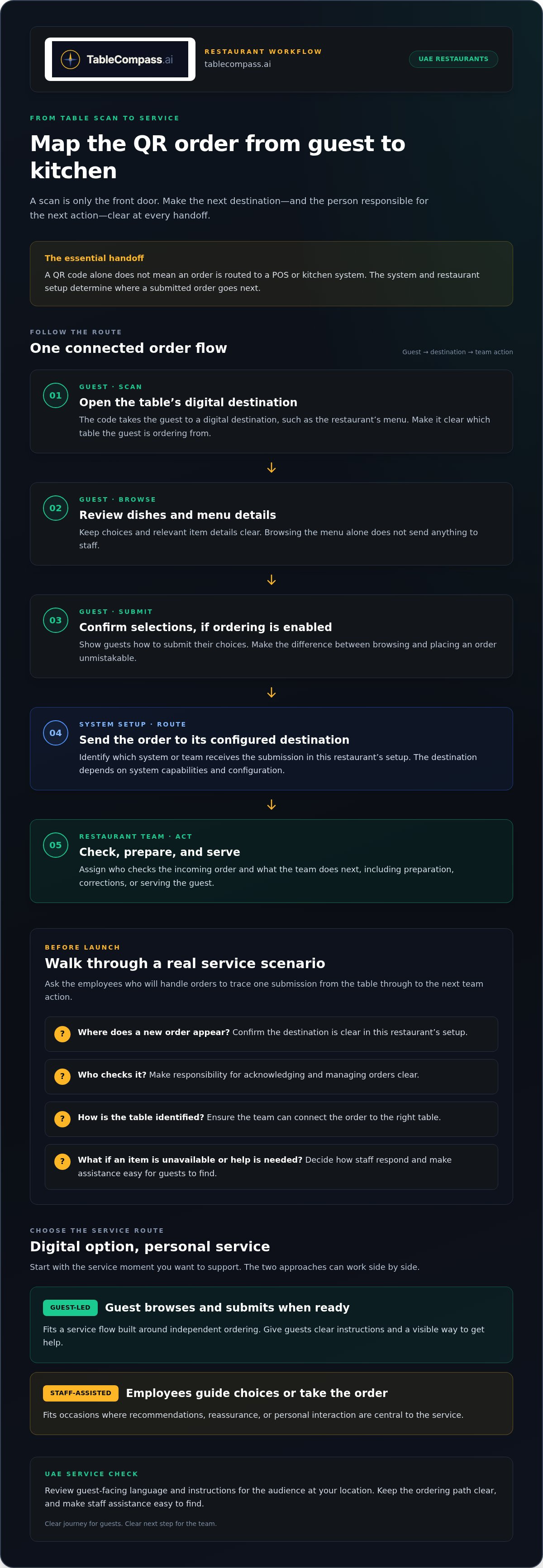
Trace the process in sequence and assign responsibility at each handoff. The guest opens the menu and submits an order; the system sends it to its configured destination; staff manage it; and the relevant team prepares and serves it. The destination and next staff action depend on the system’s capabilities and the restaurant’s setup. A QR code alone does not mean an order is routed to a POS or kitchen system.
A QR order moves from guest to digital menu, then to its configured order destination and the staff or kitchen team responsible for the next action.
Walk through a real service scenario with the employees who will handle orders. Where does a new order appear? Who checks it? How does the team identify the table? What happens if an item is unavailable or a guest needs help? Answering these questions prevents the digital journey from ending at “order submitted” while the service team is left without a reliable handoff.
- Guest: Can they identify the correct table and understand how to submit an order?
- Digital menu: Are choices and relevant item details clear before the guest orders?
- Order destination: Is it clear which system or team receives the submission in this restaurant’s setup?
- Staff action: Does someone know how to acknowledge, prepare, correct, or serve the order?
For UAE venues, review guest-facing language and instructions against the audience at that location. Keep key actions easy to understand and make a staff-assisted route visible for guests who prefer guidance. The aim is not to guess what every guest wants; it is to make the ordering path clear and help easy to find.
Keep menu and service information aligned
Assign an owner for the digital menu. That person or team should maintain item names, descriptions, and availability, with a practical process for updating information when service changes. If a dish is unavailable, the menu should not continue presenting it as a regular choice. Unclear descriptions can prompt extra questions, and outdated availability can lead to order corrections and friction for guests and staff.
Before service, review the items offered, check that descriptions make sense to guests, and align availability information with the team taking or preparing orders. Clarify who can update the menu and how staff communicate changes. That makes menu maintenance part of the operation rather than a task that gets missed between shifts.
When a restaurant manages menus across ordering channels, a centralized menu management approach can help structure that work. TableCompass also offers QR table ordering and payment as part of the wider restaurant workflow.
How to Compare QR Ordering Systems for Your Restaurant
The right choice is not the system with the longest feature list. It is the one that fits your service model, makes ordering clear for guests, and gives your team a workable process behind the scenes. Compare options against the same criteria, then judge each against your venue’s audience and day-to-day service in the UAE.
QR ordering or staff-led ordering: what fits the service?
A QR code ordering system lets guests browse and place an order themselves. Staff-led ordering gives the conversation and order-taking to an employee. Neither approach suits every moment. QR ordering can complement service when guests want time to review choices, while staff guidance remains valuable for recommendations, questions, and guests who prefer personal assistance. Make the route to staff clear whichever approach you use.
Compare the approaches by task, rather than asking which one should replace the other:
- Ordering control: Guest-led ordering lets diners choose when to submit; staff-led ordering gives employees more direct control over clarifying choices.
- Staff interaction: Consider whether conversation is central to the experience or should be available when a guest wants help.
- Guest choice: A QR option gives guests another way to order, while a staff-led route supports those who do not want to use a phone.
- Service moment: Decide where each method makes sense, such as at a table during a relaxed meal or when a guest needs help understanding the menu.
For UAE restaurants, factor in the venue’s audience, dining occasion, and preferred service style. Make assistance easy to find and give staff a simple way to explain the available ordering choices.
Which system criteria matter in daily operations?
Compare the work your team must do, not just the guest-facing screen. During a demonstration or internal review, trace a sample order from submission to the next staff action. Then check how menu changes are made and how the team knows what is available. These steps show whether the system fits the operation beyond the initial scan.
Guest usability: Can guests find the menu, understand what to do next, and locate help if needed?
Service fit: Does the ordering option support your preferred balance of guest independence and staff interaction?
Order handling: Can employees tell where submitted orders go and what action follows? POS or kitchen routing depends on the system’s configured capabilities and the restaurant’s setup. For more detail on that connection, see this QR ordering and POS integration guide.
Menu maintenance: Is responsibility for item details and availability clear, and can the team keep that information current?
Operating visibility: Can the people managing service see enough to handle orders, questions, and changes consistently?
Use the comparison to identify trade-offs, not to chase a universal winner. A system that fits a counter-service venue may not suit a restaurant built around attentive table service. Choose an approach your team can operate confidently and guests can use comfortably, while keeping personal assistance part of the experience.
How to Prepare and Roll Out QR Ordering in a UAE Restaurant
A controlled rollout gives your team room to spot practical issues before QR ordering becomes part of every service moment. Start with one clear use case, such as ordering at dine-in tables. Define what guests will do, what staff will handle, and where the order goes next. Once the flow works in the restaurant’s actual environment, decide whether to extend it to other suitable service situations.
Prepare the menu, tables, and team
Set the operational basics before guests encounter the code. Review menu names, descriptions, and availability so the digital version reflects what the restaurant intends to offer. Use clear wording so guests can choose without avoidable clarification, and agree who updates the menu when items or availability change.
Next, check the table setup. Place each code where guests can see and scan it comfortably, without obscuring other table information or interrupting the setting. Test the position from a seated guest’s point of view and make sure the next step after scanning is clear. Provide concise instructions, including how to request help.
Prepare employees as well as tables. Agree on who introduces the QR option, who answers guest questions, and who monitors orders during service. Staff should know where orders go and what to do if a guest needs assistance or the digital flow does not work as expected. A QR code ordering system should support the team’s service, not leave employees guessing about their role.
Test the complete guest-to-service journey
Run a test as if you were a guest at the restaurant. Use the table placement and scanning steps guests will use, browse the menu, submit a test order, and follow the payment instructions if they are part of the setup. Then check the process from the team’s side: can staff identify where the order appears, understand what to do next, and carry out the expected service action?
- Scan from the guest’s seat: Check that the code is easy to find and the menu opens as intended.
- Review the menu: Look for confusing descriptions, unavailable items, or instructions that leave the guest unsure how to proceed.
- Submit a test order: Follow the restaurant’s configured process and confirm the appropriate team can see or act on the submission.
- Observe service: Check that the handoff is clear through preparation and serving, including how staff respond to a guest question.
Record friction points as they happen. If a guest could mistake browsing for submitting an order, revise the instructions. If staff are unsure where to look, clarify the internal process before a wider rollout. Repeat the test after making changes, then brief the team on the final flow. This practical check helps align the guest experience with daily operations in a UAE venue.
TableCompass offers QR Table Ordering & Pay for restaurants introducing QR-based ordering and payment at the table.
Build a Connected QR Ordering Workflow with TableCompass
A QR ordering decision should reflect the priorities you have mapped: a clear guest journey, an order flow the team understands, manageable menu updates, and a service style that suits your venue. The code is only one part of the structure. The larger test is whether guests can use the option comfortably and staff can carry out the next step with confidence.
TableCompass.ai offers QR Table Ordering & Pay for QR-based table ordering and payment. The wider restaurant technology suite includes middleware for connecting restaurant POS systems with food aggregators, as well as centralized menu management. Each plays a distinct role in the restaurant’s operating environment. Define your workflow first, then consider how these tools support it.
Where QR Table Ordering & Pay fits
Think of table ordering as one guest-facing route within the restaurant’s digital operating environment. QR Table Ordering & Pay supports QR-based ordering and payment, while middleware and menu management address broader restaurant operations and connectivity. Keeping those roles distinct helps teams assess the full workflow without assuming how a particular POS connection, payment method, or automated handoff works.
Write down the expected journey and staff responsibilities before introducing the system. Note how guests access the menu, what counts as a submitted order, and which team action follows. Then consider who maintains the menu and how the ordering experience fits with other restaurant processes. This gives your evaluation a practical foundation instead of making the code itself the measure of success.
- Guest experience: Is the path from table to menu and order clear for your guests?
- Service fit: Does the option complement the level of staff interaction your venue wants to provide?
- Order handling: Can employees explain where an order goes and what they do next?
- Menu upkeep: Is responsibility for accurate item information and availability established?
- Operational fit: Does the workflow make sense alongside the systems and routines already used by the restaurant?
Restaurants reviewing the broader setup can use this QR table ordering infrastructure guide to consider how table ordering relates to the wider technology environment. Keep the focus on your service model: a workflow should make sense for the team and feel straightforward to guests, rather than adding a digital step without a clear purpose.
Choose the next step for your restaurant
Use your priorities to decide what to do next. If the guest journey is unclear, refine the instructions. If staff are unsure how to handle orders, map responsibilities. If menu accuracy is the concern, establish an update routine. A QR code ordering system earns its place when these pieces support one coherent experience, not when the restaurant simply adds another disconnected tool.
For a restaurant in the UAE considering QR-based table ordering and payment, explore TableCompass.ai restaurant solutions and see how QR Table Ordering & Pay fits within a broader restaurant technology workflow.
Make the guest journey part of your service standard
A QR code ordering system works best when it reflects how your restaurant wants guests to feel, not just how it wants orders to move. As your menu, service style, or guest expectations evolve, revisit the role of digital ordering and keep the human experience at the centre. Let guests choose the interaction that suits them, and give your team room to deliver the welcome and attention that define your venue.
Turn your priorities into a clear brief: what should the guest experience feel like, how should the team work around it, and what role should QR ordering play in the wider operation? A focused brief makes it easier to assess a solution against the service you want to provide.
TableCompass.ai serves restaurant businesses in the UAE. Explore TableCompass restaurant solutions and take the next step toward a digital ordering experience shaped around your restaurant. Build with purpose, and keep hospitality at the heart of every interaction.
Frequently Asked Questions
What is a QR code ordering system for restaurants?
A QR code ordering system gives restaurant guests a digital way to access the menu and, when ordering is enabled, submit choices from a code, often placed at a table. A restaurant might let diners place orders digitally while keeping recommendations and special requests with staff. Define the role the system should play before choosing how to use it.
Do guests need to download an app to use QR code ordering?
Not necessarily. Depending on the system, scanning a code may open an ordering experience in a phone’s browser or involve an app. Test the guest journey on a phone without a restaurant app installed, then make the instructions clear. Keep staff ready to help anyone who cannot or does not want to use their phone.
Can a QR code ordering system connect to a restaurant POS?
That depends on the ordering system’s capabilities and the restaurant’s setup. Map where an order appears and what staff must do before relying on a POS handoff. TableCompass offers middleware that connects restaurant POS systems with food aggregators; this is distinct from a claim about a specific QR-to-POS setup. Test the intended order path with your restaurant’s configuration before service.
Is QR code ordering suitable for every restaurant?
No single ordering format suits every venue or guest. A restaurant with a highly conversational service style may prefer staff to guide most orders, while another may value a digital option for guests who want to browse independently. Consider the dining occasion, menu complexity, and how guests receive assistance. In a UAE venue serving a varied audience, clear instructions and a staff-led alternative can make the experience easier to navigate.
How do restaurants roll out QR code ordering?
Begin with a defined service use, then test it with employees before introducing it more broadly. Include a realistic order and a guest question so the team can practise both the digital steps and the service response. After launch, invite staff to report confusing instructions or recurring guest questions. Use that feedback to refine the experience and menu guidance rather than assuming the initial setup will suit every shift.
Will QR code ordering replace restaurant staff?
No. QR ordering gives guests another way to place orders, but it does not replace the judgment and care employees bring to hospitality. Staff still support guests with menu questions, recommendations, requests, and service needs. Explain that guests can order digitally or ask a team member for help. That keeps technology in a supporting role and preserves personal service.