POS to Aggregator Bridge: The 2026 Guide for UAE Restaurants
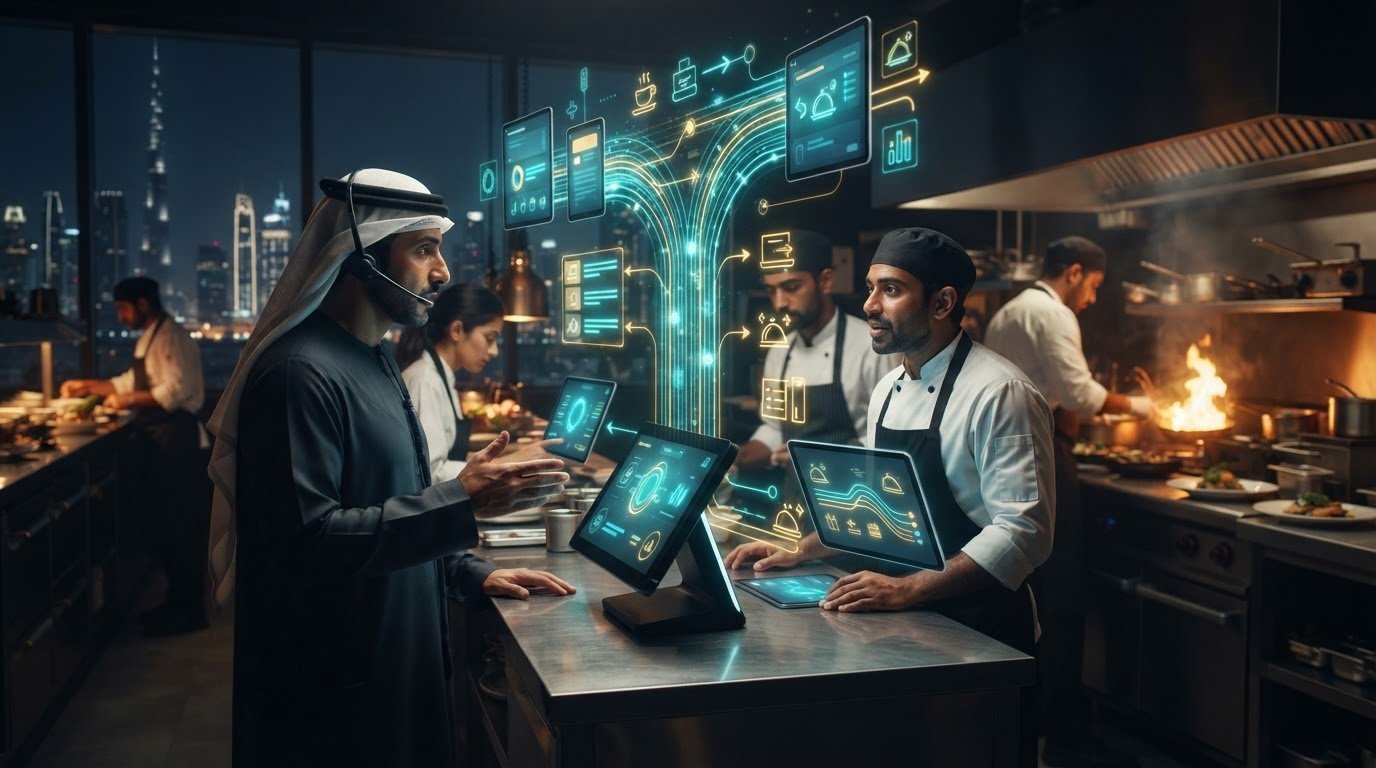
What if every Talabat and Noon order could flow straight into your POS, without another tablet or round of rekeying? A POS to aggregator bridge connects the systems behind that workflow. In a busy UAE kitchen, manual entry can slow order processing and lead to mistakes or wasted food. Switching between tablets adds another distraction during a Dubai rush.
Delivery orders need to reach the kitchen quickly and accurately. Connecting your POS and aggregator platforms lets order details, menu changes, and inventory updates move through a coordinated system instead of being managed channel by channel.
This guide explains how a POS to aggregator bridge works, how an order moves from Talabat or Noon into your POS, and how integration can reduce repetitive tasks and help keep menus and stock aligned. You’ll also see how TableCompass.ai’s Universal Bridge connects POS systems with food aggregators, while OmniSync supports synchronization and Atlas Menu Management centralizes menu control. Together, these tools support a more coordinated digital workflow for UAE restaurants.
Key Takeaways
- Understand how a POS to aggregator bridge translates information between restaurant systems and delivery platforms, and what data can move between them.
- Map your POS setup, aggregator connections, and order-handling steps to identify friction before planning an integration.
- Learn how centralized menu controls can make updates across delivery channels easier to manage.
- See how connected inventory workflows can help teams respond when popular items sell out in-store.
- Explore how TableCompass.ai’s Universal Bridge, OmniSync, and Atlas Menu Management support a coordinated restaurant technology setup.
What is a POS to Aggregator Bridge for Restaurants?
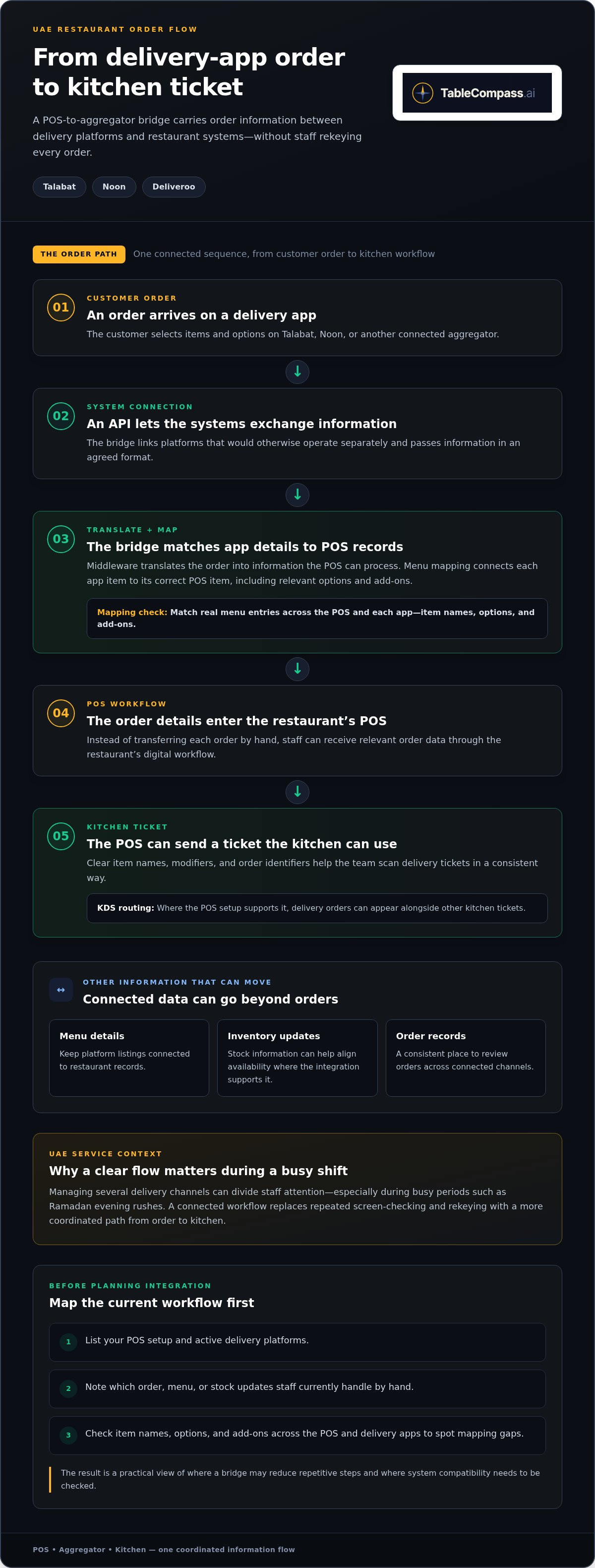
A POS to aggregator bridge is middleware that connects a restaurant’s Point of Sale (POS) system with delivery platforms such as Talabat, Noon, and Deliveroo. It translates information between systems that would otherwise operate separately, helping orders, menu details, and inventory updates move between them. Instead of transferring each order by hand, staff can receive relevant order data through the restaurant’s digital workflow.
The word “bridge” describes its role: it links separate technologies and helps create a more unified operating structure. A POS is where teams manage sales and orders; a delivery app is where customers browse and place orders. For background on the system at the centre of this connection, see this overview of the Point of Sale (POS) system.
The Anatomy of a Modern Middleware Bridge
The connection typically relies on an API, a software interface that lets platforms exchange information in an agreed format. When an aggregator order arrives, middleware translates its details into a format the POS can process. The POS can then send a kitchen ticket with the items and order details. Menu mapping links corresponding items across systems, so a delivery-app “Burger” points to the correct burger in the restaurant’s POS, rather than a similarly named item.
- Order flow: Aggregator order details are translated into information the POS can process and the kitchen can use.
- Menu flow: Matching items and options keeps platform listings connected to the restaurant’s records.
- Inventory flow: Stock information can pass between systems, helping teams align availability where the integration supports it.
For a practical setup check, compare real menu entries in the POS and each app. Include item names, options, and add-ons. Correct mapping helps prevent confusion when an order reaches the kitchen.
Why UAE Restaurants Face Unique Integration Challenges
Restaurants operating across the UAE may manage several delivery channels at once, including Talabat, Noon, and Deliveroo. Each platform has its own menu and order workflow, so switching between tablets can divide staff attention during service. The challenge is especially visible during busy periods, such as Ramadan evening rushes, when teams need incoming orders to reach the right kitchen station clearly and promptly.
Integration also depends on how systems exchange data. A useful bridge must account for the restaurant’s POS setup and the connections available with its chosen platforms. TableCompass.ai’s Universal Bridge provides middleware to connect POS systems with food aggregators, while OmniSync supports synchronization across the workflow.
The operational shift is from reading a screen and retyping an order to letting connected systems carry information between channels. Before planning an integration, list your POS, active delivery platforms, and the menu items or stock changes staff currently update by hand. This audit shows where a bridge can remove repetitive steps and create a more dependable flow from customer order to kitchen.
The Operational Impact of Implementing a POS Bridge
A connected order flow changes how staff spend their attention during service. Instead of watching separate delivery tablets, reading order details aloud, and entering them again, the team can work from a more consistent order queue. The goal is fewer handoffs and less duplicate work, with a setup suited to the restaurant’s operation.
Every manual transfer creates another opportunity for a missed modifier, incorrect item, or delayed ticket. In a busy UAE kitchen, an entry mistake can mean remaking a dish, wasting ingredients, and disrupting the next orders in the queue. Automating order processing removes a repetitive step and gives staff more time to focus on food quality, packing, and customer-facing tasks.
Financial Integrity and Reporting
Bringing aggregator orders into the POS gives managers a clearer view of sales across channels. When orders are recorded in a consistent place, teams can compare POS totals with aggregator statements and investigate mismatches using the relevant order records. Reconciliation may still involve reviewing platform payout details, but fewer disconnected records make the process easier to follow.
Sales patterns can inform practical decisions. Managers can compare busy periods with staffing and stock usage, then adjust schedules and preparation plans based on their own operating history. Start by reviewing the same time period across channels and noting where sales, labor coverage, or ingredient use don’t align. This makes reporting more useful for planning, not just an end-of-shift task.
Kitchen Efficiency and Workflow Order
Where the POS setup supports Kitchen Display System (KDS) routing, delivery orders can appear alongside other kitchen tickets. A shared format helps the team scan the essentials consistently, whether an order comes from dine-in or a delivery app. Clear item names, modifiers, and order identifiers reduce the need to interpret a different ticket style for every channel.
Better visibility can support faster preparation and more predictable handoffs, but a bridge does not control every stage of delivery. Track order acceptance, kitchen preparation, and handoff separately to see where delays occur. Use that baseline to assess whether changes to routing or workflow are helping.
- Set a useful prep-time workflow: Review kitchen load during peak periods and adjust preparation estimates in the systems that support it.
- Standardize ticket details: Align item names and modifier labels so kitchen staff can read tickets quickly.
- Review exceptions: Track cancellations, remakes, and delayed tickets to spot recurring process gaps.
The operational value of a POS to aggregator bridge comes from making order information more consistent and reducing avoidable re-entry. TableCompass.ai’s Universal Bridge and OmniSync support connected restaurant workflows. Explore restaurant integration solutions to plan a setup around your UAE operation.
Beyond Basic Syncing: Advanced Features of a 2026 Bridge
A connected order pipeline is the foundation. The next step is coordinating what each channel displays, which items are available, and how the restaurant communicates with guests. Menu management, inventory synchronization, and customer engagement tools can bring these tasks into a more coordinated workflow.
Centralized Menus and Smarter Availability
Atlas Menu Management centralizes menu control across digital channels. If a dish changes or an ingredient runs out, teams can manage the update through a central workflow instead of trying to remember every separate listing. Where connected platforms support availability updates, inventory changes can help prevent customers from ordering an item that has sold out in-store.
Channel-specific menus may also need different prices, descriptions, or service hours. A restaurant could offer a breakfast selection in the morning and a different menu for dinner while keeping item names and modifiers consistent. If platform pricing needs to account for channel costs, document the approved price for each channel before publishing changes. This helps prevent accidental discrepancies between the POS and delivery listings.
Practical tip: Before a menu update or limited-time promotion, list the affected items, platforms, prices, and start and end times. Then review each customer-facing storefront after the change. A simple change log helps the team spot missed updates and restore regular pricing or availability at the right time.
Inventory and Demand Planning
Inventory synchronization helps teams align online availability with what the kitchen can prepare. If an item sells out in-store, a connected workflow can update its delivery listing on platforms that support that update. Establish a clear staff routine for recording stock changes promptly so the source information remains accurate.
Demand planning matters during UAE holidays and other distinctive trading periods, when ordering patterns may differ from a typical week. Compare past sales by item and time period, then use those observations to plan purchasing and preparation. Satellite AI is part of TableCompass.ai’s automation suite and can support a more informed operational approach alongside managers’ knowledge of their menu and local customers.
Guest Automation That Follows the Order
GuestConnect AI supports automated customer interactions and engagement. Automation can help with routine guest communication, giving staff more time for other service tasks. Map the guest journey first: order received, preparation underway, ready for handoff, and any point where customers commonly need help. This shows where automation can make the experience clearer and more useful.
Order and interaction data can also inform relevant follow-up. Start by identifying recurring guest questions and common order patterns, then decide which communication would genuinely help. With the POS to aggregator bridge as the connective layer, Atlas Menu Management for centralized menu control, and GuestConnect AI for automated interactions, restaurants can manage digital channels as part of a more coordinated operation.
How to Implement a POS to Aggregator Bridge in the UAE
A smooth launch starts with a clear picture of the systems and routines your restaurant already relies on. Before connecting a POS to delivery platforms such as Talabat, Noon, or Deliveroo, document the POS software and version, the devices used to receive orders, and the aggregator accounts in scope. Note where staff re-enter orders or update menus manually. This gives the integration plan a practical starting point.
Audit, Map, and Plan the Connection
Next, prepare the menu data. Match each platform listing to the correct POS item, including modifiers, add-ons, and availability. For example, confirm that a meal option with a drink choice maps to the intended POS item and kitchen instructions, not just a similar item name. Treat mapping as an accuracy task: a connection can only pass along information as clearly as the underlying menu setup allows.
When assessing middleware, focus on fit. Use this checklist:
- Platform coverage: List the aggregators you use, such as Talabat, Noon, or Careem, and align the planned connection with those channels.
- POS compatibility: Record your POS brand, version, and setup so the integration can be matched to your environment.
- Growth needs: Consider whether a middleware foundation such as Universal Bridge fits the workflows of your F&B group as the operation develops.
- Operational ownership: Clarify who manages menu mapping, order-flow testing, and staff guidance during rollout.
Coordinate the technical setup with the relevant aggregator teams when platform access or integration details are needed. Check that the restaurant’s internet connection is stable where orders are received and prepared, then identify who will respond if an order doesn’t appear as expected. For multi-location groups, define which menu details are shared centrally and which differ by branch. This keeps local operating needs visible within a unified structure.
Test the Workflow Before Go-Live
Schedule initial testing during a quieter service period. Place test orders through each connected channel and follow them through the full path: receipt, POS record, kitchen ticket, and order status. Check item names, modifiers, and branch-specific details. Train staff on the new POS-centred routine, including how to spot an exception and what to do if a ticket fails to arrive. Keep the existing process available during the transition until the team is comfortable with the new flow.
After launch, review early orders with the people using the system: front-of-house staff, kitchen leads, and managers. Record mismatches and unclear steps, then correct the menu mapping or workflow before expanding the rollout. For another perspective on coordinated operations across locations, explore seamless restaurant POS synchronization.
TableCompass.ai provides Universal Bridge middleware for connecting POS systems with food aggregators. Explore POS integration with TableCompass.ai and plan a controlled implementation for your restaurant.
OmniSync: The Gold Standard for UAE Restaurant Integration
For a UAE restaurant group, integration needs to support the way the business operates today and provide a foundation for its next steps. TableCompass.ai brings together OmniSync, which supports synchronization, and Universal Bridge, middleware that connects POS systems with food aggregators. Together, they help restaurants coordinate digital workflows instead of managing each connection as a separate task.
OmniSync supports synchronization across connected restaurant workflows. Universal Bridge provides the middleware layer for connecting POS systems and food aggregators. This gives restaurant teams a more coordinated way to manage order information, menus, and day-to-day decisions. The integration plan should reflect the group’s existing systems and workflows.
Build a Foundation That Can Scale
A single outlet and a multi-brand group have different coordination needs. As a restaurant expands, managers may need to align shared processes while preserving branch-level differences, such as the items each location serves. A considered middleware setup gives the group a clearer framework for connecting POS and aggregator workflows across its operation. Explore POS middleware for UAE hospitality for more context on how this integration layer fits into restaurant technology.
For a Dubai-based group assessing efficiency, start with its own baseline rather than relying on generic claims. Track how orders are received, how often staff re-enter information, where menu mismatches occur, and how much time teams spend resolving exceptions. Compare those measures after changes are introduced. This gives operators a grounded view of what is improving and where workflows still need attention, while recognizing that results can differ by location.
Put Local Insight and People at the Centre
Technology should reduce operational friction without distancing the team from the guest experience. UAE restaurant operators need workflows that make sense for their channels, service patterns, and outlet structure. Restaurant staff provide essential insight into what happens during a real shift. Involve a manager and kitchen lead in planning so the integration reflects both reporting needs and practical service realities.
Before moving ahead, outline the delivery workflow you want to improve. Note the systems in use, the channels connected, the steps still handled manually, and the locations involved. This creates a focused starting point for an OmniSync setup. Plan implementation around the restaurant’s systems and rollout scope.
TableCompass.ai helps UAE restaurants connect POS and aggregator workflows through OmniSync and Universal Bridge. Transform your restaurant operations with OmniSync today.
Build Your Next Service Shift on a Stronger Foundation
The next step isn’t changing every part of your operation at once. Choose one friction point, such as delayed order entry or menu updates that staff repeat across platforms, and map how it affects a typical shift. That gives your team a clear starting point for planning a POS to aggregator bridge around real kitchen and service needs.
Bring the people closest to the workflow into the plan. A manager can identify reporting needs, while kitchen and front-of-house staff can flag handoffs that cause confusion during busy periods. Use those insights to shape a connected setup that can adapt as your restaurant grows without losing sight of the guest experience.
TableCompass.ai offers OmniSync and restaurant integration technology for connected operations. Optimize your delivery workflow with OmniSync and take the next step toward a more coordinated service. Your team can spend less time managing disconnected processes and more time focusing on guests.
Frequently Asked Questions
What is a POS to aggregator bridge, and why does my UAE restaurant need one?
A POS to aggregator bridge connects your restaurant’s POS with delivery platforms so order information can flow into your operating workflow. For a UAE restaurant handling several delivery channels, it can reduce the need to re-enter order details and make it easier to view channel activity alongside in-store sales. Start by identifying where staff switch screens or copy information, then prioritize the handoff that causes the most friction.
Can I sync my restaurant menu with Talabat and Noon at the same time?
Centralized menu tools can help manage listings across Talabat and Noon from a coordinated workflow. Atlas Menu Management supports centralized control, while each platform can still have its own item mapping and channel-specific details. Before publishing a change, check that names, options, prices, and availability appear as intended on both storefronts. This quick review helps catch differences that a shared management process alone may not resolve.
Will a POS bridge help me reduce manual order entry errors?
Sending aggregator orders into your POS can remove retyping as a routine step and help reduce mistakes such as missed modifiers or incorrect quantities. Menu mapping and staff processes still matter. To measure the difference, track order corrections and remakes before and after launch, and note whether errors come from data transfer, unclear menu options, or kitchen communication.
How long does it take to implement a POS to aggregator integration in Dubai?
Implementation time varies by restaurant. The work depends on the POS setup, the delivery platforms involved, menu complexity, and the testing required. A single outlet with a straightforward menu may need a different rollout plan from a group with several branches and distinct menus. To plan realistically, prepare your POS details, platform list, menu files, and preferred test window before implementation begins.
Is my current POS system compatible with a universal bridge middleware?
Compatibility depends on the POS system, its version, and the integration methods available. Universal Bridge provides middleware for connecting restaurant POS systems with food aggregators. Gather the POS name and version, the channels you use, and any existing integrations to give the implementation team a clear basis for mapping the connection.
Can a POS bridge help manage inventory across different delivery apps?
It can support inventory updates across connected channels, helping availability reflect what the restaurant can serve. For example, if a popular dish sells out, a connected workflow can help update its availability on delivery storefronts that support the update. Keep stock records current in the system used as the inventory source, and establish who updates them during service. Accurate source data is essential for useful synchronization.
Does the bridge handle customer reviews or just order data?
The bridge’s core role is connecting POS and aggregator workflows, including order-related information. Reviews are a separate customer-engagement task, so an order connection does not automatically collect or respond to review activity. TableCompass.ai also offers Review Automation for Restaurants. Map where reviews arrive today and decide who monitors responses, keeping that workflow distinct from order processing.
What happens if the internet goes down while using a POS bridge?
A lost connection can interrupt the flow of new information between systems, so your team should have a clear fallback process. Decide who checks the aggregator channels, how staff record incoming orders temporarily, and who reconciles those records once connectivity returns. Before launch, walk through this scenario with front-of-house and kitchen leads to help prevent missed tickets and duplicate preparation during a disruption.