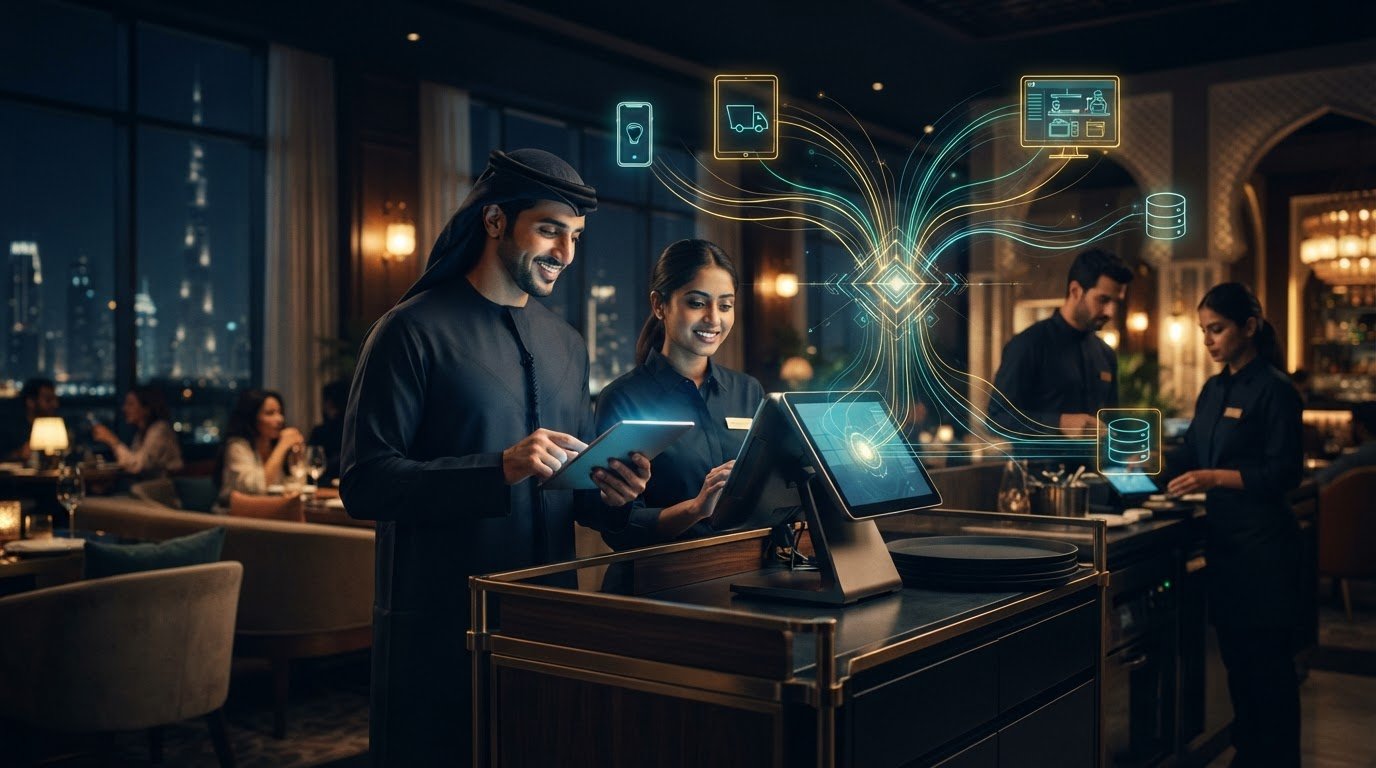
POS Middleware for UAE Restaurants: 2026 Buyer’s Guide
The best POS middleware for restaurants isn’t the platform with the longest feature list. It’s the one that connects your ordering channels to your POS without creating more work for the team. In a UAE restaurant, staff re-entering delivery orders, uncertain system compatibility, and menu or availability changes across multiple channels can quickly disrupt a busy shift.
If you’re already juggling a POS and delivery aggregators, you know that adding another tool only helps if it simplifies the workflow. Middleware acts as a connective layer, helping orders and information move between systems. The right setup depends on how well it fits your existing stack and day-to-day operations.
This guide explains how restaurant POS middleware connects ordering channels, what to assess before choosing a provider, and how to prepare a focused UAE-specific evaluation. You’ll compare practical criteria such as compatibility, order handling, menu and inventory synchronization, and vendor support, then build questions that help you assess options such as OmniSync without relying on feature lists alone.
Key Takeaways
- Map how orders move from each delivery channel to your POS, noting where staff still re-enter information or update availability manually.
- Use POS middleware for restaurants as a connective layer, then confirm exactly which POS and aggregator systems a provider supports.
- Compare providers by workflow fit, menu and inventory information handling, and the evidence they can share about compatibility, not by feature count alone.
- Before a vendor evaluation, list your POS, ordering channels, locations, menu owners, and staff handoffs so questions reflect real UAE operations.
- Assess OmniSync against your requirements; TableCompass.ai describes it as middleware connecting restaurant POS systems with food aggregators.
Why POS Middleware Matters When Restaurant Orders Come From Multiple Channels
Picture a busy evening at a UAE restaurant. A dine-in guest orders at the counter while new orders arrive through delivery apps. Staff may need to monitor separate screens, enter delivery orders into the POS, and check whether a popular item is still available. Each extra handoff adds work at the moment the team has least time for it.
POS middleware for restaurants is software that connects a restaurant’s POS with other systems, such as external ordering channels, and passes relevant operational information between them. It’s a connective layer, not a replacement for the POS. For background on the system at its centre, see Point of sale (POS) systems, which support sales transactions and related functions in settings such as hospitality.
What does POS middleware do for a restaurant?
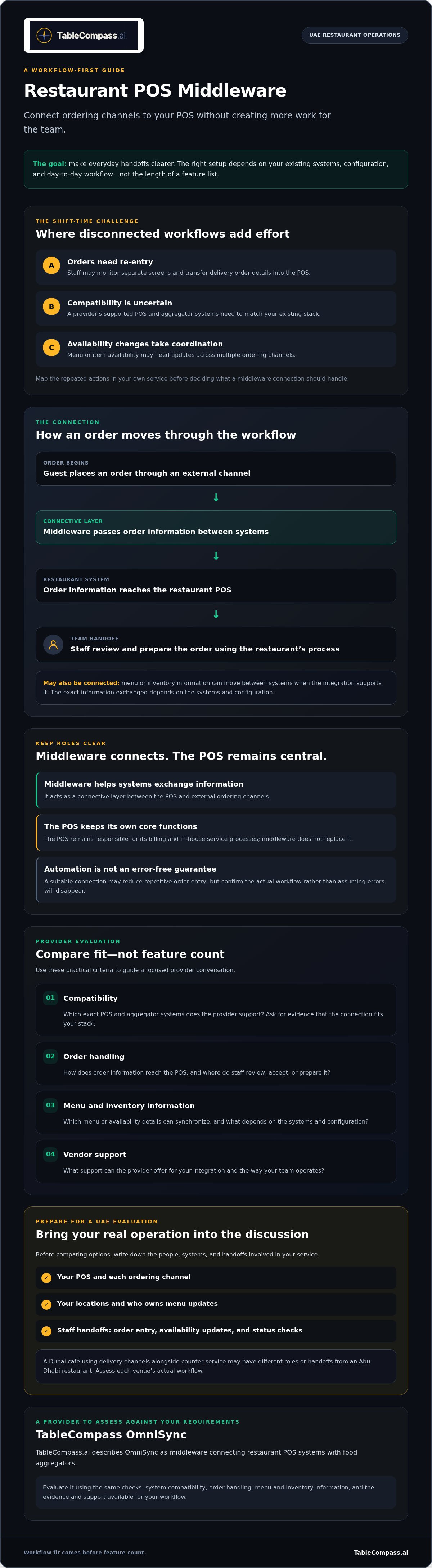
In a connected workflow, a customer places an order through an external channel. Middleware passes the order information to the restaurant’s POS, where staff can handle it within their existing sales workflow. Depending on the setup, relevant menu or inventory information may also be synchronized between connected systems. The exact information exchanged depends on the systems and configuration, so confirm the workflow with a provider before choosing.
Automation can reduce repetitive manual handling, such as re-entering order details, but it shouldn’t be treated as a promise that errors will disappear. Middleware also doesn’t take over every POS function. The POS remains responsible for its own billing and in-house service processes, while middleware helps connected systems exchange information.
Which restaurant problems can middleware help address?
Separate ordering interfaces can divide staff attention. A team may need to notice a new order on one screen, transfer its details to another system, and then check that it has been accepted. If order status isn’t clear across the workflow, employees may spend time confirming whether an order is still pending or already being prepared.
Disconnected inventory and ordering processes can create more checks. For example, a café in Dubai using delivery channels alongside counter service may need staff to verify availability in multiple places after an item sells out. A restaurant in Abu Dhabi may have different channels, roles, or handoffs. The practical issue is the same: information needs a clear path, but each venue’s workflow should be assessed on its own.
Before evaluating a solution, note where staff currently repeat an action: order entry, availability updates, or status checks. That short workflow map will help you identify what middleware should connect, and what should remain within the POS.
How Restaurant POS Middleware Moves Orders and Data Between Systems
Think of middleware as a controlled handoff between the places guests order and the systems restaurant staff use to manage service. An order starts in an ordering channel, passes through middleware, and is delivered to the restaurant’s POS for staff to review and prepare. Information can also travel between systems in the other direction, such as menu or availability updates, if the connection supports it.
Typical flow:
Ordering channel → middleware → restaurant POS → staff preparation
Menu or inventory information may flow between connected systems, depending on the integration.
The middleware acts as a translator and relay. It helps systems exchange information in a way each connected system can use. The National Restaurant Association’s research on restaurant technology describes how operators see technology as something that gives them a competitive edge. For a restaurant, the practical test is whether the connection makes an everyday handoff clearer and easier to manage.
How does an aggregator order reach the restaurant POS?
A typical order journey looks like this:
- A guest submits an order through an external ordering channel.
- The channel sends order information to middleware.
- Middleware passes the information to the restaurant’s POS.
- Staff receive and prepare the order using the restaurant’s normal process.
With a suitable connection, staff may not need to re-enter every order manually. That can reduce repetitive handling, while leaving the team responsible for reviewing and preparing orders. Don’t assume every setup routes orders or reports status in the same way. Those details depend on the specific POS, aggregator, and middleware provider. Ask a vendor to demonstrate a representative order journey, including what staff see when an order is received or needs attention.
How do menu and inventory updates fit into the connection?
Order transmission moves a guest’s purchase into the POS. Menu or inventory synchronization is a separate flow: it shares relevant information, such as item availability, between connected systems where supported. That distinction matters. A connection that passes orders doesn’t automatically mean it also updates menus or stock information.
If a dish becomes unavailable during a busy service, outdated channel information can lead to orders the team can’t fulfil, extra checks, or guest disappointment. Ask which system is the source of truth for menus and availability, what information is shared, and how updates are handled. For a closer look at menu workflows, read this centralized menu management guide. You can also explore restaurant POS synchronization for more on connected operations. If middleware is on your shortlist, review TableCompass middleware options against the connections your restaurant needs.
How to Compare POS Middleware Without Choosing on Feature Count Alone
A long feature list can look impressive, but it won’t tell you whether a connection fits your POS, ordering channels, or service routine. POS middleware for restaurants adds value when the systems exchange the information your team needs and staff know what to do when an order or update needs attention. Compare providers against your actual workflows, not a generic checklist.
What compatibility questions should restaurants ask?
Write down the exact POS, aggregator channels, restaurant locations, and order workflows you need supported. Then ask the provider to confirm each connection by name and demonstrate an end-to-end order using your intended setup. Broad claims such as “works with leading platforms” aren’t enough to establish compatibility.
Use this comparison table during vendor discussions. Ask for evidence you can review, such as a live demonstration, written integration confirmation, or relevant reference, where available.
| Criterion | Question to ask | Evidence to request |
|---|---|---|
| Compatibility | Does the connection support our specific POS, channels, locations, and workflow? | Named integration confirmation and an end-to-end demonstration. |
| Order handling | How are order details transferred, and what happens if information needs attention? | A demonstration using a representative order and exception. |
| Menu and inventory | Which menu or availability information is shared, and which system controls it? | A walkthrough of an update and how it appears in connected systems. |
| Monitoring and support | How can staff spot a synchronization issue, and what support process applies? | A sample issue-handling procedure and clear support arrangements. |
How can a restaurant assess reliability and operational fit?
Ask how teams identify, investigate, and resolve synchronization exceptions. A useful demonstration should show what staff see when an order doesn’t follow the expected path, and who takes the next step. Check whether the restaurant has a clear fallback procedure if a connected system is unavailable. Don’t assume the provider’s process matches your team’s; confirm responsibilities and support arrangements before selection.
Fit also depends on the rhythm of service. A workflow that looks simple in a quiet demonstration may create extra steps during a busy shift. Ask for a demonstration or reference relevant to your operating model, if available, and involve the people who receive and prepare orders in the evaluation.
Middleware doesn’t create value simply by adding another layer. It needs to fit the existing systems and make handoffs clearer. Once your criteria are set, you can explore TableCompass middleware and assess it against the same requirements as any provider.
How to Prepare a UAE Restaurant for a Middleware Evaluation
A productive vendor conversation starts with your operation, not a product demo. Before evaluating POS middleware for restaurants, map the systems, people, and handoffs it would need to connect. UAE restaurants can have different setups across locations, service formats, and ordering channels, so use your own operating details rather than assuming every branch follows the same process.
What information should restaurant teams gather first?
Build a short, verified inventory. Confirm system names and versions with the people who manage them or with the relevant vendors. Record what each location uses and who owns each part of the workflow.
- Systems and channels: List the POS, ordering channels, and any other systems involved in receiving or managing orders.
- Locations and workflows: Note which locations use which systems, and whether dine-in, takeaway, and delivery orders follow different paths.
- Menu and availability: Identify who owns menu changes and how availability updates currently reach each ordering channel.
- People and handoffs: Name the operational lead, technology decision-maker, and person responsible for staff training. Map who receives, checks, and prepares incoming orders.
Keep the map practical. For example, write down what happens when an item becomes unavailable during service, who updates it, and how the team checks that the change has reached the relevant channels. For broader UAE-focused planning, see this UAE restaurant aggregator integration strategy.
How should a middleware demonstration be tested?
Bring real scenarios, not just a list of features. Choose situations that reflect your restaurant’s service, such as an order arriving during a busy period, a menu change, or an item becoming unavailable. Include dine-in, takeaway, and delivery only where those channels are part of your operation.
- Ask the vendor to demonstrate a normal order from submission through staff receipt and preparation.
- Request a realistic exception, such as an order or availability update that needs staff attention.
- Observe what information appears, what the team must do next, and how responsibilities are made clear.
- Score each vendor against the same criteria, including confirmed compatibility, workflow fit, menu and inventory handling, exception visibility, and support arrangements.
Involve the staff who handle these steps. Their feedback can reveal extra taps, unclear handoffs, or gaps that a management-only review might miss. Keep the results in one comparison sheet so the decision reflects demonstrated workflows, not presentation quality.
Ready to assess a middleware option against your restaurant’s verified systems and service routines? Explore TableCompass middleware as part of your evaluation.
When TableCompass OmniSync May Fit a Restaurant’s POS Workflow
OmniSync is worth evaluating if your restaurant is looking for a connection between its POS and food aggregator channels. TableCompass describes OmniSync as middleware that connects POS systems and food aggregators. The company also states order processing and inventory synchronization capabilities. These are product-level descriptions, not confirmation that a specific POS, aggregator, location, or workflow is supported in your setup.
That distinction matters. The right POS middleware for restaurants must fit the systems your team already uses and the way orders are received, checked, and prepared. A capability listed by a provider only becomes relevant to your restaurant once the vendor confirms how it applies to your configuration.
What should operators confirm about OmniSync before proceeding?
Use your system inventory and workflow map to guide the discussion. Ask TableCompass to confirm compatibility for your specific POS, required aggregator channels, and operating locations. Avoid relying on broad compatibility language; request confirmation for each named system in your planned setup.
Then clarify what the proposed connection includes. Ask which order details can pass to the POS, what menu or inventory information can be synchronized, and which system controls each update. Confirm the sequence of onboarding steps, what your staff will be responsible for, what support arrangements apply, and how the team should handle exceptions or an unavailable connection. These are evaluation questions, not assumed OmniSync specifications. Get answers that describe your proposed deployment.
What is a practical next step after shortlisting a solution?
Prepare a concise brief before requesting a demonstration. Include your POS and aggregator names, locations, current order journey, menu ownership, and any manual handoffs. Note representative scenarios, such as a delivery order arriving during a busy period or an item becoming unavailable, if those reflect your operation.
Ask for a demonstration that follows those scenarios from order submission through staff handling. Record what the system shows, what information reaches the POS, what staff need to do, and how exceptions are surfaced. Compare the answers with the same criteria you use for other providers, including documented compatibility, workflow fit, information handling, onboarding responsibilities, and support arrangements.
A clear decision comes from evidence, not assumptions. If OmniSync’s confirmed setup matches your restaurant’s systems and service routines, you’ll have a practical basis for deciding whether to proceed. To review your requirements with the provider, discuss restaurant middleware with TableCompass.
Build a More Connected Restaurant Workflow
Choose POS middleware for restaurants by how well it fits your existing systems and service routines, not by the size of its feature list. Confirm compatibility with your specific POS and aggregator channels, then ask vendors to demonstrate real order flows, menu or inventory updates, and how staff handle exceptions.
Preparation makes the evaluation sharper. Map your systems, locations, menu responsibilities, and staff handoffs before speaking with providers. TableCompass describes OmniSync and Universal Bridge as restaurant middleware offerings, and states that its middleware supports synchronization between POS systems and food aggregators. Confirm which capabilities and integrations apply to your intended setup before deciding whether to proceed.
Ready to discuss your restaurant’s requirements and assess the fit? Discuss your restaurant’s POS middleware requirements with TableCompass. A clear workflow map and focused questions can help you move toward a more connected operation with confidence.
Frequently Asked Questions
What is POS middleware for restaurants?
POS middleware for restaurants is software that connects a restaurant’s point-of-sale system with other platforms, such as food delivery aggregators, and passes relevant information between them. It can serve as a bridge for order processing and, where supported, menu or inventory synchronization. The exact information exchanged depends on the systems and verified integrations involved, so ask a provider to explain the proposed workflow for your restaurant.
How does POS middleware work with food delivery aggregators?
When a guest submits an order through an aggregator, middleware can pass the order information to the restaurant’s POS. Staff can then handle it through the restaurant’s established service process, potentially reducing manual re-entry. The precise routing, information transferred, and status handling vary by aggregator, POS, and provider. Before choosing a solution, ask for a demonstration of an order journey using the systems your UAE restaurant actually uses.
Does POS middleware replace a restaurant POS system?
No. Middleware connects systems; it doesn’t replace the restaurant POS. The POS remains the system your team uses for its own billing and in-house service functions, while middleware can pass information between the POS and supported external channels. Treat middleware as a connection layer within your technology setup. Confirm what each system continues to manage so staff understand where to handle orders, updates, and exceptions.
How can I check whether middleware is compatible with my restaurant POS?
Confirm the exact POS name and version with your internal system owner or POS vendor, then give that information to the middleware provider. List the aggregator channels and locations you need to connect, and ask for written confirmation for each combination. Request an end-to-end demonstration of a representative order flow. Don’t rely on general claims of compatibility; verify that the specific setup your UAE restaurant needs is supported.
Can restaurant middleware connect multiple food aggregators?
It may, but the number and identity of supported channels depend on the provider’s verified integrations and your restaurant’s setup. Give the vendor a list of every aggregator you want to connect, alongside your POS and operating locations. Ask them to confirm each connection and demonstrate how orders from those channels reach the POS. Don’t assume that support for one aggregator means support for another.
Can POS middleware synchronize restaurant menus and inventory?
Some middleware setups support sharing menu or inventory information between connected systems, but capabilities vary. Order transfer and menu or stock synchronization are separate workflows, so confirm which information is included and which system controls each update. TableCompass describes its middleware as supporting POS and food aggregator synchronization, with stated order processing and inventory management capabilities. Ask the provider to verify how these apply to your proposed configuration.
What should UAE restaurants ask a POS middleware provider?
Ask whether your specific POS, aggregator channels, and locations are supported, then clarify what order, menu, and inventory information can be exchanged. Request a demonstration of a normal order and a realistic exception, such as an update that needs staff attention. Also confirm onboarding steps, staff responsibilities, support arrangements, and procedures if a connected system is unavailable. Use the same questions with each provider to compare evidence fairly.
How long does it take to implement restaurant POS middleware?
There isn’t one timeline that applies to every restaurant. Implementation can depend on the systems involved, confirmed integrations, number of locations, workflows, and the work required from the restaurant and provider. Ask for a proposed schedule based on your verified POS and aggregator setup, including any testing, staff preparation, and key responsibilities. Get the assumptions behind the estimate in writing before planning a transition to the connected workflow.