Mobile Ordering Guide for UAE Restaurants
What if the real ordering problem isn’t choosing an app, but connecting every order to the operation behind it? For UAE restaurants, a restaurant mobile ordering platform can bring direct app orders, QR table orders and aggregator orders into a more coordinated workflow. The guest-facing channel is only the entry point. The platform connects that order with restaurant systems and menu operations.
When digital orders arrive in separate places, staff may need to re-enter details, check menus across channels and juggle disconnected processes. The practical decision is whether your restaurant needs a branded app, QR ordering or a broader system that connects existing channels with its POS workflow.
This guide explains the difference between ordering channels and the platform that connects them. Compare the main mobile ordering options, see how POS and aggregator connections fit into the picture, and learn how tools such as OmniSync, Atlas Menu Management and TableCompass.ai’s direct ordering options support a more connected operation.
Key Takeaways
- Trace how an order moves from guest selection into restaurant handling to spot where manual steps add friction.
- Compare marketplace-led, single-channel and connected-platform models by guest experience, operational links and channel scope.
- Use your service model, existing systems and branch needs to assess which restaurant mobile ordering platform fits your UAE operation.
- Consider how centralized menu management and aggregator synchronization can support a more consistent digital workflow.
- See how TableCompass offerings, including OmniSync, connect ordering technology with restaurant operations.
What a Restaurant Mobile Ordering Platform Should Solve for UAE Restaurants
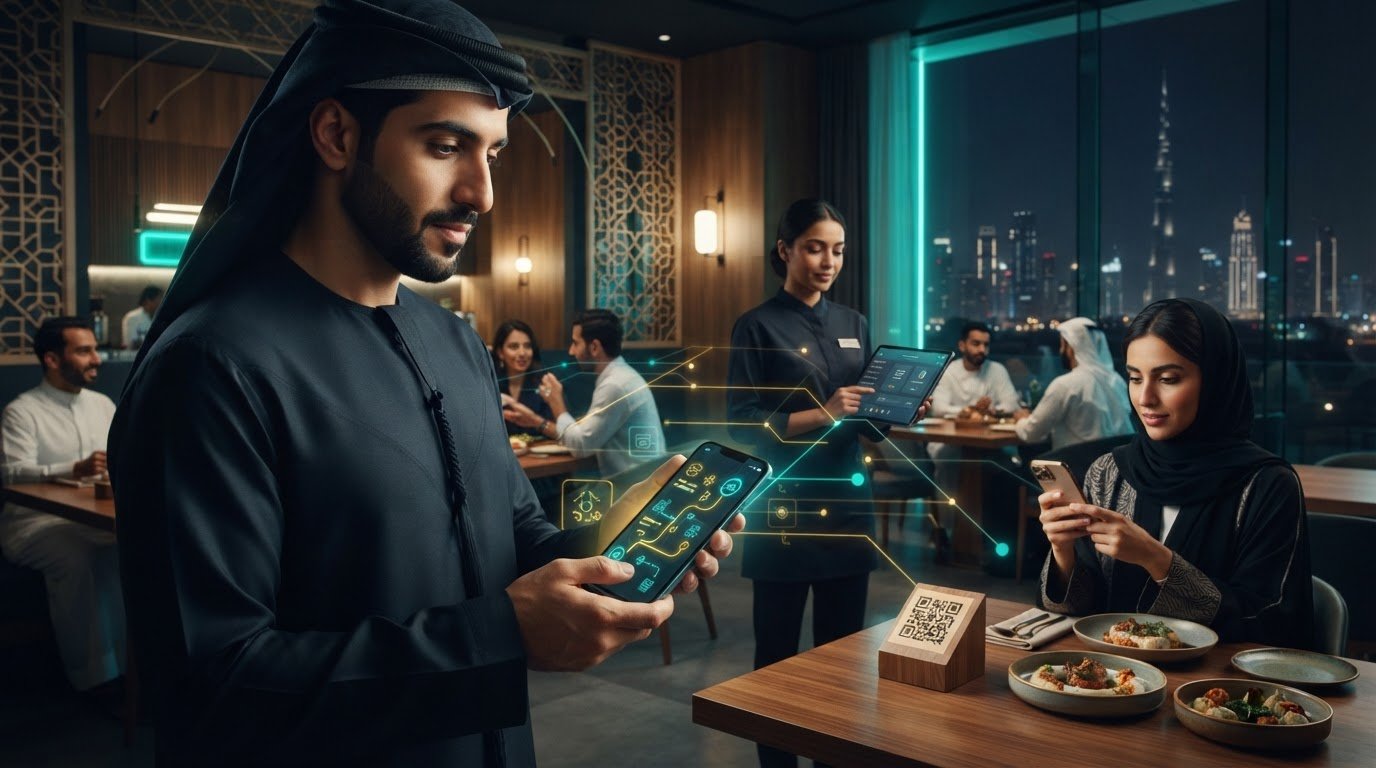
A dine-in guest scans a QR code, another customer places a direct order on a restaurant’s app, and a third order arrives through a food delivery aggregator. If each channel operates in isolation, staff may need to check several screens, re-enter order details or relay information by hand. The challenge isn’t simply accepting digital orders. It’s getting each order into the restaurant’s workflow clearly and consistently.
A restaurant mobile ordering platform connects guest ordering experiences with restaurant operations. It can support different digital touchpoints and help move order information into the systems and workflows the restaurant uses. That’s broader than a guest-facing app: an app is one possible channel, while the platform connects channels with the operation behind them.
What does a restaurant mobile ordering platform do?
Guests can place orders through a branded mobile app, a QR ordering experience at the table or a third-party marketplace. The platform carries relevant order information from that touchpoint toward the restaurant’s operating workflow. The systems involved vary by setup, but the goal is the same: make the order clear to the team responsible for handling it.
Think of the parts this way:
- Ordering channel: The guest-facing route, such as an app, QR code or aggregator.
- Order information: The selected items and details submitted through that channel.
- Restaurant workflow: The process and systems staff use to receive and handle the order.
This software is not the physical kitchen, and it isn’t a delivery fleet. Kitchen staff prepare the food; delivery arrangements sit outside the ordering platform’s operational role. Online food ordering covers the wider practice of placing food orders digitally, while a restaurant platform focuses on how those digital orders connect with the business behind the guest experience.
Why fragmented ordering creates pressure during service
Disconnected channels create small but repeated handoffs. A staff member may need to find a marketplace order on one device, confirm a direct order elsewhere, then pass details to the team handling preparation. If menu information or order statuses are managed separately, staff may also need to verify details rather than rely on a shared process.
During a busy lunch, dinner or weekend service, those checks compete with guest-facing responsibilities. The workflow can end up relying on staff to remember where each order came from and what to do next. The useful question is not only, “Can guests order on their phones?” It’s, “Can our team receive and manage those orders without unnecessary manual steps?”
A restaurant mobile ordering platform connects digital ordering touchpoints with the restaurant’s operating workflow.
To assess your current setup, map one dine-in QR order, one direct order and one aggregator-originated order from submission to staff handling. Note where each appears, who must pass it along, and which steps require retyping or checking. This exercise helps reveal whether the main gap is a missing guest channel or a weak connection between channels and operations.
How a Restaurant Mobile Ordering Platform Connects the Order Journey
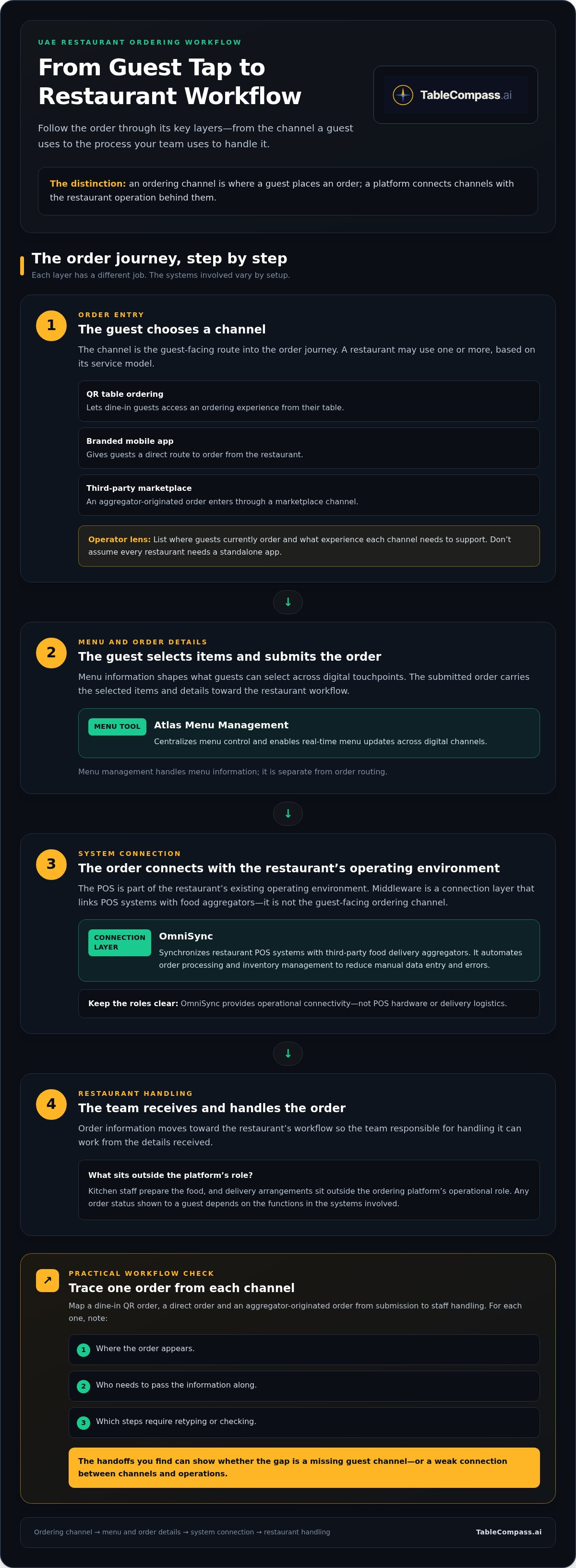
Think of the order journey as a set of distinct layers, not one app doing everything. A guest chooses a channel, views menu information and submits an order. The restaurant receives it through its operating environment, then the team handles it. Any order status shown to the guest depends on the functions in the systems involved.
This distinction matters for UAE restaurants that serve dine-in guests while also accepting direct and aggregator orders. Mapping each layer helps operators see where a channel ends, where existing restaurant systems begin and where a connection layer fits.
Guest-facing channels and order entry
A branded mobile app gives guests a direct route to order from the restaurant. QR-based table ordering lets diners access an ordering experience from their table, which can suit a dine-in service model. A restaurant focused on direct repeat orders may prioritize its own app, while a venue serving guests at tables may consider QR ordering. Some operations use both, alongside aggregator channels.
Start by listing where guests currently place orders and what experience each channel should support. Choose channels based on service needs, rather than assuming every restaurant needs a standalone app. Detailed QR setup is a separate consideration.
The operational backbone behind each order
The POS is part of the restaurant’s existing operating environment. Middleware is a connection layer that links POS systems with food aggregators. It is distinct from the guest-facing ordering channel. TableCompass’s OmniSync synchronizes restaurant POS systems with third-party food delivery aggregators, automating order processing and inventory management to reduce manual data entry and errors. It provides operational connectivity, not POS hardware or delivery logistics.
An ordering channel is where a guest places an order; an integration layer connects order systems behind the scenes.
Menu information has its own role. It shapes what guests can select across digital touchpoints, so operators need a clear way to manage menu content across channels. Atlas Menu Management centralizes menu control and enables real-time menu updates across digital channels. That is separate from order routing: a menu tool manages information, while middleware handles connections between systems.
To make the flow concrete, follow a single order through these stages:
- Guest selection: The customer chooses items through an app, a table-based QR experience or an aggregator.
- Menu and order details: The selected items and submitted details form the order information.
- System connection: The order enters the restaurant’s operating environment through the relevant channel or connection layer.
- Restaurant handling: Staff use their established workflow to manage the order. Any guest-facing status depends on the systems and functions in use.
For an integration-focused explanation, the POS Middleware for UAE Hospitality: 2026 Integration Guide is a relevant next reference. As a practical first step, sketch the path for one direct order and one aggregator order, then mark where information changes systems or requires staff action. This shows which connections your restaurant mobile ordering platform needs to support, while accounting for how each channel works.
Restaurants assessing how these layers fit together can explore TableCompass restaurant technology as part of their planning.
Compare Restaurant Mobile Ordering Platform Models Before You Choose
Ordering models differ in more than how guests place an order. They also shape who controls the guest-facing experience, how orders connect with restaurant operations, and how many channels the team must manage. For a UAE restaurant, the right choice depends on how it serves guests and handles incoming orders, not on which option has the longest feature list.
| Model | Guest experience | Operational connections | Channel scope |
|---|---|---|---|
| Marketplace-led | Primarily hosted on the marketplace | Orders originate through the marketplace; restaurant handling depends on its setup | Marketplace ordering |
| Single-channel | Focused on one restaurant-selected touchpoint, such as an app or QR ordering | May serve a defined ordering workflow | One direct channel |
| Connected platform | Can support multiple guest-facing channels | Designed to connect ordering with relevant restaurant systems and processes | Several channels, depending on the restaurant’s setup |
Marketplace-led ordering versus direct ordering
With marketplace-led ordering, the guest discovers and places an order through a third-party platform. With direct ordering, the guest orders through a restaurant’s own channel, such as a branded app or QR ordering experience. In the UAE, restaurants may receive orders through aggregators as well as their own channels, so these approaches can serve different roles rather than being an either-or choice.
Direct ordering is a channel decision, not a promise of a particular commission outcome or business result. Consider where your guests already order, how you want them to engage with your brand, and how your team will handle each order source. If customer retention is part of the plan, connect ordering choices with a broader loyalty approach, such as the 2026 Guide to Choosing a Restaurant Loyalty App Builder in the UAE.
Single-purpose tools versus connected platform capabilities
A standalone ordering touchpoint can address a clear need, such as giving diners a way to order at the table. A connected platform approach is broader: it considers how several channels relate to the restaurant’s existing POS environment and how menu information is managed across digital touchpoints. Those relationships matter because separate tools can create separate staff routines.
That doesn’t mean every restaurant needs every channel. A dine-in venue may prioritize table ordering, while a business focused on direct repeat orders may favor a branded app. A restaurant already balancing direct and aggregator orders may place greater value on operational connections. The best-fit restaurant mobile ordering platform supports the workflows the business actually runs.
Before choosing, write down your main order sources and who handles each one. Then identify the friction you want to address: guest access, repeated staff handoffs or disconnected menu management. This comparison helps narrow the model to a clear operating need, rather than adding channels simply because they are available.
Choose a Restaurant Mobile Ordering Platform for Your UAE Operation
Choose around the way your restaurant runs, not a feature checklist. A café with dine-in service, a delivery-focused kitchen and a multi-branch group may have different channel priorities and staff routines. Before comparing tools, document how orders currently move from guest to team. That gives you a practical baseline for judging whether a restaurant mobile ordering platform fits your operation.
Map the restaurant’s current order workflow
Capture each order source separately: dine-in, direct app or web orders, and orders from food aggregators. For each, note where the order first appears, who checks it, how it reaches the staff responsible for handling it, and where its progress is recorded. This map can reveal duplicated entry, unclear handoffs and menu updates that depend on several separate steps.
Also name the person or role responsible for menu changes, channel access and resolving order questions. If POS connections are central to your assessment, the guide titled Seamless Restaurant POS Synchronization: The 2026 Executive Guide to Integrated Operations can help frame the questions. Use your order map as a reference point, then compare platform capabilities against the gaps it exposes.
Set practical evaluation criteria for UAE teams
Use a short checklist to keep selection grounded in daily operations:
- Service model: Decide whether the priority is table ordering, direct customer orders, aggregator orders or a combination.
- Existing systems: Record the POS and aggregator workflows already in use. Assess how a proposed solution fits those workflows and supports the connections your operation requires.
- Branch structure: For a multi-branch business, identify which processes should be shared and which are managed at each location, including menu responsibilities.
- Operational ownership: Assign responsibility for menu maintenance, staff guidance and day-to-day order handling.
- Scope and upkeep: Compare what needs to change during implementation and what work the restaurant will own after rollout. Focus on responsibilities, not just software functions.
Aggregator channels are part of the operating picture for UAE restaurants, but their role varies by business. A restaurant may rely on them for marketplace orders while also using direct channels. The useful question is how each order source fits the team’s process, not whether one channel should replace all others.
Before a wider rollout, pilot the intended workflow in a limited setting, such as one branch or a defined service process. Set clear responsibilities for receiving orders, resolving exceptions and maintaining menu information. Review where staff still need manual steps, then refine the process before extending it. This gives the team a shared operating plan grounded in day-to-day use.
Build your selection around the channels and systems your team actually uses. Explore TableCompass restaurant ordering solutions to assess how connected ordering technology can support your UAE operation.
Build a Connected Restaurant Mobile Ordering Platform with TableCompass
For UAE restaurants, choosing digital ordering is only part of the decision. The operating model also needs to account for how direct orders and food aggregator orders fit with existing restaurant systems, how digital menus are managed, and which ordering experience suits the service style. TableCompass is a UAE-focused restaurant technology provider built around these connected operational needs. It provides software and connectivity, not POS hardware.
Start by connecting the pieces that solve a real workflow need. A restaurant that receives aggregator orders may focus on POS-to-aggregator synchronization. A dine-in venue may prioritize QR-based table ordering and payment. A business seeking a branded direct-order channel may consider a white-label mobile app. These capabilities can be considered as parts of an operating setup, rather than as a requirement to adopt every channel at once.
Connect ordering channels with restaurant operations
OmniSync is middleware for synchronizing restaurant POS systems with third-party food delivery aggregators. It automates order processing and inventory management to reduce manual data entry and errors. Restaurants can assess its role by documenting which systems currently handle incoming orders and where staff perform manual handoffs. OmniSync provides connectivity, not POS hardware or delivery logistics.
Atlas Menu Management centralizes menu control across digital channels and enables real-time menu updates. For teams managing digital menu information in more than one place, it provides a central point for menu control. Consider who is responsible for maintaining that information and how updates are handled across the channels the restaurant uses. Clear ownership supports a more consistent process as the digital setup grows.
These capabilities address different layers of the workflow: OmniSync supports POS and aggregator synchronization, while Atlas centralizes digital menu control. They are not interchangeable. List the order sources and menu channels your restaurant uses, then identify whether the main operational need is connectivity, menu management, a direct ordering touchpoint or a combination. TableCompass also offers GuestConnect AI and Satellite AI for automated customer interactions and guest communication.
Choose direct ordering experiences that fit the service model
A White-Label Mobile App gives restaurants a branded option for direct customer orders. QR Table Ordering & Pay provides a QR-based option for ordering and payment at the table. One supports direct ordering through a restaurant-branded app; the other is suited to a table-based experience. The right choice depends on how guests interact with your business and how your team manages orders.
Start with the guest journey you want to support. A restaurant focused on direct customer orders can consider a branded app; a dine-in operation can consider QR table ordering and payment. Map that choice to the restaurant’s existing staff responsibilities and operating workflow before expanding to additional channels. This keeps the platform aligned with service, not technology for its own sake.
Build your restaurant mobile ordering platform around the channels and connections your operation needs. Explore TableCompass ordering solutions and plan a workflow that fits your restaurant.
Turn Your Ordering Plan into the Next Step
Your next move doesn’t need to be a full technology overhaul. Choose one order journey that matters to your team, define what a smoother handoff should look like, and use it as the starting point for shaping your digital operation. A clear first step gives staff and decision-makers something practical to work from.
The right restaurant mobile ordering platform should support the way your UAE restaurant serves guests today while giving you room to refine the workflow over time. Keep the focus on useful connections, clear ownership and an ordering experience that makes sense for your service model.
Ready to shape a connected approach around your restaurant’s needs? Plan your ordering workflow with TableCompass and take the next step with confidence.
Frequently Asked Questions
Is a restaurant mobile ordering platform the same as a POS?
No. A POS supports restaurant sales operations, while a restaurant mobile ordering platform provides digital ways for guests to place orders and can connect with operating systems. Their functions can overlap depending on the restaurant’s setup. For example, a team may use its POS for in-person sales while adding a digital ordering touchpoint. Map a sample order from guest selection to staff handling to see whether a new platform fills a gap or duplicates an existing tool.
Do guests need to download an app to place a mobile order?
Not necessarily. It depends on the channel a restaurant offers. A branded mobile app is one option; QR-based ordering or another digital entry point offers a different guest experience. Don’t assume every QR ordering flow works without an app, or that every guest prefers the same route. Consider how customers find your UAE restaurant and whether they’re ordering at a table, from home or through a channel they already use.
How much does a restaurant mobile ordering platform cost?
Pricing varies with the channels, integrations, locations and implementation scope involved, so there isn’t one useful figure for every UAE restaurant. Compare costs as separate line items: platform scope, recurring charges, transaction-related fees if applicable, and support terms. Also record what your team will manage internally. Looking at the full arrangement makes it easier to compare options by operational fit and ownership, rather than choosing based on a headline price alone.
Can a small UAE restaurant benefit from mobile ordering?
Yes, if a digital channel addresses a real need, but restaurant size alone doesn’t determine whether it’s a good fit. A small café might assess whether table ordering suits its service, while a takeaway restaurant may focus on how customers place direct orders. Consider order volume, staff capacity, guest preferences and current manual work. Starting with one useful channel keeps the decision focused; there’s no need to adopt multiple options by default.
How should restaurant teams prepare staff for a new ordering platform?
Assign clear owners before the platform enters daily service. Decide who monitors incoming orders, handles exceptions, updates menu information and helps guests who need assistance. Train staff against the restaurant’s actual routines, then rehearse common situations, such as a changed item or an order needing clarification. Keep responsibilities visible during early use and invite staff to report points of confusion, so the workflow can be adjusted with practical feedback.
What should managers measure after launching mobile ordering?
Track measures that connect directly to the reason for introducing the channel. A restaurant might record order volume by source, order corrections, manual handling and staff feedback. Establish a baseline before launch, then review the same measures consistently afterward. Note changes to menus, operating hours or service mix alongside the results. That context helps managers interpret patterns carefully instead of assuming any improvement or decline came from the platform alone.