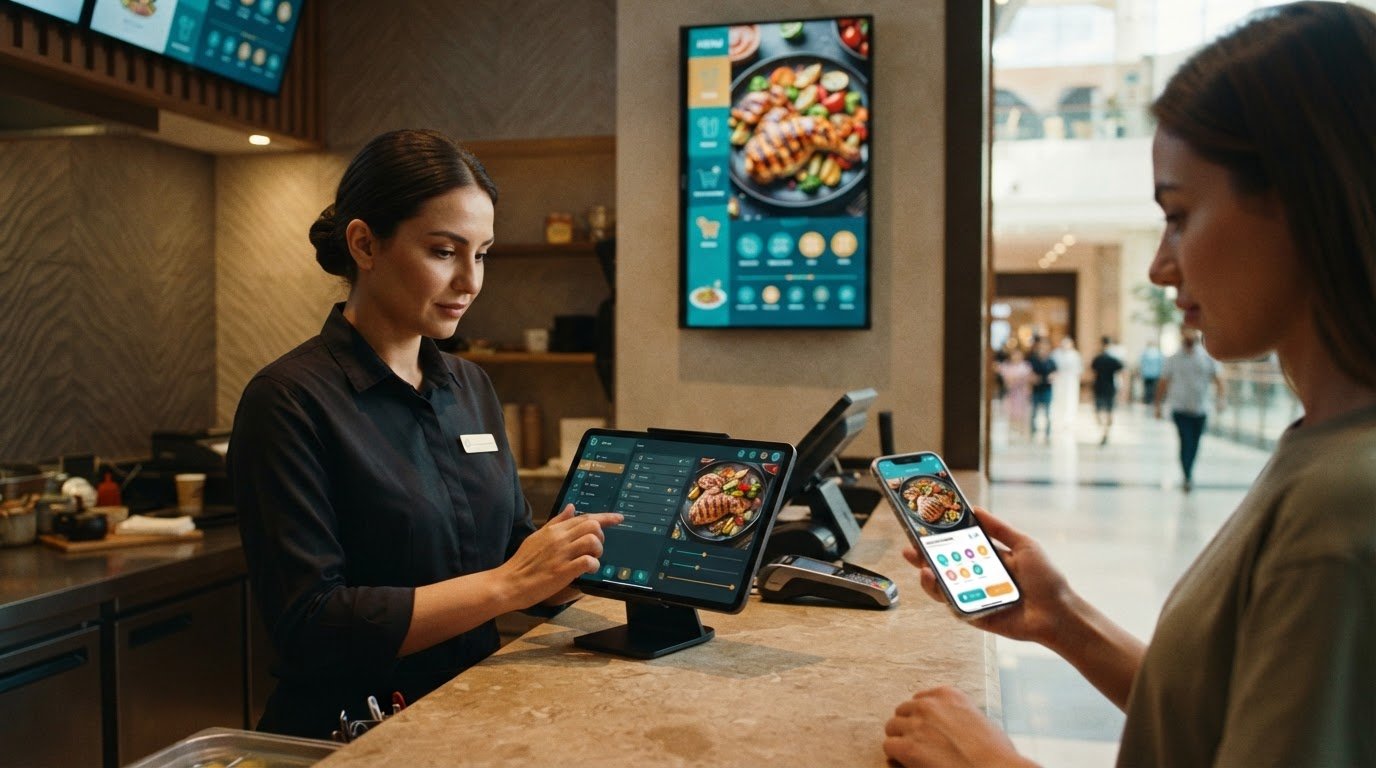
Headless Restaurant Architecture for Quick-Service Restaurants
A quick-service restaurant’s digital front end shouldn’t dictate how its content works. To understand what a headless restaurant is, separate the content system from the customer-facing channels: teams manage information centrally, then deliver it through APIs to websites, apps, kiosks and other digital touchpoints. One menu source can serve multiple experiences, with each channel presenting it in a format that fits.
For UAE operators, this distinction matters when menu updates, promotions and customer journeys need to stay aligned across locations and ordering channels. A conventional setup can tie content closely to one platform, making changes harder to coordinate. Headless architecture offers a more flexible structure, but still requires clear governance and dependable connections between systems.
This article explains how the model works in quick-service restaurants, the operational needs it can address, and what to consider before adopting it. You’ll see how centralized content supports consistency while allowing appropriate local variations, and how connected restaurant software can bring digital ordering and menu management into a more coordinated operation.
Key Takeaways
- Separate content management from customer-facing platforms so menus and promotions can reach multiple digital channels from a central source.
- Plan governance for location-level differences, including who can edit content and how local changes are approved.
- Distinguish a digital architecture from a kitchen model: headless describes how systems deliver content, while ghost and virtual restaurants describe business formats.
- Map the ordering journey across your website, app, kiosk and other channels to identify where connected systems can reduce operational friction.
- Review how menu management, customer engagement and ordering tools fit together before shaping your restaurant’s architecture.
Meaning of headless architecture for quick-service restaurants
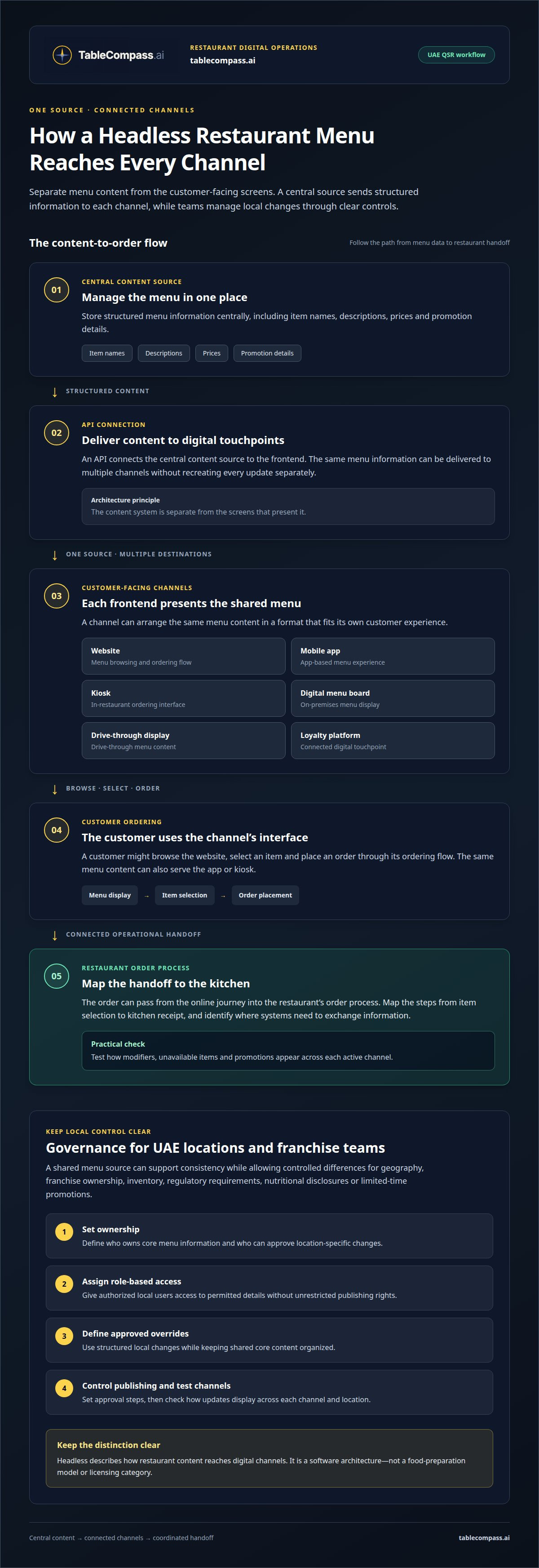
In a quick-service restaurant, headless architecture separates menu content from the screens customers use. A central system sends structured information through APIs to different digital channels.
Headless architecture describes software, not food preparation or a licensing category. UAE licensing and food-safety requirements relate to the food business and its activities, not its digital structure.
There’s no single startup-cost figure for this model. Costs depend on premises, kitchen capacity, staffing, channel choices, integrations and menu complexity.
Differences from Ghost Kitchens and Virtual Restaurants
Headless describes how restaurant content reaches digital channels. A ghost kitchen describes a food operation focused on delivery or collection, while a virtual restaurant is a brand customers encounter through digital ordering. These ideas can overlap: a ghost kitchen in Dubai could run a virtual brand and use headless architecture. Compare the operating model with the technology layer; they are not competing labels.
Food Businesses Using the Model
Quick-service brands with multiple UAE locations can use one structured menu source across websites, apps, kiosks and digital menu boards. Franchise groups can keep core content consistent while allowing controlled local changes. A single-site operator may also use the model if customers order through several channels. Before choosing an architecture, assess locations, menu variations and publishing responsibilities.
Customer Ordering Process
A customer might browse a restaurant’s website, select an item and place an order through its ordering flow. The channel requests menu content from the central system, then presents available items in its own interface. The same content can also feed an app or kiosk. Map each step, from menu display to order handoff, and identify where systems need to exchange information.
How the Architecture Works
Traditional restaurant software can bind content closely to one customer-facing platform. Headless architecture separates the content source, such as item names, descriptions, prices and promotion details, from the frontend that displays it. An API connects the two, delivering structured content to each channel.
For example, a menu update can be managed centrally and sent to a website, mobile app, kiosk or digital menu board. Each frontend can arrange the content differently while sharing the same source. This reduces the need to recreate each update separately in every channel.
Quick-service brands can extend delivery to drive-through displays, loyalty platforms and conversational AI agents. The system needs structured content, API-first connections, multi-site management, scalability and publishing controls. These foundations help teams coordinate updates across locations and channels.
Local Control and Governance
Menus can vary by geography, franchise ownership, inventory availability, regulatory requirements, nutritional disclosures or limited-time promotions. A headless setup can support corporate-to-local content inheritance, role-based access, structured overrides and controlled publishing workflows. UAE operators should define who owns core menu information and who can approve location-specific changes. Clear governance keeps shared content organized without removing necessary local control.
Operational benefits
Headless architecture can improve how a quick-service team coordinates digital operations. For a UAE brand, the gains depend on how well menus, order channels and workflows connect.
Menu changes become easier to manage. A team can update a promotion once, then distribute it across its website, app and kiosk. This reduces repetitive entry and the risk of an outdated offer appearing on one channel. Before rollout, assign someone to approve changes and test how each channel displays them.
Location teams can work within clearer boundaries. Corporate staff can manage core item descriptions, while authorized local users adjust permitted details. For a franchise group, this makes local variations easier to oversee without giving every user unrestricted publishing access. Define roles and approval steps before teams begin using the workflow.
Connected channels can also make operational handoffs more visible. A customer order can start online and pass into the restaurant’s order process while staff focus on preparation and fulfilment. Map the journey from item selection to kitchen receipt. Then test changes to modifiers, unavailable items and promotions across each active channel.
Headless architecture doesn’t create profit by itself. Restaurants earn revenue through food and drink sales, while margins depend on sales mix, ingredient costs, labour, rent, and operating expenses. Profit margins for most restaurants are around 10% to 12%; that figure is not a guaranteed result for an individual UAE operator.
Delivery platform fees reduce the amount retained from platform orders and can put pressure on profits. Their effect depends on each platform’s commercial terms, menu pricing, order volume and fulfilment costs. Compare the contribution from platform orders with direct orders, using the same item-level cost assumptions.
- Reduce repeat updates. Track how much staff time goes into changing menus across channels.
- Protect publishing quality. Set access roles and approval steps for each location.
- Check order handoffs. Test item options and unavailable products through every ordering route.
- Review channel economics. Compare order revenue with food, labour, fulfilment, and platform costs.
For a practical next step, review how restaurant operations software can connect workflows and customer-facing channels. Start by listing the systems your team uses, the repeated tasks they create, and the handoffs that need closer control.
Many restaurants in the United States do not survive past their first or second year of operation. This is a reminder to treat connected operations as a way to support consistency, not as a substitute for sound commercial decisions. A shared publishing process can help teams align the customer offer with what staff are expected to prepare. Clear ownership also makes exceptions easier to review.
Use the same discipline when assessing any technology change. Identify which repeated updates and handoffs it should improve, then check whether those tasks become clearer for central and local teams. Keep approval responsibility visible and revisit the workflow when menus or ordering routes change. The aim is dependable execution across channels, with costs and customer-facing information considered together.
What is the difference between a headless restaurant, ghost kitchen, and virtual restaurant?
These terms describe different parts of a food business. In the UAE, distinguish the technology, production setup and customer-facing brand. One operator can combine all three, but they do not mean the same thing.
Headless describes the technology
A headless restaurant uses an architecture that separates content from the screens displaying it. The term describes how digital systems connect, not where chefs cook or whether guests can dine in. A quick-service brand in Dubai, for example, could use this structure for its website and app while operating a conventional restaurant. The practical question is how menus and other information move between systems.
Ghost kitchen describes food production
A ghost kitchen is a production operation focused on fulfilling delivery or collection orders, rather than serving diners in a conventional dining room. Its defining feature is the kitchen and fulfilment model. A UAE operator might prepare orders from a dedicated kitchen without offering dine-in service there. The label doesn’t say whether the operator uses one digital system or several separate tools.
Virtual restaurant describes the brand
A virtual restaurant is a customer-facing food brand built around digital ordering. It may operate from a ghost kitchen or from the kitchen of an existing restaurant. For example, one UAE kitchen could prepare meals for its established restaurant brand and a separate online-only concept. Customers see distinct brands, even when the same kitchen team prepares both menus.
The terms can overlap, but they answer different questions. A virtual brand can be produced in a ghost kitchen, while headless technology can support its digital content. Likewise, an established dine-in restaurant can use headless architecture without becoming a ghost kitchen or launching a virtual brand.
- Technology: Headless describes how systems deliver content to digital channels.
- Production: Ghost kitchen describes where and how orders are prepared.
- Brand: Virtual restaurant describes the identity customers encounter online.
Use these distinctions when assessing a UAE business plan. First, decide whether the operation needs dine-in service, delivery, collection or a mix. Next, identify whether each digital brand has its own menu and customer journey. Then assess how the kitchen, ordering channels and content systems must connect. This sequence helps prevent confusion between a technology choice and a kitchen format.
For instance, a Dubai quick-service restaurant could keep its dining room, add a virtual brand and use a delivery-focused kitchen workflow. Headless architecture would remain a separate technology decision, useful if the business needs coordinated content across several digital channels. Start with the operating model, then choose technology to support actual customer and staff journeys.
What kinds of food businesses use the headless restaurant model?
The model suits food businesses whose content appears across several digital touchpoints. A UAE quick-service brand may serve customers through its website, mobile app, kiosk and digital menu boards. The strongest fit depends on operational complexity, not cuisine. Review how often menus change, who approves changes and how many channels need the same information.
Multi-location and franchise operators
Multi-site restaurant brands can benefit when teams coordinate content across locations. Enterprise content management can support brands managing hundreds or thousands of locations. For a UAE franchise group, corporate teams might maintain core product information while local teams manage approved variations. Map publishing roles first, then define which content stays central and which locations can adapt.
Quick-service brands with several ordering channels
A burger chain using a website, app, kiosk and drive-through display has several customer-facing surfaces to manage. A shared content structure can serve those channels while each interface presents information in its own layout. The practical test is whether updates have to be repeated manually. List every channel, name the person responsible and trace how a menu change reaches customers.
Operators with multiple brands or dayparts
A restaurant group running a family dining brand and a separate lunch concept may need distinct menus and promotions. Structured content can help teams organize those differences without treating every channel as a separate source. Daypart changes are another clear use case. Identify which items, descriptions and offers change between service periods, then decide who publishes each version.
Businesses managing local menu variation
Menu differences can reflect geography, franchise ownership, inventory availability, regulatory requirements, nutritional disclosures or limited-time promotions. A UAE operator with locations serving different neighbourhoods can use governance controls to manage permitted variations. Start with a content matrix that records the shared menu, local exceptions and approval owner. This makes variations visible before they reach digital screens.
Smaller operators can also consider the model. A single restaurant in Abu Dhabi might use several ordering channels and run frequent campaign updates. Headless architecture may be less useful if one simple platform already manages its content and operations. Compare the time spent maintaining channels with the effort needed to manage a shared system.
- Multi-location brands: assess central publishing and controlled local changes.
- Multichannel operators: map where menu updates must appear.
- Multi-brand groups: separate brand content while coordinating shared workflows.
- Single-site restaurants: compare channel complexity against system overhead.
Before deciding, document locations, brands, channels, menu variations and publishing owners. This inventory reveals whether the business needs a shared content foundation or a simpler setup. For a UAE quick-service operator, choose architecture based on actual workflows, not brand size alone.
How do customers order from a headless restaurant?
Customers use familiar digital channels, such as a restaurant website, mobile app, kiosk or digital menu board. Headless architecture works behind those screens. For example, a customer in Abu Dhabi can browse a quick-service menu on a phone. The screen requests structured menu content, then displays it in its own layout. The customer chooses items and follows that channel’s ordering steps.
The customer experience can vary by channel while the underlying content comes from a shared source. A website may present a full menu, while a kiosk highlights meal options. The restaurant manages the information centrally, and each interface displays its version to customers. This keeps channels aligned without making them look identical.
A typical digital ordering journey follows a clear sequence:
- Browse: The customer opens a website, app, or kiosk and views the menu.
- Choose: They select items and any available options shown in that channel.
- Review: The interface presents the selected order for the customer to check.
- Submit: The customer places the order through the channel’s ordering flow.
- Fulfil: Restaurant staff receive and prepare the order through their operational process.
For a Dubai quick-service restaurant, the same menu content might support app and kiosk journeys. The interface still needs to make choices clear. Item descriptions, options and promotions should display correctly on each screen. Teams can test a representative order on every active channel before publishing changes.
Menu availability also shapes what customers see. If an item is unavailable, the relevant channel needs an accurate menu update. A promotion should appear only where its terms apply. Map who manages each change and how it reaches customer-facing screens. This helps prevent mismatches between a digital menu and the restaurant’s current offer.
The order handoff deserves equal attention. Trace what happens after a customer submits an order. Identify which system receives it, how staff see its details and how exceptions are handled. For example, test an order with a customized item, then check that its selected options remain clear for kitchen staff. This walkthrough can expose weak points before customers encounter them.
For a connected ordering journey, coordinate your restaurant’s digital ordering channels around the customer path. Start with one channel, document each step, then repeat the test across the website, app, and kiosk. This gives operators a clear view of where content, ordering, and fulfilment must connect.
TableCompass.ai: OmniSync
TableCompass.ai’s OmniSync connects restaurant POS systems with food aggregators through middleware. For UAE quick-service operators, it can support a more connected digital operation when orders and menu workflows cross platforms. It’s relevant when teams coordinate multiple systems and need a clearer connection between their POS and aggregator channels.
For menu control, Atlas Menu Management provides a central way to manage menu information. GuestConnect AI and the White-Label Mobile App can support customer engagement and a branded digital experience. Choose tools based on the gap you need to address: system connectivity, menu coordination or customer-facing channels. These offerings support restaurant technology workflows; they do not replace the kitchen’s operating model.
If you’re mapping a connected restaurant setup, contact TableCompass.ai or visit tablecompass.ai to explore the available options.
Build Your Next Digital Step With Confidence
Understanding what a headless restaurant means for your operation is the starting point, not the finish line. Before changing systems, map the customer journey and identify where menu updates, orders or team handoffs become difficult to manage. Choose an operational priority first, then decide which connections would make that workflow clearer.
TableCompass.ai can support that planning with OmniSync, Atlas Menu Management and GuestConnect AI. Consider how each fits your priorities: connecting POS systems with food aggregators, managing menu information or supporting customer engagement. The next step is a focused conversation about your restaurant’s channels, current systems and desired workflow.
Contact TableCompass.ai to discuss your restaurant and explore a practical path toward a more connected operation. Start with the challenge that matters most, then build from there.
Frequently Asked Questions
What is a headless restaurant?
A headless restaurant uses separate systems to manage digital content and display it to customers. In practical terms, the menu source and the website or app interface aren’t locked into one platform. This architecture can support several customer touchpoints, but it doesn’t define the kitchen format. A restaurant can still offer dine-in, takeaway or delivery while using this digital setup.
How does a headless restaurant operate?
A headless restaurant operates by connecting its content system to customer-facing channels through APIs. For example, a menu update can be made in the central system, then requested by an app when a customer opens it. The app displays the information in its own design. Operators should test the full customer journey, including menu options, order submission and the handoff to staff.
What are the benefits and drawbacks of running a headless restaurant?
The main benefit is flexibility: restaurants can support different digital experiences without rebuilding content for each channel. Central workflows can also make updates easier to govern. The trade-off is added technical coordination. Teams must maintain integrations, manage permissions and troubleshoot issues across connected systems. A restaurant with just one simple ordering channel may find that added structure creates more work than value.