Food Aggregator Middleware: Guide for UAE Restaurants
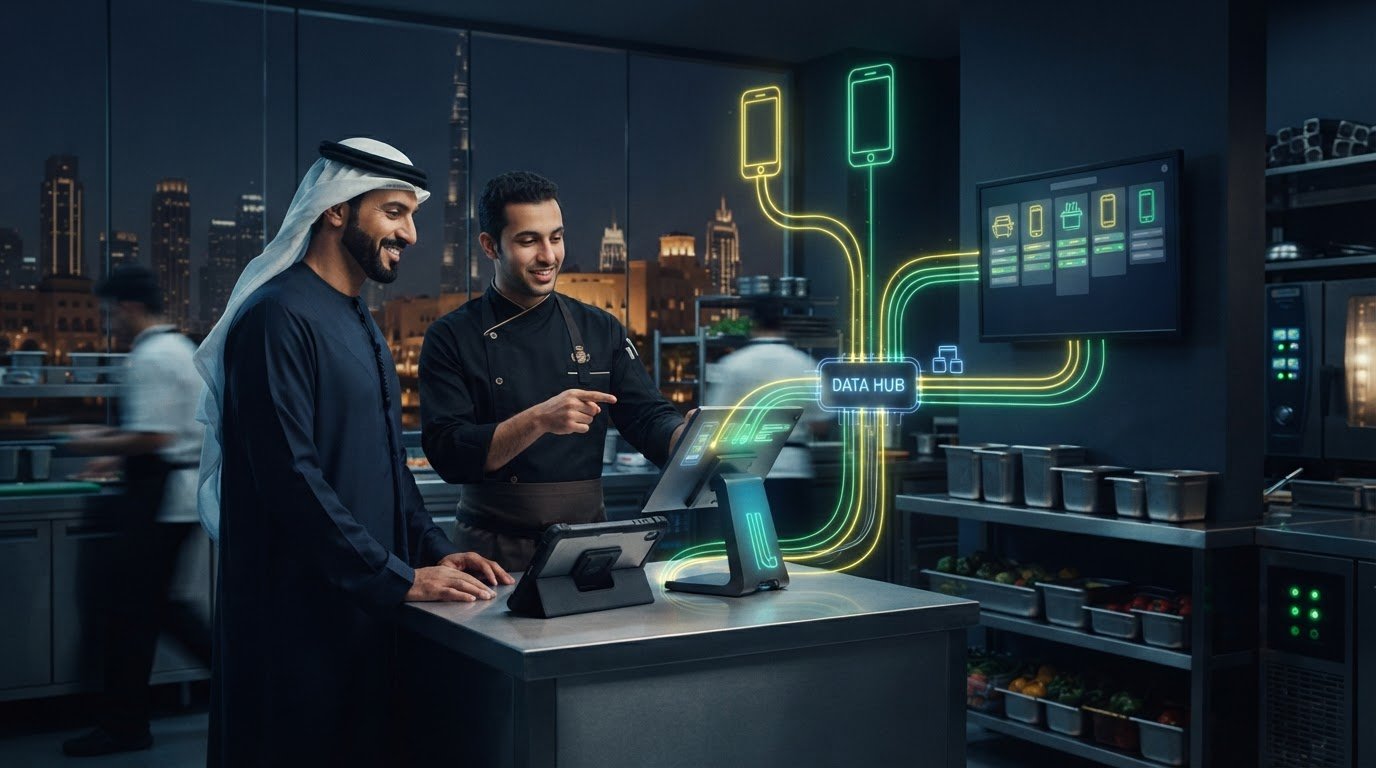
A delivery order shouldn’t have to pass through a separate tablet and a staff member before it reaches your kitchen. Food aggregator integration middleware creates a bridge between delivery platforms and your restaurant POS, helping orders flow into the system your team already uses.
If staff are re-entering orders by hand or juggling disconnected screens, it’s worth examining how those handoffs work. The right setup can reduce manual steps, limit avoidable errors, and bring delivery workflows into clearer view, whether you manage one UAE location or several.
This guide explains how an order moves from platforms such as Talabat, Deliveroo, or Careem through middleware and into your POS and kitchen workflow. You’ll also learn what to map before connecting systems, including order handling, menu ownership, and inventory updates. TableCompass.ai’s OmniSync and Universal Bridge connect restaurant POS systems with food aggregators, helping bring digital orders into restaurant operations.
Key Takeaways
- See how food aggregator integration middleware passes delivery orders into a restaurant POS and onward to the kitchen workflow.
- Compare middleware, direct connections, and manual tablet entry to understand the trade-offs in workflow effort and system coordination.
- Map your POS, aggregator channels, order steps, menu ownership, and exception handling before planning an integration.
- Learn how OmniSync connects restaurant POS systems with food aggregators and automates order processing and inventory management.
- Explore how a unified integration layer can help UAE restaurants manage multiple ordering channels with fewer manual steps.
What Is Food Aggregator Integration Middleware for Restaurants?
Food aggregator integration middleware is a software layer that connects a restaurant’s POS with external ordering channels and passes order information into the restaurant’s workflow. It sits between two systems with different roles: the channel where a customer places an order and the POS the restaurant uses to manage orders.
For a UAE restaurant, this connection can bring digital orders into the same operational flow as dine-in activity. Instead of checking a delivery app and entering the order into the POS, staff can receive order details through connected systems. The exact information passed depends on the integration and its configuration, but the practical aim is to reduce repeated handling and make incoming orders easier to manage.
How middleware differs from a POS and a delivery aggregator
The POS is the restaurant’s core order-management system. An aggregator, such as Talabat, provides a customer-facing channel to browse and place an order. Middleware connects the two: it receives order information from a connected channel and transmits it to the POS. It doesn’t prepare food or provide delivery logistics. Those remain separate parts of restaurant and delivery operations.
This distinction helps when you map your setup. The POS manages restaurant orders, the aggregator provides an online ordering channel, and middleware helps the systems exchange information. For background on the wider category, Wikipedia describes online food ordering systems, which give customers a way to place orders through digital channels.
Why UAE restaurants connect delivery channels to their POS
Digital orders need to move alongside dine-in tickets, kitchen preparation, and staff responsibilities. If a team handles each aggregator on a separate tablet, someone may need to monitor every screen and re-enter order details into the POS. During service, those extra steps can make order handling harder to organize.
A centralized connection can reduce repetitive handling by routing orders from connected channels into the POS workflow. For example, a restaurant receiving both dine-in orders and Talabat orders may want staff to manage incoming tickets through a more unified process. The benefit is not that every task becomes automatic. It is that fewer order details need to be transferred by hand.
Before choosing an integration approach, write down where orders currently arrive and where staff re-enter or check them. This simple map shows which handoffs middleware could streamline, while keeping clear that integration connects systems, not delivery logistics.
How Food Aggregator Middleware Moves an Order into the Restaurant Workflow
An integrated delivery order should follow a clear route from the customer’s app to the restaurant’s preparation workflow. Food aggregator integration middleware passes order information between connected systems, reducing the need for staff to transfer the same details by hand.
From aggregator order to POS ticket
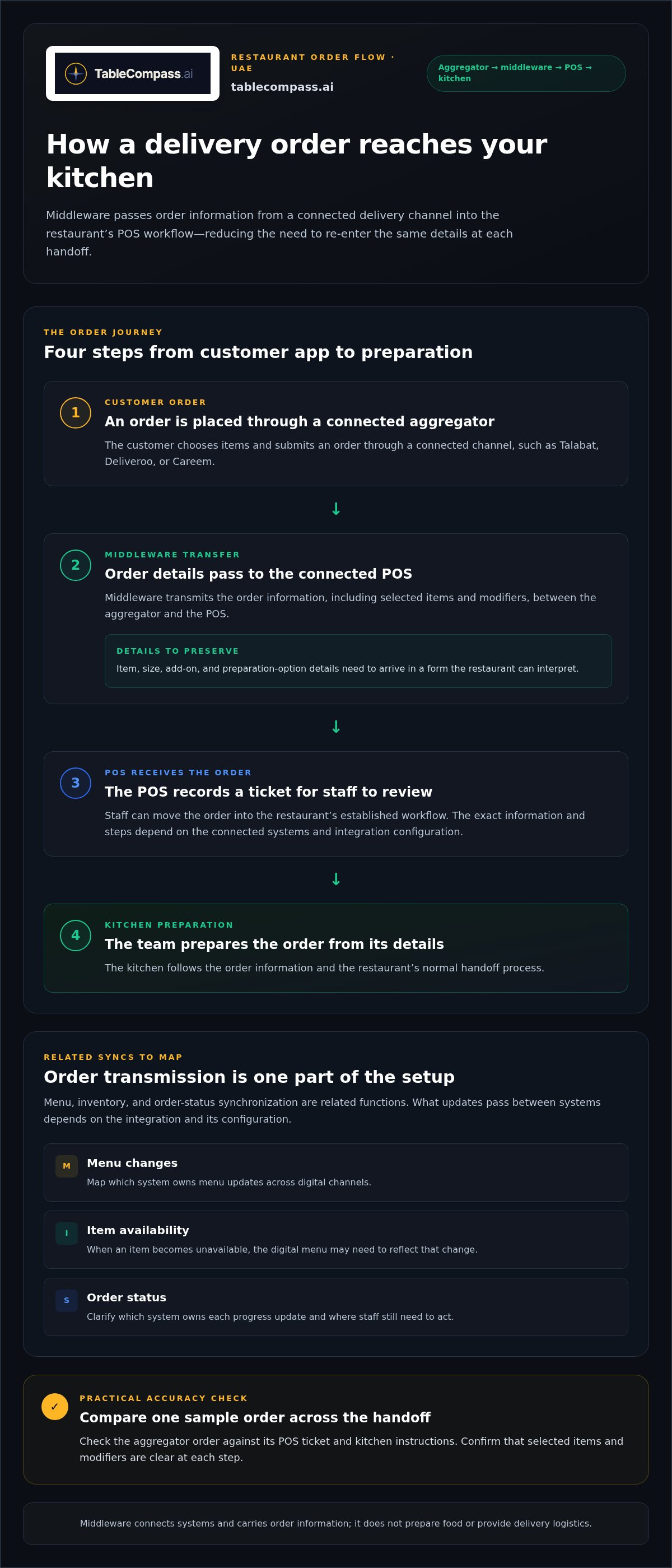
A typical order journey works like this:
- Order placed: A customer chooses items and submits an order through a connected aggregator channel.
- Details transferred: Middleware passes the order information, such as selected items and modifiers, to the connected POS.
- Order received: The POS records the order so staff can review it and move it into the restaurant’s established workflow.
- Preparation begins: The team prepares the order according to its details and the restaurant’s normal handoff process.
Accurate item and modifier data matters at every step. If a customer selects a particular size, add-on, or preparation option, those details need to arrive in a form the restaurant can interpret. A useful test is to compare a sample aggregator order with its POS ticket and kitchen instructions. The precise steps depend on the systems connected and how the integration is configured.
Middleware reduces duplicate handling by carrying order details across connected channels instead of requiring staff to re-enter them at each handoff. The International Food & Beverage Technology Association (IFBTA) offers broader context on technology in the food and beverage industry, where connected workflows are part of restaurant operations.
Where menu, inventory, and order status synchronization fit
Order transmission is one function; menu and inventory synchronization are related but separate. A menu change affects what customers can select on a digital channel. If an item becomes unavailable, the digital menu may need to reflect that change to help prevent new orders for it. Inventory synchronization can support this process, depending on the connected systems and their configuration.
Order status is another potential integration function. Status information may pass between connected systems so teams can follow an order through the workflow. The specific statuses and updates depend on the setup. Map which system owns each update, such as marking an item unavailable or changing an order’s progress. This clarifies where staff still need to act.
For deeper guidance on maintaining digital menus across channels, see our centralized menu management guide. To plan connected order flows for a UAE restaurant, explore TableCompass.ai middleware.
Middleware, Direct Integrations, or Manual Entry: Compare the Approaches
There isn’t one integration model for every restaurant. A UAE operator’s best fit depends on its POS, aggregator mix, number of locations, and the way staff handle orders during service. Compare how each approach organizes the work, not just how many systems it connects.
| Approach | Operational centralization | Daily workflow effort | System dependence |
|---|---|---|---|
| Middleware | Can route orders from connected channels through a shared integration layer. | May reduce repeated order entry, while staff still manage exceptions and preparation. | Depends on the middleware, POS, and channels working together as configured. |
| Direct integration | Connects a specific channel and POS directly, where that connection is available. | Can avoid re-keying for the connected flow; other channels may follow separate workflows. | Relies on each direct connection and the systems it links. |
| Manual tablet entry | Orders remain on separate aggregator devices until staff move them into the restaurant workflow. | Requires staff to monitor channels and enter order details into the POS or kitchen process. | Depends on the separate devices and staff handoffs. |
When a middleware layer can make operations more manageable
Food aggregator integration middleware can help when a restaurant receives orders across multiple digital channels and wants a shared route into its POS workflow. Rather than treating each channel as a separate island, a middleware layer can centralize connected order flows. This may reduce repeated handling, but staff still need to manage exceptions and ensure the connected systems fit the restaurant’s process.
What direct connections and manual workflows may involve
A direct integration links systems without a shared middleware layer. It may suit a simpler setup when the required connection is available, while restaurants using several channels may need to manage more than one connection. Manual entry is easy to understand, but staff must transfer order details themselves. Each approach has trade-offs, and the right one depends on how the restaurant operates.
Integration can sound like another layer of complexity. Separate the setup decisions from the daily workflow: setup determines which systems connect and how order information moves; daily operations determine who monitors incoming tickets and handles exceptions. Planning can simplify routine handoffs, even though the setup itself takes coordination.
To assess your operation, list each POS, ordering channel, location, and staff handoff. Mark where orders are entered more than once and which channels need to share a workflow. This makes it easier to compare approaches against actual service needs instead of assuming every system will work with every other system.
How to Prepare a UAE Restaurant for Food Aggregator Middleware
A smooth integration starts with a clear picture of how your restaurant operates now. Before planning food aggregator integration middleware, map the systems, locations, people, and handoffs involved. This is especially useful for UAE restaurants balancing dine-in service with several digital channels, or groups where branches may use different processes.
Map systems, channels, and kitchen handoffs
Create a simple record for each location. Note its POS, active ordering channels, and the steps an order follows from arrival to kitchen preparation. Document who owns digital menu updates and who resolves day-to-day issues. For a group, compare branches rather than assuming every location handles orders the same way.
- Order changes: Record how staff handle cancellations, customer changes, and unavailable items.
- Handoffs: Identify where an order moves between front-of-house staff, the POS, and kitchen teams.
- Ownership: Name the role responsible for menu accuracy and the person who handles integration-related issues during service.
This map reveals where information is duplicated and where teams rely on informal workarounds. It also gives you a practical foundation for reviewing your POS synchronization guide and aggregator integration strategy pillar for related guidance.
Set practical integration goals before rollout
Choose goals staff can observe in daily operations. For example, aim to reduce duplicate order entry or bring connected channel orders into a more centralized workflow. Decide what should happen when an order doesn’t arrive as expected, an item is unavailable, or details need clarification. Clear exception ownership helps staff respond consistently during busy service.
Before rollout, agree on how the team will review the workflow. Gather feedback from the people receiving orders and preparing them, then note recurring issues and any steps that remain manual. Use those observations to refine the process rather than assuming the integration has resolved every handoff.
Keep goals specific to your operation. A single-location restaurant and a multi-branch group may have different priorities, especially if POS setups, channel mixes, or menu-update responsibilities vary. A written process gives each location a shared reference while leaving room for branch-specific needs.
Ready to plan a connected workflow around your restaurant’s systems and channels? Explore TableCompass.ai middleware for UAE restaurant operations.
Connect UAE Restaurant Channels with TableCompass.ai Middleware
Once you’ve mapped your POS, ordering channels, and service handoffs, choose an integration layer that fits the workflow. TableCompass.ai offers OmniSync middleware to connect restaurant POS systems with food aggregators, providing a unified route between digital order channels and restaurant operations.
How OmniSync fits the restaurant technology stack
Think of the setup as connected parts: customers place orders through aggregator channels, OmniSync acts as the middleware layer, and the restaurant POS receives information for its order workflow. OmniSync automates order processing and inventory management, helping reduce manual data entry and errors while supporting more consistent handling of connected channels.
Inventory management and order processing are related, but serve different purposes. Order processing moves an order through the restaurant’s workflow; inventory management helps keep stock information aligned with operations. To plan practically, identify which order and inventory steps your team currently handles manually, then map how those steps fit into a connected setup. The precise workflow depends on the systems and configuration involved.
TableCompass.ai also offers Universal Bridge middleware to connect POS systems with food aggregators. Include it in your integration planning alongside OmniSync. For product-specific detail, use the OmniSync integration guide as a companion to this broader workflow overview.
Next steps for an integration-ready operation
Prepare a concise reference for your operation before moving forward. Include the POS used at each location, active aggregator channels, how orders reach the kitchen, and who handles exceptions. For a restaurant group in the UAE, record branch-level differences as well as shared processes. This gives your team a practical view of where a common integration layer could support multi-channel service.
Then connect your goals to specific workflows. If reducing duplicate entry is a priority, identify where staff currently re-key order details. If inventory alignment matters, note which updates teams make and where they originate. Clear goals keep the integration focused on actual restaurant needs rather than adding connections without a defined operational purpose.
Explore a connected approach for your restaurant’s POS and aggregator channels with TableCompass.ai middleware.
Build a More Connected Order Workflow
A well-planned integration gives delivery orders a clearer path from aggregator channels into your restaurant’s POS and daily operations. The right approach depends on your systems, channels, locations, and how your team handles orders and exceptions. Map those workflows before deciding between middleware, direct connections, or manual entry.
For UAE restaurants, food aggregator integration middleware can reduce repeated order handling by connecting systems in a unified flow. TableCompass.ai offers OmniSync and Universal Bridge to connect restaurant POS systems with food delivery aggregators. OmniSync automates order processing and inventory management, helping reduce manual entry and errors while supporting a more consistent operational foundation.
Start with your current setup, identify the handoffs you want to improve, and align the integration with the way your team works. Explore TableCompass.ai middleware to take the next step toward a more connected restaurant operation.
Frequently Asked Questions
What is food aggregator integration middleware?
Food aggregator integration middleware is a software layer that connects a restaurant POS with external ordering channels. It passes order information between connected systems so staff can manage digital orders within the restaurant’s workflow. For UAE operators, this can bring aggregator orders into a more centralized process alongside dine-in service. Middleware connects systems; it doesn’t replace the POS, provide the customer ordering app, or deliver the food.
How does food aggregator middleware send orders to a POS?
When a customer submits an order through a connected aggregator, middleware transfers its details to the restaurant’s POS. The POS can then receive the order for staff to review and route through the kitchen workflow. Item names, options, and modifiers need to match how the restaurant handles orders. The precise steps depend on the connected systems and configuration, so compare a sample incoming order with its POS ticket during planning.
Can middleware connect multiple food delivery aggregators to one POS?
Yes, middleware can connect multiple aggregator channels to one POS when the systems are supported and configured for that workflow. This can give staff a shared route for orders instead of requiring them to manage every channel separately. Channels may still behave differently, so map your active platforms, locations, and order steps, then define how the team will handle exceptions such as cancellations or unavailable items.
What is the difference between middleware and a direct POS integration?
Middleware acts as an integration layer between a POS and connected ordering channels, while a direct integration links a specific system to the POS without a shared middleware layer. A direct connection may suit a more limited setup; middleware can help centralize flows across connected channels. The right fit depends on your POS, aggregator mix, locations, and service processes. Compare where staff still need to check or re-enter orders.
Does food aggregator middleware synchronize restaurant menus and inventory?
It can support menu or inventory synchronization, but these functions are distinct from transmitting orders and depend on the connected systems and setup. Menu synchronization helps keep digital channel information aligned with restaurant updates; inventory synchronization can help reflect stock changes in connected workflows. Identify where menu changes originate and who manages unavailable items. TableCompass.ai offers Atlas Menu Management for centralized digital menu control, alongside middleware for order and inventory workflows.
Is food aggregator middleware useful for UAE restaurant groups?
It can be useful for a UAE restaurant group managing digital orders across several branches, especially when locations share channels but differ in POS setups or service routines. A unified integration layer can help centralize connected order flows and reduce repeated manual handling. Start by documenting each branch’s POS, ordering channels, kitchen handoffs, and exception process. This reveals which workflows can be shared and where location-specific practices need to remain clear.
Does middleware replace a restaurant POS or delivery aggregator?
No. A POS remains the restaurant’s core order-management system, while an aggregator provides a customer-facing channel to browse and place orders. Middleware connects these systems and passes information between them. It doesn’t provide delivery logistics. A restaurant can retain its POS and aggregator channels while using middleware to route connected order details into its operational workflow. Each component has a separate role.