Direct Ordering Guide for UAE Restaurant Operators
A direct ordering channel only gives a UAE restaurant more control when it connects to the operation behind it. A restaurant direct ordering system can create a closer route to guests, but if orders sit outside the POS workflow or menu changes must be repeated across tools, it adds another layer to manage. Aggregators can still play a role. Direct ordering is about building a channel the restaurant can shape, not abandoning the others.
The key is to connect the guest experience to the work happening behind the counter. This guide explains the core parts of a direct ordering setup, how QR table ordering and a branded mobile app serve different occasions, and where POS workflows, aggregator synchronization, and centralized menu management fit. You’ll also learn how to check whether orders reach the right teams without creating extra manual steps.
Whether you operate one restaurant or a UAE group, start by mapping how orders move today. Identify where they leave your existing workflow, then decide which direct channel best fits your guests and operations.
Key Takeaways
- Map each direct order from the guest-facing channel to the team responsible for preparing and fulfilling it.
- A restaurant direct ordering system works best when its channels fit the existing POS workflow and menu management process.
- Use direct channels and aggregators for different ordering contexts. You don’t have to replace one to develop the other.
- Assess channel fit, menu control, staff steps, and branch needs before choosing where to start.
- Consider QR Table Ordering & Pay for in-restaurant orders and a White-Label Mobile App for branded direct ordering.
What Is a Restaurant Direct Ordering System, and What Does It Control?
A restaurant direct ordering system connects a restaurant’s own guest-facing ordering channels with the workflow its team uses to receive and fulfil orders. It brings together the ordering experience, digital menu, and order handling, rather than treating each online order as a separate task.
The distinction is control of the channel. A restaurant may accept orders online through a third-party platform, but that doesn’t make the platform a channel the restaurant owns. A branded app or QR table ordering gives the restaurant more say over how guests encounter its menu and place orders. For context, online food ordering systems include both restaurant-controlled channels and third-party models.
For UAE operators, direct ordering can support brand consistency and give guests another way to order. A connected workflow helps the team manage those orders alongside its other service tasks. It doesn’t require removing aggregators. Each channel can serve a different purpose: an aggregator may help guests discover a restaurant, while a direct channel gives returning customers another route to order.
Which channels can a restaurant use for direct orders?
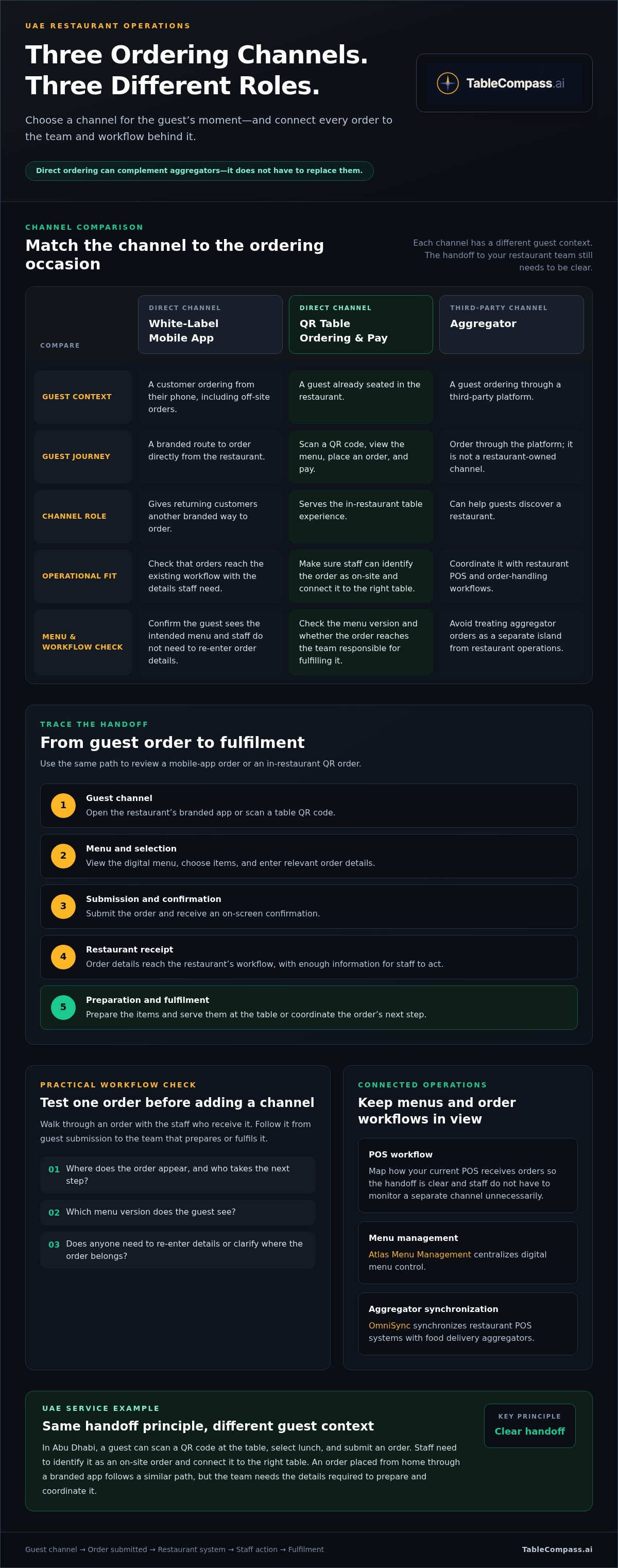
A White-Label Mobile App provides a branded route for customers ordering from their phones, including guests who want to order directly rather than through an aggregator. QR Table Ordering & Pay serves a different moment: a guest already seated in the restaurant scans a QR code to view the menu, place an order, and pay.
Choose by guest context. An app supports off-site ordering journeys; QR ordering is designed for the on-site table experience. Both can represent the restaurant’s brand, but they serve different needs. Match the channel to how staff receive and fulfil orders.
What makes a direct ordering system more than an ordering page?
Featured snippet definition: A restaurant direct ordering system is a set of restaurant-controlled ordering channels connected to menu management and the restaurant’s order-handling workflow.
An ordering page captures a request. A system connects that request to the right menu information and the team responsible for handling it. If channels sit apart from the restaurant’s established workflow, staff may need to check separate screens, re-enter orders, or manually reconcile menu changes. That duplicate handling can add friction during busy service.
Before adding a channel, trace one test order from guest submission to the team that prepares or fulfils it. Check where the order appears, which menu version the guest sees, and whether staff need to enter details again. Atlas Menu Management centralizes digital menu control, while OmniSync synchronizes restaurant POS systems with food delivery aggregators. These tools can form part of a connected setup alongside the restaurant’s existing operations.
How Direct Orders Move from Guest to Restaurant Team
A direct order has two connected journeys. The guest chooses items and submits the order; the restaurant receives the details and prepares, serves, or coordinates fulfilment. Mapping both sides shows where staff need information and whether orders flow into existing operations or require separate handling.
From app or QR order to the restaurant’s workflow
Use this sequence to trace an order through your restaurant:
- 1. Guest channel: The guest opens the restaurant’s branded app or scans a table QR code.
- 2. Menu and selection: They view the digital menu, choose items, and enter relevant order details.
- 3. Submission and confirmation: They submit the order and receive an on-screen confirmation.
- 4. Restaurant receipt: Order details reach the restaurant’s order-handling workflow, where staff need enough information to act.
- 5. Preparation and fulfilment: The team prepares the items and serves them at the table or coordinates the order’s next step.
Guest channel → Order submitted → Restaurant system → Staff action → Fulfilment
For example, a guest dining in Abu Dhabi scans a QR code at the table, selects lunch, and submits the order. Staff need to identify it as an on-site order and connect it to the right table. A customer using a branded app to place an order from home follows a similar path, but the team needs the details required to prepare and coordinate that order. The channel changes; the handoff still needs to be clear.
Walk through both examples with the staff who receive orders. Note where each order appears, who takes the next step, and whether anyone has to re-enter details or clarify where it belongs.
Where POS and menu synchronization fit
A POS connection can bring direct orders into a restaurant’s established order workflow, reducing the need to monitor a separate channel. Map how your current POS receives orders before deciding how a new channel should connect. The aim is a clear handoff, not an assumption that every restaurant operates the same way.
Menu control matters too. When digital channels are managed separately, a change can require repeated updates and create inconsistent information for guests and staff. Atlas Menu Management centralizes digital menu control, while OmniSync synchronizes restaurant POS systems with food delivery aggregators. Together, these tools can help operators coordinate channels without treating each one as a separate island.
NYU Stern’s research on the impact of delivery platforms offers useful context for managing aggregator orders alongside direct channels. A restaurant direct ordering system can sit within a broader channel mix. To see how direct ordering options fit into that operating picture, explore TableCompass ordering workflows.
Direct Ordering vs. Aggregators: Keep the Channels Working Together
Direct channels and food delivery aggregators can support the same restaurant without serving the same purpose. An aggregator offers a place where guests can discover and order from participating restaurants. A restaurant’s own channel gives it a branded ordering touchpoint that it can manage as part of the wider guest experience. For UAE operators, the practical choice isn’t always one channel or the other. It’s how each channel fits the restaurant’s service and order-handling workflow.
A restaurant direct ordering system should make the restaurant-owned route clear to guests and manageable for staff. That doesn’t mean shutting down aggregator listings. Guests may use an aggregator to explore options, then choose the restaurant’s branded app when ordering directly. A diner already seated at a table may use QR ordering instead. These channels can work side by side when the team can see and handle incoming orders reliably.
What direct channels give a restaurant control over
A branded app and QR table ordering put the restaurant’s identity at the centre of the ordering journey. The app is a direct route for customers placing orders through the restaurant’s branded mobile experience. QR Table Ordering & Pay is designed for guests who are already dining on-site. Each channel fits a different moment, so operators can start with the guest context that best matches their service.
Control means shaping the restaurant-facing channel and its menu presentation. It doesn’t mean assuming every channel offers the same customer information or marketing options. To assess the guest experience, place a test order through each route. Check that the menu is clear, the order destination is understandable, and the staff handoff fits the way the team works.
How to coordinate direct orders with aggregator orders
The operational test is visibility. Staff need to know where an order arrived, which team handles it, and how it moves into preparation or fulfilment. If direct and aggregator orders appear in disconnected workflows, employees may need to monitor separate screens or repeat steps. Map the channels currently in use, then trace a sample order from each one to the team that acts on it.
OmniSync synchronizes restaurant POS systems with food delivery aggregators, helping coordinate aggregator orders with POS workflows. Direct ordering doesn’t require replacing aggregator channels. Consider how the POS connection fits the systems already used by the restaurant, then identify any remaining gaps in order visibility or handling.
For a practical comparison, list each channel’s role, the guest context it serves, where its orders appear, and who is responsible for the next step. That simple view helps single-location restaurants and UAE groups make channel decisions around their real operations, not assumptions.
How to Evaluate a Direct Ordering System for a UAE Restaurant
Start with the operation you have, not the feature list. Before adding a channel or changing a process, trace how an order arrives, who handles it, where menu updates happen, and what staff do when something needs clarification. This gives you a practical baseline for judging whether a restaurant direct ordering system will fit your team.
Questions to map before choosing a system
- Which channels are live? List table QR orders, branded app orders, aggregator orders, and any other routes. Note where staff check for each one and where they repeat steps.
- How are menus updated? Track who makes changes and how those updates reach restaurant-owned and third-party channels. Look for duplicate entry or mismatched menu information.
- Who owns each handoff? Identify the team that receives, prepares, and fulfils each type of order, plus who resolves questions or corrections.
- Where does the POS fit? Record whether orders flow into the existing POS workflow or need separate monitoring and handling.
A single-location café can map these steps with the staff on shift. A UAE group can compare the same workflow across branches, noting where local processes differ and where shared menu control could reduce repeated updates. Keep the map simple: channel, order destination, staff owner, and next action.
Match the ordering channel to the restaurant’s service model
Choose a channel based on the moment it needs to serve. QR ordering suits guests already seated at a restaurant table. A branded mobile app provides the restaurant’s own mobile ordering touchpoint. Aggregators remain a separate route for guests using those platforms. The options can coexist; the key is to make order visibility and staff responsibilities clear across them.
Test a sample order for each channel with the staff who will handle it. Confirm where it appears, whether details need re-entry, and how a menu change is reflected. For QR orders, check how the order reaches the team and how staff connect it to the right table and POS workflow.
Use your findings to define the next step, whether that’s centralizing digital menu control or improving order visibility. Explore TableCompass direct ordering options for a setup that can align with your restaurant’s channels and operations.
Build a Connected Direct Ordering Workflow with TableCompass
A useful setup starts with the guest journey and follows the order into restaurant operations. TableCompass.ai brings together direct ordering channels and tools for digital menu control and POS-to-aggregator synchronization. For UAE operators, the practical question is how each component fits the restaurant’s current service model, whether it’s a single location or a group of branches.
Choose the direct channel that fits the guest journey
QR Table Ordering & Pay is designed for guests ordering and paying at their table. It gives diners an on-site ordering route through a QR code. A White-Label Mobile App provides a restaurant-branded mobile channel for customers placing direct orders through the app. The two options address different guest contexts, so choose based on where and how your customers are likely to order.
Before introducing either channel, walk through a sample guest journey with your team. Check how the guest finds the menu, submits an order, and receives confirmation. Then trace where the order reaches staff and what the team needs to take the next step. This connects the front-end experience to the real service workflow.
Connect ordering channels to the wider operating system
Direct ordering works as part of a broader digital structure, not as a standalone page. Atlas Menu Management centralizes digital menu control, giving operators a place to manage menus across digital channels. OmniSync is middleware that synchronizes restaurant POS systems with food delivery aggregators. Together, these tools address two key parts of the operating picture: menu management and coordination between the POS and aggregator channels.
Use your existing workflow map to plan a practical starting point. Identify whether your priority is table ordering, a restaurant-branded mobile route, centralized digital menu control, or coordination between the POS and aggregator orders. Then define who manages the menu, who receives orders, and how staff handle each handoff. For a multi-branch group, include the relevant branch teams in that review so the process reflects actual operations.
A restaurant direct ordering system is most useful when its guest-facing channel and behind-the-scenes workflow work together. Review the current process, choose the channel that fits the guest journey, and connect it to the menu and order-handling structure your team uses. Explore TableCompass.ai direct ordering solutions to see how these components can fit into your restaurant’s operations.
Put Your Direct Ordering Workflow Into Motion
A well-planned restaurant direct ordering system connects the guest’s ordering channel to the team handling the order. Start by mapping where orders arrive, how menus are managed, and where staff repeat steps. Then choose the channel that fits the service moment, while keeping aggregator orders part of the wider workflow where they remain useful.
TableCompass brings together QR Table Ordering & Pay for table ordering and payment, a White-Label Mobile App for branded direct orders, and OmniSync to synchronize restaurant POS systems with food delivery aggregators. Each has a distinct role in a connected operation.
Choose one practical starting point, trace the order from guest to team, and build from there. Explore TableCompass direct ordering solutions and take the next step toward a more coordinated ordering experience for your UAE restaurant.
Frequently Asked Questions
What is a restaurant direct ordering system?
A restaurant direct ordering system connects guest-facing channels owned by the restaurant with the process for receiving and handling orders. These channels can include a branded mobile app for direct customer orders or QR ordering at a restaurant table. The system is more than an online menu: operators should consider how orders reach staff and how digital menu information is managed. TableCompass serves UAE restaurants with direct ordering options and connected operational tools.
How does a direct ordering system work with a restaurant POS?
A direct ordering channel and a POS can be coordinated so staff can handle orders through the restaurant’s established workflow. Map where an order appears after submission, who acts on it, and whether anyone must re-enter details. OmniSync synchronizes restaurant POS systems with food delivery aggregators. Trace a test order through your restaurant’s systems and identify any gaps in visibility or handoffs.
Can a restaurant use direct ordering and food delivery aggregators at the same time?
Yes. A UAE restaurant can offer its own ordering channels while continuing to accept orders through food delivery aggregators. The channels can serve different guest needs: an aggregator may be the route a guest uses to discover or order from a restaurant, while a branded app offers a direct route and QR ordering serves on-site diners. Map where each order arrives and assign clear staff responsibilities so channels work alongside one another.
What is the difference between a restaurant ordering app and a direct ordering system?
A restaurant ordering app is one guest-facing channel; a direct ordering system includes the channel and the connected processes for managing menus and handling orders. A White-Label Mobile App gives a restaurant a branded mobile route for customer orders. The broader system also considers how an order reaches restaurant staff and fits existing operations. For UAE operators, assess the full order journey rather than judging a setup by its app alone.
Is QR ordering considered direct ordering for a restaurant?
Yes. QR ordering can be a direct channel when guests use it to view a restaurant’s digital menu and place an order directly with that restaurant. QR Table Ordering & Pay is designed for ordering and payment at the table. It serves a different moment from a branded mobile app, which provides a restaurant-branded mobile ordering route. To assess fit, trace a QR order from guest submission to the staff who handle it.
How can a UAE restaurant start accepting more direct orders?
Start by mapping current order channels, staff handoffs, and how menu changes are managed. Then choose a practical first channel based on your service model: QR ordering for table guests or a branded app for direct mobile orders. Test the order path with staff and note where details need re-entry. For a single outlet, review the process with the relevant team; for a group, compare branch workflows before standardizing menu management or order handling.
Does a direct ordering system replace food delivery aggregators?
No. A direct ordering system adds restaurant-controlled channels; it doesn’t require a restaurant to abandon aggregators. Operators can maintain aggregator orders while offering QR table ordering or a branded app for guests who prefer those routes. The practical priority is coordinating visibility and staff workflows across channels. OmniSync synchronizes restaurant POS systems with food delivery aggregators, supporting coordination between POS and aggregator operations as part of the wider setup.