Custom Mobile App for Restaurants: 2026 Practical Guide
A restaurant app can add work if it doesn’t fit how guests order and staff fulfil orders. A custom mobile app for restaurants should make the guest journey clearer while fitting the workflows behind the counter, not create a disconnected channel.
The first decision isn’t simply which features to add. It’s whether a bespoke build or a branded white-label app better suits your restaurant, and how the app will fit with the systems you already use. For UAE operators, a considered plan can support branded direct ordering while keeping day-to-day service in view.
This guide will help you define requirements around real guest and staff needs, compare development approaches using consistent criteria, and plan a practical route to direct ordering. You’ll also learn how to map the app’s role alongside your restaurant systems, so each part of the digital workflow has a clear purpose before you commit to building.
Key Takeaways
- Start with a defined guest or business need, then choose app functions that address it rather than adding features without a clear purpose.
- Map the guest journey from menu discovery to order submission and post-order communication. Document which system owns menu, order, and customer information.
- Compare a custom mobile app for restaurants with a white-label approach using the same criteria: control, branding, maintenance responsibility, and fit with your workflows.
- Turn planning into six practical decisions, from setting goals and understanding guests to documenting workflows and measuring outcomes.
- Explore how a White-Label Mobile App can support branded direct orders, while QR Table Ordering & Pay and Atlas Menu Management serve distinct roles in the restaurant workflow.
What a custom mobile app for restaurants should actually do
Start with the operating decision, not the feature list: what guest need or business friction should the app address? A restaurant mobile app is a branded digital channel where guests can interact with the restaurant and place orders. Its job is to make a defined part of the guest journey easier to manage. An app alone does not guarantee increased sales or customer retention.
Separate the outcome from the tool. “Make direct ordering easier for guests” is an outcome. “Add a reorder button” is one possible feature. It earns a place only if it supports the outcome and fits the way the restaurant handles orders. A useful overview of mobile app development explains how options such as native, web, and hybrid apps relate to design and technical considerations. For restaurant planning, start with the service journey, then consider the technology.
Which guest and restaurant needs can an app address?
Trace the journey from discovery to order. A guest might find a restaurant through a social post, check its menu, choose an item, submit a pickup order, and look for an update. At each point, ask what currently causes effort or uncertainty. Is the menu hard to find? Does the guest have to switch channels to order? Do staff re-enter details from incoming orders? Identify the friction before deciding whether a feature is needed.
Consider a UAE restaurant serving both dine-in guests and people collecting takeaway. A guest may want to check the menu and order for pickup while out, while staff need a clear process for receiving that order during a busy service. These connected needs still require different considerations:
- Guest-facing convenience: clear menu access, a straightforward ordering path, and useful communication after submission.
- Staff-facing operations: a defined destination for incoming orders, clear responsibility for reviewing them, and a process that fits service routines.
Map your current channels before adding another. Note where dine-in, phone, aggregator, and direct orders begin, and how staff handle each. Choose the biggest point of friction to solve first. This keeps requirements grounded in actual service rather than assumptions about what guests might want.
What does custom mean in a restaurant app project?
“Custom” can describe different levels of ownership. A fully bespoke build is developed for a restaurant’s specific requirements. A branded white-label solution uses an existing product architecture configured to present the restaurant’s brand and support direct customer orders. Both can create a branded guest experience, but they differ in how much of the underlying product is built specifically for one business.
Keep three decisions distinct: branding is the guest-facing identity; configuration is how the product is set up for the restaurant’s needs; and architecture is the foundation the app runs on. A branded app doesn’t have to be built from scratch. Write down the guest journey and staff workflow you need first, then use them to judge how much bespoke control the operation requires.
How restaurant app architecture should fit the guest journey and operations
An app journey is only complete when each guest action has a clear operational owner. A guest may discover a menu, choose items, submit an order, pay, and expect useful communication afterward. Behind that sequence, staff need to know where the order appears, who checks it, and how its status is handled. For a custom mobile app for restaurants, documenting these handoffs matters as much as choosing the guest-facing screens.
Map the guest journey before specifying features
Sketch the journey before writing a feature list. Note how guests enter the experience, what they need to decide, what happens when they submit an order, and where confusion could arise. Payment expectations may differ by ordering channel, so record what guests encounter today rather than assuming every journey should work the same way.
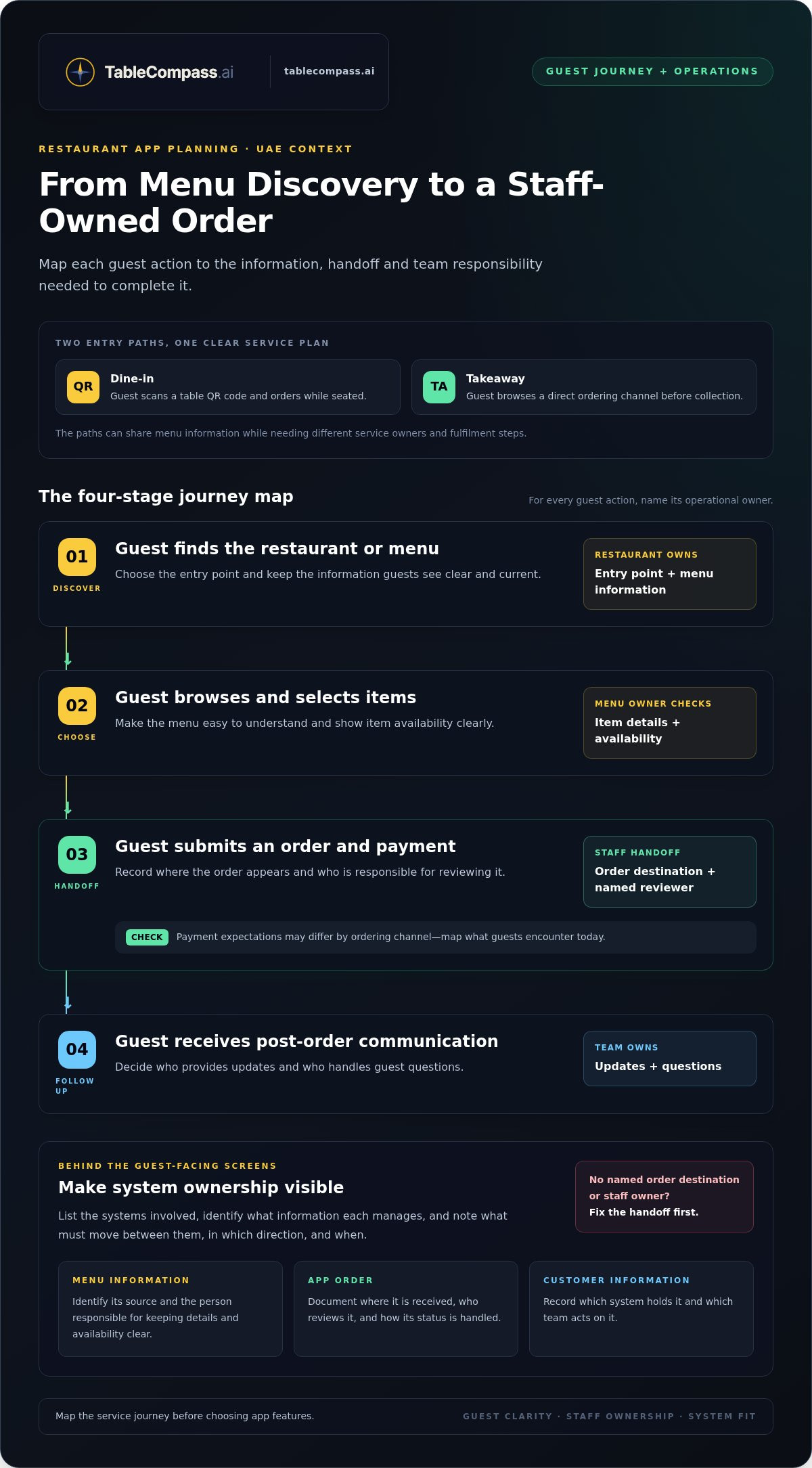
In a UAE restaurant, a dine-in guest might scan a table QR code and order while seated, while a takeaway guest may browse a direct ordering channel before collection. The journeys share menu information but have different service owners and fulfilment needs. Map each path in a simple sequence:
- Guest finds the restaurant or menu → the restaurant defines the entry point and maintains the information shown.
- Guest browses and selects items → the menu owner keeps item details and availability clear.
- Guest submits an order and payment → document the order destination and the staff member responsible for reviewing it.
- Guest receives post-order communication → define who provides updates and handles questions.
Use the map to expose gaps. If a submitted order has no named destination or staff owner, adding app features won’t fix the underlying workflow.
Define system boundaries and integration questions
List each system involved and assign ownership for the information it manages. Identify the source of menu details, where an app order is received, which system holds customer information, and which team acts on each item. Then document what information needs to move between systems, in which direction, and at what point in the guest journey.
Keep similar-sounding workflows separate. Menu management means maintaining menu information across the restaurant’s chosen channels. POS-to-aggregator synchronization concerns the exchange of information between a restaurant POS and food delivery aggregators. They address different tasks. Atlas Menu Management centralizes menu control across digital channels; OmniSync and Universal Bridge synchronize POS systems with food aggregators. Those functions do not, by themselves, establish a connection between app orders and a POS.
Before specifying an app-to-POS connection, write down the systems involved, the order information to be exchanged, and what staff should do if a handoff needs attention. An integration depends on a defined connection between the relevant systems, so don’t treat it as automatic. A centralized restaurant menu management approach can also help operators clarify where menu information is maintained.
For a UAE restaurant assessing a branded digital workflow, TableCompass restaurant technology can be considered alongside the operation’s other ordering channels.
Custom-built vs white-label restaurant apps: what should UAE operators compare?
Neither development model is automatically the right choice. A custom mobile app for restaurants should fit the guest experience and daily operation, not just sound advanced. Compare the work each approach involves, the control it provides, and the responsibilities it creates after launch.
Use the same criteria for both options:
| Criterion | Bespoke build | Branded white-label app |
|---|---|---|
| Control | More scope to shape requirements around a distinctive workflow. | Uses an existing product structure, so choices follow its configuration options. |
| Branding | Can be designed around the restaurant’s identity. | Can present a branded guest experience without building every layer from scratch. |
| Maintenance responsibility | Ongoing ownership, maintenance, and future changes need clear planning. | Responsibility is shared according to the product arrangement. Clarify what the restaurant manages and what the platform maintains. |
| Workflow fit | May suit requirements that don’t fit an existing product’s structure. | May suit defined direct-order needs that align with the product’s existing workflow. |
For either route, write down how orders are received and handled, who maintains menu information, and what staff must do during service. These details make the comparison operational, not just visual.
When might a bespoke build be a better fit?
A bespoke build may be worth evaluating when a restaurant has a distinctive ordering process or a specific requirement that an existing product structure can’t accommodate. For example, an independent UAE venue with a specialised service journey may value control over how that journey is designed. A multi-location group may need requirements considered across different operating contexts. Neither case guarantees a better guest experience or business result.
Plan for the work beyond initial development. The restaurant needs a plan for ongoing maintenance, decisions about future changes, and ownership of the app’s evolution. If internal teams don’t have capacity to manage that work, additional control may also bring additional operational effort. Compare the requirement that calls for a bespoke solution with the responsibility it creates.
When might a white-label app be the practical route?
A white-label app can provide a branded channel for direct customer orders using an existing product architecture, rather than building every layer from the ground up. This may suit an independent restaurant seeking a branded ordering experience, or a group assessing a consistent approach across locations, provided the product’s configuration and workflow align with its needs. TableCompass.ai’s White-Label Mobile App supports restaurant branding and direct customer orders.
Assess fit against three essentials: can the app represent the restaurant’s brand, support its intended direct-order journey, and sit sensibly alongside the workflows staff already manage? A UAE guide to white-label restaurant app development can add context to that evaluation. If the requirements fit the product structure, a white-label route may avoid bespoke-build responsibilities while meeting the needs that matter most.
Finally, consider whether the app solves enough friction to justify launching and operating another channel. If it adds steps for guests or staff without addressing a clear need, revisit the requirements before choosing either model.
Plan a restaurant mobile app in six practical steps
A focused plan turns an app idea into decisions your team can evaluate. For a UAE restaurant, those decisions should reflect the guests you serve, your locations, and the ordering channels already in use. Work through these six steps in sequence and record each decision in a short app brief.
- Define the goal. Choose one primary outcome the app should support. An independent café might prioritise making direct pickup orders easier to place, while a multi-location group may want a consistent branded ordering experience across its venues.
- Map your guests. Identify who the app is for and how they currently interact with the restaurant. Ask whether your audience mainly dines in, collects takeaway, or orders through existing digital channels. Note where guests encounter friction rather than assuming every customer needs the same journey.
- Document workflows. Describe what happens after a guest submits an order. Record who receives it, who acts on it, and how staff handle questions or changes. Include the systems and channels involved so the proposed app fits the real operation.
- Set requirements. Specify the essentials: brand presentation, the primary ordering journey, relevant locations, and the operational systems involved. Separate must-haves from optional enhancements. If the immediate goal is direct ordering, prioritise that journey before adding features that don’t address it.
- Compare models. Use the same criteria for a bespoke build and a branded white-label app: control, branding, maintenance responsibilities, and workflow fit. Choose the approach that meets the requirements without adding unnecessary ownership or complexity.
- Measure outcomes. Decide how you’ll assess whether the app is serving its purpose. Pick measures tied to the goal, establish a baseline before launch, and review results afterward without relying on unsupported industry benchmarks.
Turn restaurant priorities into an app brief
Make the brief specific enough to guide decisions. Name the primary guest journey, the locations it should cover, the brand elements that matter, and the ordering needs it must support. Include relevant operational systems and describe staff responsibilities. Label each requirement essential or optional so the scope stays connected to a real restaurant priority.
Choose measures that reflect real restaurant goals
Useful measures depend on the goal. A restaurant focused on direct ordering might track direct orders and order completion. If encouraging repeat engagement is a priority, it could monitor repeat usage. Record the current baseline using information available to your team, then review the same measures over time. A restaurant loyalty app builder guide can offer further context if repeat engagement is central to your brief.
Once your priorities and measures are clear, explore branded mobile app options as part of a considered restaurant workflow.
How TableCompass supports branded restaurant app experiences
A restaurant app works best as part of a defined digital workflow, not as a standalone layer added on top of existing channels. TableCompass.ai offers a White-Label Mobile App for restaurants seeking a branded guest experience and a channel for managing direct customer orders. It is a white-label option, not a bespoke app built from scratch. Start with the restaurant’s goal: what should guests be able to do, and how will staff handle the resulting activity?
That distinction matters for operators considering a custom mobile app for restaurants. The solution should match the requirements in the app brief, including the intended guest journey and the restaurant’s existing processes. Branding is one part of the decision. The role the app plays in service is another.
Where the White-Label Mobile App fits
The White-Label Mobile App supports restaurant branding and direct customer orders. Use the defined guest journey to assess its fit. For example, consider whether the restaurant’s priority is giving guests a branded route to place orders directly. This provides a practical comparison point without assuming every feature or workflow needs to be developed specifically for that restaurant.
Before evaluating the app, record the core requirements: the brand experience guests should see, the order journey the restaurant wants to support, and the staff process for handling those orders. Then compare those needs with the product’s role. A guide to branded mobile apps for F&B direct sales can provide additional context alongside the restaurant’s operational priorities.
How the wider TableCompass.ai suite supports restaurant workflows
Related tools address distinct parts of TableCompass.ai restaurant technology. Keep their roles clear as you plan:
- QR Table Ordering & Pay supports QR-based ordering and payment.
- Atlas Menu Management centralizes menu control across digital channels.
- OmniSync and Universal Bridge synchronize restaurant POS systems with food delivery aggregators.
These functions are not interchangeable. Menu management concerns menu information; QR table ordering supports a guest ordering and payment journey; POS-to-aggregator synchronization concerns the connection between a restaurant POS and food delivery aggregators. The stated roles of OmniSync and Universal Bridge don’t establish that app orders automatically connect to a POS. For any app-to-POS workflow, keep the systems and required connections explicit in the restaurant’s plan.
For a UAE operator, a useful next step is to take the app brief and mark which needs relate to branded direct orders, QR-based table service, menu management, or POS-to-aggregator synchronization. Then compare the relevant TableCompass.ai solution with those defined workflows. This keeps the technology structure clear and helps the team focus on a branded guest experience that fits its operation.
Make your next app decision with purpose
Turn your planning into a working brief your team can use. Describe the guest journey you want to support, how staff will manage it, and what you’ll measure after launch. This gives your restaurant a clear basis for deciding whether a custom mobile app for restaurants is the right fit and how it should sit within your wider digital operation.
TableCompass.ai brings together a White-Label Mobile App and a wider suite of restaurant operations and guest-experience products. Use your brief to identify which solution matches your priorities, without adding tools that don’t serve a defined need.
Explore TableCompass solutions for restaurant app experiences and take the next step toward a digital guest journey designed around your restaurant.
Frequently Asked Questions
Does every restaurant need its own mobile app?
No. An app makes sense when it serves a clear guest or operational need that existing channels don’t handle well. A small UAE restaurant that already manages orders smoothly through its current channels may have little reason to add another. First identify the task the app should improve, then weigh that value against the work of maintaining another guest-facing channel.
How much does a custom mobile app for a restaurant cost?
The cost depends on the project’s scope and development approach, so there isn’t one figure that applies to every restaurant. A bespoke build and a white-label solution involve different requirements and responsibilities. Before requesting or comparing estimates, define the guest journey, branding needs, ordering workflow, locations, and ongoing maintenance expectations. This gives you a clearer basis for evaluating the full commitment in AED, rather than comparing headline prices alone.
How long does it take to build a restaurant app?
There’s no reliable single timeline without a defined scope. The work depends on the required guest journeys, design and configuration, and how the app must fit the restaurant’s operational systems. A UAE operator can make planning more concrete by documenting who approves requirements, who supplies menu and brand information, and who tests the guest experience and staff process before launch.
Can a restaurant app serve more than one location?
Yes, a restaurant app project can be planned around multiple locations, but the operating details matter. Decide whether guests should see the same menu and ordering journey at each branch or whether some information and processes differ. For a UAE group, document how branch selection, order handling, and location-specific menu details should work. These decisions define the requirements without assuming every venue operates identically.
Do customers have to download an app to order from a restaurant?
Customers need to download an app if they choose to order through one that requires installation. They don’t necessarily need to use that route if the restaurant offers other ordering channels. A guest who prefers not to install an app may use another channel the restaurant already provides. Make the available routes clear and ensure each has a defined process for handling orders.
How can a restaurant measure whether its app is working?
Choose measures that match the app’s intended role, then compare them with a baseline recorded before launch. A restaurant aiming to encourage direct ordering might monitor the number of orders placed through that channel and how often orders are completed. If the goal is easier ordering, review guest questions and staff feedback as well. Check results at regular review points and use them to decide what to adjust.