Common Restaurant Management Problems: Causes, Fixes, and Smarter Operations
A late order, a missing ingredient, and an exhausted shift team may look like separate problems. In practice, they can point to one operation working in silos. These common restaurant management problems often surface together during a UAE service: staff repeat tasks, stock records lag behind demand, and orders from different channels need manual handling. The pressure is visible, but the cause may sit between people, processes, and systems.
Staffing, food waste, and service consistency all need ongoing attention. The challenge is to identify which breakdown is driving the others, then fix it without adding more admin. This guide shows you how to spot symptoms, trace them to practical causes, and prioritize improvements that fit your restaurant’s setup.
We’ll look at service and staffing pressure, inventory visibility, and disconnected workflows, including how demand shifts such as Ramadan can test routines. You’ll also see how clear procedures and connected tools can support your team. For example, synchronizing POS orders with food aggregators through OmniSync can reduce repetitive order processing. Technology works best as operational infrastructure, supporting sound processes rather than replacing them.
Key Takeaways
- Recognize common restaurant management problems by tracking recurring symptoms and tracing them to operational causes.
- Use clear ownership, consistent steps, and reliable handoffs to find where people, processes, or systems contribute to repeat issues.
- Prioritize fixes by their effect on guests, how often they occur, and how much of the operation they disrupt.
- Test practical changes with the staff who perform the workflow, then review feedback across shifts before standardizing the approach.
- Connect tools to specific workflow gaps, such as repeated order entry or menu updates, while keeping sound processes and team training in place.
Common Restaurant Management Problems: Spot the Symptoms Before They Escalate
Keeping service, staff, stock, and digital orders aligned takes attention throughout a shift. A delay at the pass, an unavailable menu item, or a repeated order entry may seem like a separate hassle, but each can point to a weak handoff. Restaurant management involves coordinating people and daily operations, so a useful diagnosis looks beyond the visible snag to the process around it.
Watch for delayed service, stock discrepancies, duplicated tasks, communication gaps, and guest experiences that vary between visits or ordering channels. These common restaurant management problems can overlap. A stock mismatch, for example, may make an item unavailable, leave staff explaining the change, and result in different information online and in person. Look for a pattern before choosing a fix.
Which restaurant problems show up during everyday service?
Missed handoffs can leave front-of-house staff waiting for kitchen updates, or the kitchen working from incomplete order changes. When no one clearly owns updating item availability or resolving an order issue, two people may repeat the same check while another decision stalls.
UAE restaurants may combine dine-in and delivery in different ways, depending on their operating model. If your restaurant serves guests through several channels, check whether the same menu information and order status reach the people who need them. Trace the actual workflow in your venue rather than assuming every restaurant operates alike.
How can you tell a recurring issue from a one-off disruption?
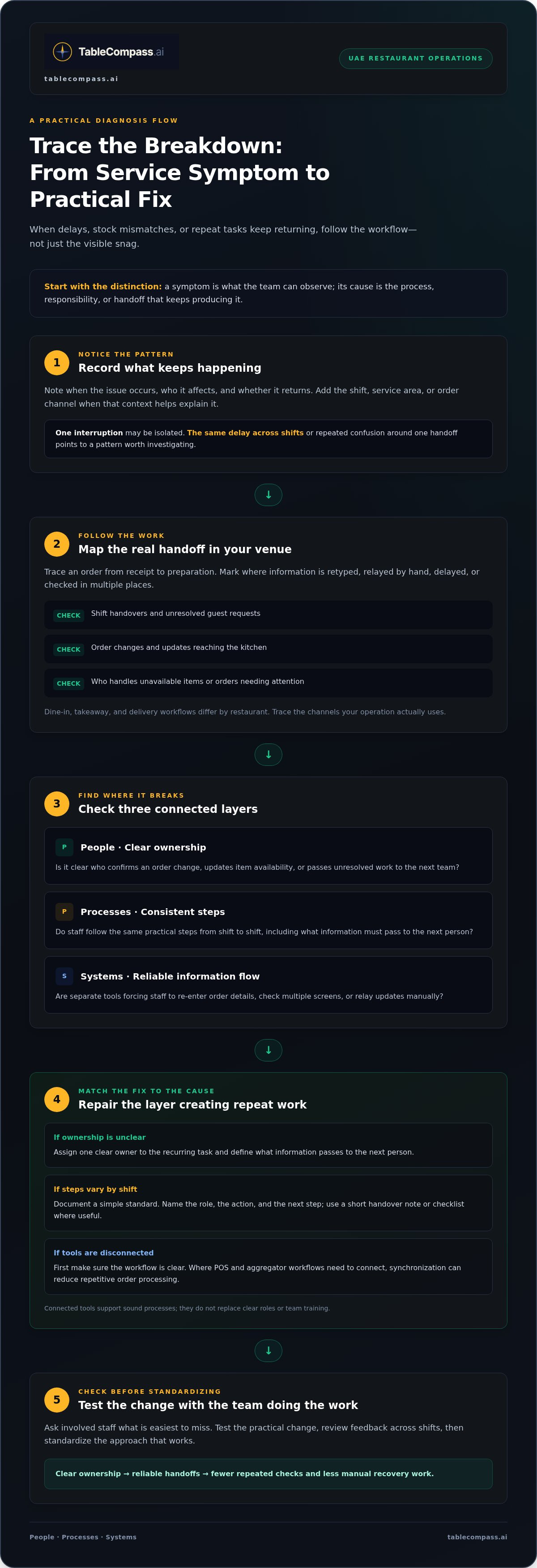
Record when an issue occurs, who it affects, and whether it returns. Add the shift, service area, and order channel if those details help explain the context. A single interruption may be isolated. The same delay across shifts, or repeated confusion around one handoff, suggests a process pattern that deserves attention.
An operational symptom is what the team can observe; its underlying cause is the process, responsibility, or handoff that keeps producing it. Review your notes with the staff involved before deciding what to change. This helps prevent a quick patch from masking the same breakdown elsewhere.
Why Restaurant Management Problems Repeat: People, Processes, and Systems
A problem rarely repeats for just one reason. Use three connected layers to find where the workflow is breaking: people need clear ownership, processes need consistent steps, and systems need reliable handoffs. A missed order update, for example, might begin with unclear responsibility, become a skipped step during a busy shift, and leave different teams working from different information.
This framework helps operators avoid jumping straight to a software fix. If staff don’t know who confirms an order change, define the owner and handoff first. If everyone knows their role but the steps vary by shift, document a simple standard. If the process is clear but information must be copied between separate tools, connecting systems may reduce repeat entry. For more on procedures and daily controls, see Restaurant Operations & Management.
When unclear roles and handoffs create service problems
Review three pressure points: shift handovers, order changes, and escalation ownership. Is the outgoing team passing on unresolved guest requests? Does everyone know who updates the kitchen when a dine-in order changes? Who handles an unavailable item or an order that needs attention? Assign one clear owner to each recurring task. Then document what information must pass to the next person and how they confirm they received it.
Keep instructions practical: name the role, the action, and the next step. A short handover note or checklist can strengthen the process without adding a complex procedure. Ask the staff doing the work which instructions are easiest to miss, and make those steps especially clear.
When disconnected systems create repeat work
Restaurants that serve dine-in, takeaway, and delivery may manage orders through different channels. If those channels don’t share information with the POS, staff may re-enter details, check multiple screens, or relay updates by hand. Each extra handoff creates another chance for a delay or mismatched information. First establish whether the workflow is unclear, the tools are disconnected, or both.
A broken information handoff doesn’t just lose a detail; it can multiply the work needed to recover it. Map how an order moves from receipt to preparation, then mark each point where someone retypes or relays information. Where POS and aggregator workflows need to connect, restaurant POS synchronization can help reduce repetitive order processing. The technology supports the workflow, while clear roles and reliable procedures still matter. Explore connected restaurant operations technology as one part of a broader fix.
How to Prioritize Restaurant Management Problems by Impact
When several issues compete for attention, start with the one that most affects guests or interrupts service, not necessarily the one that’s easiest to notice. Compare each problem by four factors: its effect on guests, how often it occurs, how much work it disrupts, and whether it affects more than one channel. This gives UAE operators a practical way to weigh a dining-room delay against an inventory mismatch or a menu inconsistency across digital ordering channels.
| Problem | Observable signal | Likely cause | First action |
|---|---|---|---|
| Service delays | Orders repeatedly wait at the same handoff point | Unclear responsibilities or incomplete order information | Observe the order journey and identify where it pauses |
| Inventory discrepancies | Recorded stock doesn’t match what staff can use | Updates are missed, delayed, or handled inconsistently | Compare stock records with a focused check of affected items |
| Repetitive admin | Staff re-enter or relay the same order details | Separate channels or tools require manual handoffs | Map each step and note where information is copied |
| Inconsistent digital menus | An item or detail differs between channels | Updates are made in multiple places without a clear owner | Set an update owner and review where menu information is managed |
Which issue should a restaurant manager fix first?
Act first on a recurring problem that affects guests or blocks service, such as an order delay that repeatedly interrupts preparation. An isolated disruption may need an immediate response, while a process improvement can be scheduled if service is stable. Before changing the workflow, record a simple baseline: what happened, when, how often, and which team or channel was affected. Review the same details afterward to see whether the change helped.
How to compare quick fixes with longer-term improvements
Some friction calls for a quick operational adjustment: clarify who updates an unavailable item, or add a handoff step to a shift checklist. Other patterns need a closer look at the process or systems supporting it. Technology is most useful when it addresses a defined, repeated problem, such as copying orders between disconnected channels, rather than taking the place of clear procedures.
If the pattern points to disconnected tools, consider how middleware can connect restaurant systems. Treat common restaurant management problems as a queue of evidence, not a list of assumptions: fix the most disruptive repeat issue, then reassess what remains.
Practical Steps to Solve Restaurant Management Problems in the UAE
To turn recurring friction into a lasting fix, use a simple improvement cycle. Whether the issue is delayed dine-in orders, repeated corrections on takeaway orders, or a menu detail that differs across channels, start with what your team can observe. This keeps common restaurant management problems grounded in the way your restaurant actually operates, rather than assumptions about how every UAE venue should work.
- 1. Define the problem. Describe the visible symptom clearly, such as order changes reaching the kitchen late or staff repeatedly correcting the same item information. Avoid vague labels like “poor communication.”
- 2. Observe the workflow. Watch the task from its trigger to completion. Note when it happens, who handles it, and where delays, corrections, or repeated steps appear.
- 3. Find the handoff. Map the people, process, and systems involved. Check where responsibility or information passes between the team, such as from a server to the kitchen or from a digital order channel to preparation.
- 4. Test one focused change. Choose a practical adjustment, assign an owner, and explain the expected action. For example, clarify who records an order change and how the next person confirms receipt.
- 5. Review the result. Compare what happens after the change with your original observations. Ask staff across shifts whether the symptom has eased and whether the adjustment has created new friction.
- 6. Standardize what works. If the change helps, document the agreed steps and make them accessible to everyone involved. If it doesn’t, revisit the handoff and test a different adjustment.
Involve the staff who perform the workflow, not only the people who supervise it. A short conversation after service can reveal a missed step that’s invisible in a manager’s report. Gather feedback across shifts and, where relevant, from the dine-in, takeaway, and delivery processes your restaurant uses. Keep the notes practical: what happened, where it happened, and what would make the next handoff clearer.
Make the agreed process easy to find, then set a review point so the team can flag changes or unintended effects. If item information differs across channels, identify where each update is made, who owns it, and how staff can confirm the change has reached the right places. Atlas Menu Management centralizes menu control across digital channels and supports real-time menu updates.
Once the process is clear, connected tools can help reduce repeated manual steps between systems. Explore connected restaurant workflow tools to see how technology can support a more consistent operation.
Build a More Connected Restaurant Operation with the Right Tools
Connected technology is useful when a defined workflow keeps creating avoidable work. If staff repeatedly enter the same delivery order into separate systems, can’t see order information in one place, or update the same menu item across multiple channels, there may be a gap between tools. Start with the task that’s being repeated, then look for a capability that addresses that specific handoff.
Before adopting a new tool, map how information moves through your restaurant. Follow an order from the channel where it arrives to the POS and the team preparing it. For menus, check where an item or availability change is made and how it reaches each digital channel. This gives you a practical basis for deciding whether you need a clearer procedure, connected systems, or both.
What to look for in restaurant operations technology
Assess whether the technology supports a documented workflow and reduces a recurring step, rather than adding another place for staff to check. Consider how information passes between your POS, delivery channels, menus, and guest touchpoints. Be clear about the problem you expect the tool to address, who will use the workflow, and how your team will review whether it’s working. Tools can support operations, but they don’t replace staffing decisions, training, or consistent procedures.
How TableCompass.ai supports connected restaurant workflows
For repeated order entry between a restaurant’s POS and food delivery aggregators, TableCompass.ai OmniSync synchronizes those systems and automates order processing. If teams are duplicating menu changes across digital channels, Atlas Menu Management centralizes menu control and enables real-time updates. For a restaurant looking to support ordering and payment at the table, QR Table Ordering & Pay offers a QR-based option. Each addresses a different workflow, so begin with the issue you’ve identified.
Take a practical next step: choose one recurring point of friction, document the current handoff, and decide what clearer process or system connection would help. Then involve the people who use that workflow in reviewing the change. This keeps technology grounded in daily operations and helps your team build on a process that makes sense.
Explore TableCompass.ai restaurant workflow solutions to see how connected tools can support clearer day-to-day operations.
Strengthen Your Restaurant’s Next Shift
Common restaurant management problems become easier to address when recurring symptoms are treated as clues. Trace each issue to its cause, decide whether the gap sits with ownership, process, or a system handoff, then prioritize the fix by its effect on guests and service. Test one practical change with the people who do the work, review what happens across shifts, and standardize the steps that help.
When manual entry, scattered order information, or repeated menu updates are part of the problem, connected tools can support a clearer workflow. OmniSync synchronizes restaurant POS systems with third-party food delivery aggregators and automates order processing. Atlas Menu Management centralizes menu control across digital channels, while QR Table Ordering & Pay supports ordering and payment at the table. These tools work best alongside clear responsibilities and sound processes.
Take the next step toward a more connected operation. Explore connected restaurant workflows with TableCompass.ai and choose a practical path forward for your team. Better operations are built one clear handoff at a time.
Frequently Asked Questions
What are the most common restaurant management problems?
Common restaurant management problems include staffing and handoff pressure, inventory discrepancies, inconsistent service, duplicated admin, and disconnected ordering channels. Use this as a diagnostic starting point: note the recurring symptom, when it appears, and which people or steps are involved. For example, repeated order corrections may point to an information handoff that needs attention, rather than an isolated mistake by one team member.
How can restaurant managers improve operations without adding more software?
Start by mapping the workflow behind the recurring issue. Clarify who owns each task, simplify the handoff, and document the agreed steps in a format staff can use during service. Ask the team performing the work what causes friction, then track whether the original symptom changes after the adjustment. If information still has to be transferred repeatedly between separate systems, assess whether connecting those systems would address that specific gap.
Why do restaurant inventory problems keep happening?
Inventory discrepancies can arise from inconsistent recording, unclear task ownership, timing differences, or stock information that doesn’t reach everyone involved. Trace how an item is counted, recorded, and updated, then compare recurring gaps across shifts instead of attributing the issue to one person or service. A consistent counting and handoff process can help. If the problem stems from fragmented information, connected tools may also support clearer visibility.
How can a restaurant reduce order errors between delivery apps and its POS?
First, identify where errors enter the workflow: order receipt, manual re-entry, menu availability, or a later handoff. Record the channels and steps involved, then clarify responsibility and remove unnecessary duplication where possible. If disconnected order flow is the cause, TableCompass OmniSync synchronizes restaurant POS systems with third-party food delivery aggregators and automates order processing. It supports connected order handling, but managers should still investigate each error rather than assume every mistake has the same cause.
Can restaurant technology solve staffing and service problems?
Technology can support specific tasks, such as transferring order information between systems or centralizing digital menu updates, but it can’t replace clear roles, training, or sound service processes. Define the operational problem first and involve the team affected by it. Then decide whether the right response is a process adjustment, a technology improvement, or both. Review what happens after the change to see whether it addresses the original issue without creating new friction.
What should a UAE restaurant fix first when several problems happen at once?
Start with the recurring issue that most affects guests or disrupts service, then consider how often it happens and how many workflows it touches. Don’t try to change everything at once. Map the people, process, and systems involved in the highest-priority issue, record what happens now, and choose one focused improvement. Review its effect with the team before moving to the next problem, adapting the approach to your restaurant’s own service model.