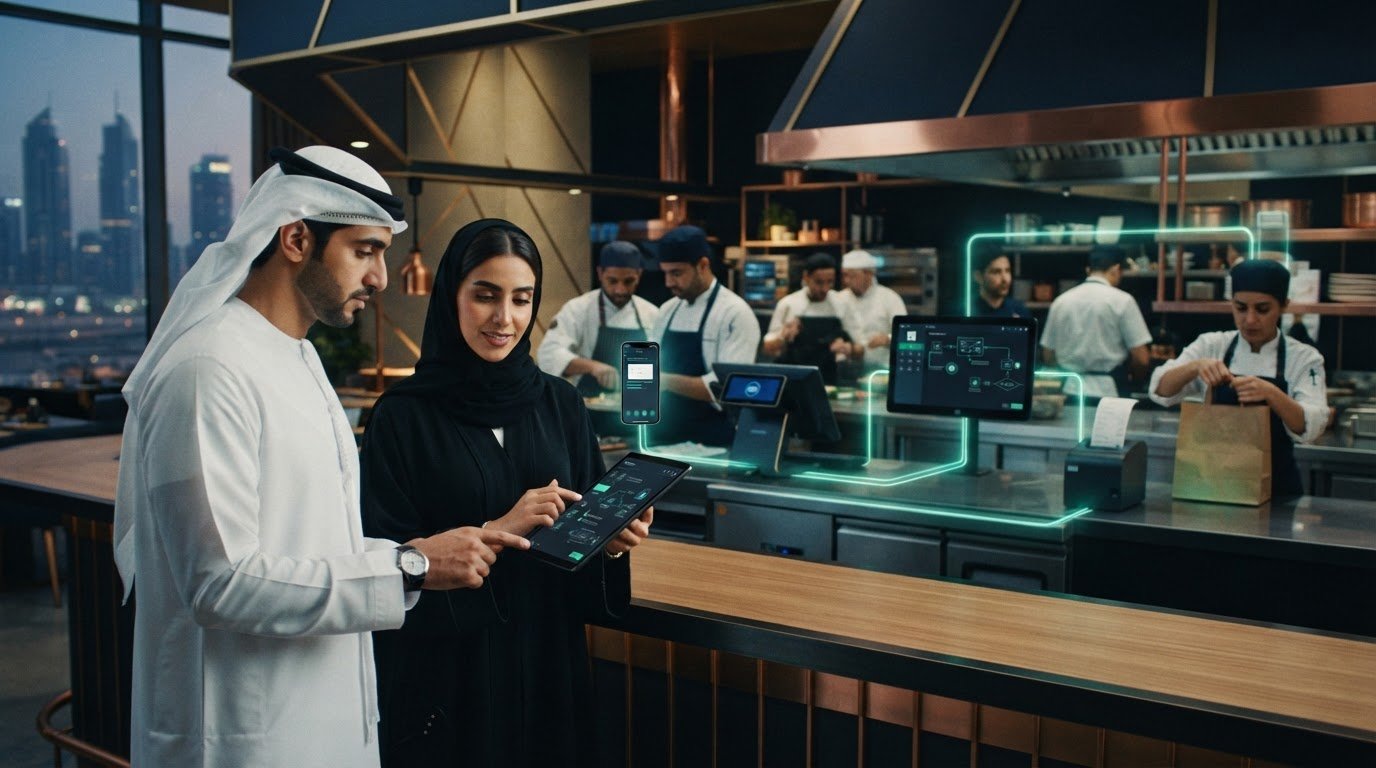
Automated Food Ordering: 2026 Guide for UAE Restaurants
What if the biggest ordering bottleneck isn’t taking an order, but moving it from one system to another? For UAE restaurants managing dine-in, takeaway and delivery, an automated food ordering system should connect guest requests to the POS workflow, not add another screen for staff to monitor. When orders arrive through separate channels, teams may re-enter details while menu availability falls out of sync.
Automation works best when guest channels feed a coordinated restaurant workflow. That doesn’t mean replacing the systems your team already uses. Middleware such as OmniSync connects restaurant POS systems with food aggregators, helping orders move into restaurant operations with less manual handling.
This guide follows an order from a guest’s selection through receipt, preparation and fulfilment. You’ll learn which capabilities to assess, how menu updates and direct ordering fit into a connected setup, and how to prepare your existing POS workflow. The aim is clearer control, fewer repetitive steps and an ordering process your team can manage confidently.
Key Takeaways
- An automated food ordering system does more than collect guest selections: it routes order details into the restaurant’s working process.
- Trace each order from guest selection through receipt, preparation and fulfilment to find manual handoffs your team can reduce.
- Compare systems by channel coverage, POS connection, menu control and order visibility, not just by the guest-facing interface.
- Before automating, document your delivery, dine-in and multi-location workflows, then assign responsibility for menus and exceptions.
- Connected POS and aggregator workflows, supported by middleware such as OmniSync, can help bring order processing into a more coordinated operation.
What Is an Automated Food Ordering System for Restaurants?
An automated food ordering system captures a guest’s order and routes its details into the restaurant’s workflow with less manual handling. Instead of copying an order from one screen to another, connected tools pass the selection to the system the team uses to receive and process orders.
The basic journey is straightforward: a guest chooses items and submits an order, the restaurant receives the details, and the team prepares and fulfils it. The software supports this flow. It is not the delivery service that transports food or the POS hardware used at the counter. For a wider background on how customers place orders digitally, see Online food ordering.
Automation can reduce repetitive entry and make it easier to follow an order from submission to preparation. The result depends on how channels and restaurant systems are connected and how the team uses the workflow. To assess the potential value, note each time staff currently copy order details, switch screens or check availability manually.
Which restaurant ordering channels can a system support?
Channels are the different ways guests place orders. A UAE restaurant might receive delivery orders through food aggregators, direct orders through its own app, and dine-in orders through QR table ordering. Each channel serves a different guest journey, but connected ordering can route selections into the restaurant’s processing flow.
For example, during a busy service, dine-in guests may order at the table while delivery requests arrive through aggregator platforms. Start by listing the channels your restaurant uses, then record where each order appears and which team member takes the next step. This makes it easier to see which channels need to connect and where staff are repeating work.
How is automated ordering different from a basic digital menu?
A digital menu displays food and drink choices; a connected ordering system captures a guest’s selections and passes the order into restaurant operations for processing. A menu alone may let guests browse on a phone, but that doesn’t mean the kitchen or POS receives their selections. The key distinction is the handoff: does the order move beyond the guest’s screen?
Consider a guest scanning a QR code at a Dubai café. If the code only opens a menu, staff still need to take and enter the order. If it supports ordering and connects to the restaurant’s workflow, the selection can reach the team for preparation without the same manual transfer. QR Table Ordering & Pay supports direct ordering experiences, while centralized digital menu management helps keep menu information aligned across channels.
How an Automated Food Ordering System Moves Orders Through the Restaurant
A connected order flow links a guest’s selection to the restaurant’s next steps. An automated food ordering system can pass order details between digital channels and restaurant systems, reducing the need for staff to enter the same information more than once. The exact route depends on the channels and systems in use.
In short: A guest submits an order, connected systems route its details to the restaurant, and the team prepares and fulfils it.
From guest selection to order receipt
A guest submits selected items and any available order preferences through a delivery platform or the restaurant’s own ordering channel. For a UAE restaurant, an aggregator order can pass into the connected POS workflow. For dine-in, a guest ordering through the restaurant’s digital channel can have the selection routed to the system the team uses to process orders.
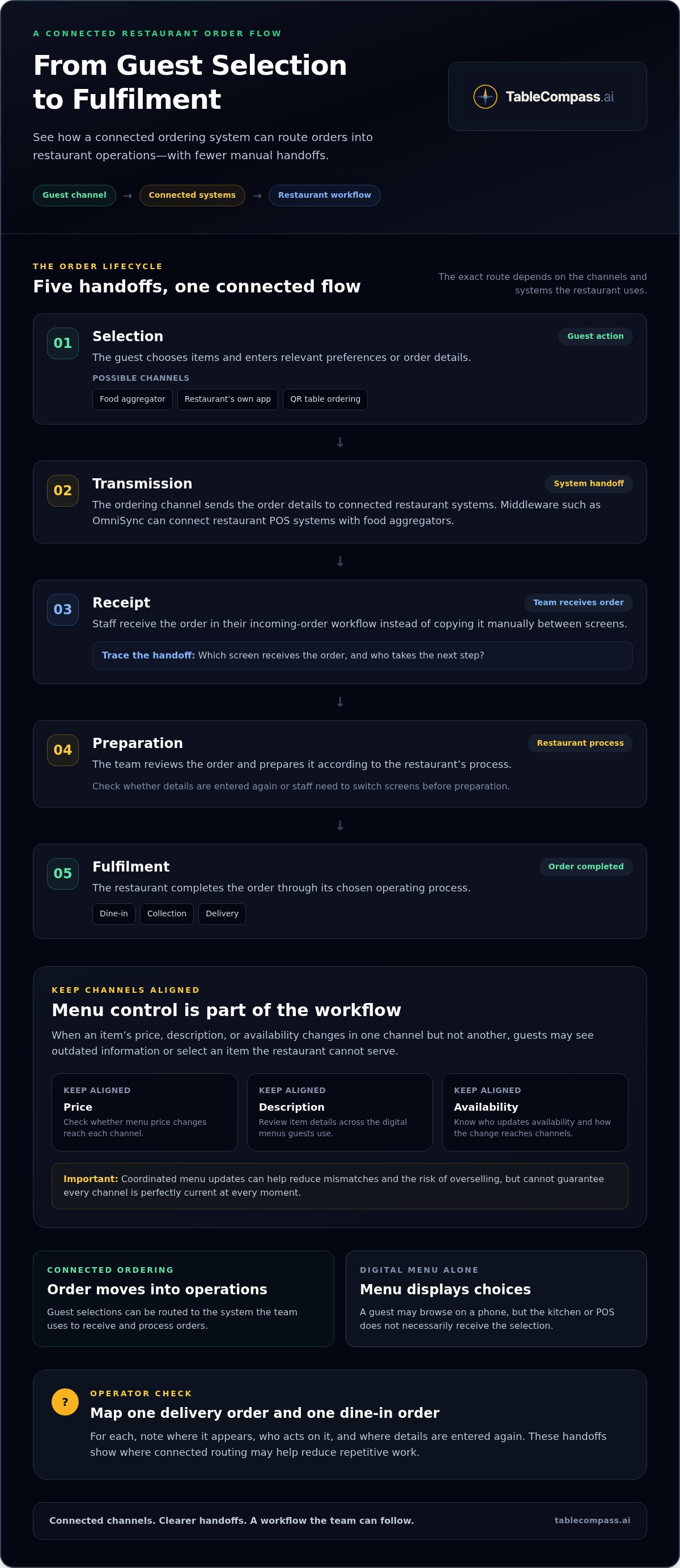
A typical lifecycle looks like this:
- Selection: The guest chooses items and enters relevant preferences or order details.
- Transmission: The ordering channel sends the order to connected restaurant systems.
- Receipt: Staff receive the order in their incoming-order workflow instead of copying it manually between screens.
- Preparation: The team reviews the order and prepares it according to the restaurant’s process.
- Fulfilment: The restaurant completes the order for dine-in, collection or delivery through its chosen operating process.
For operators, the practical question is where staff still need to rekey details or move them manually. Trace one delivery order and one dine-in order from submission to preparation. Note which screen receives each order, who acts on it and where the information is entered again. Those handoffs show where connected routing may help.
Where menu and inventory synchronization fit
Order routing is only part of the workflow. If an item’s price, description or availability changes in one channel but not another, guests may see outdated information or select something the restaurant can’t serve. Coordinated menu updates help reduce these mismatches and the risk of overselling, though they can’t guarantee every channel is perfectly current at every moment.
Central menu control helps operators manage digital menu information across ordering channels. TableCompass.ai’s Atlas Menu Management centralizes digital menu control and supports real-time updates. As you review your workflow, list who updates item availability and how that change reaches each channel. For deeper guidance, refer to the guide to centralized menu management.
To explore how POS and aggregator connections fit into restaurant operations, see TableCompass.ai restaurant technology.
What to Evaluate Before Choosing an Automated Food Ordering System
Choose around the workflow your restaurant needs to run, not just the screen a guest sees. A polished app can collect selections, but if staff still copy orders into the POS or check availability in a separate place, the process remains partly manual. Assess how each channel connects to order handling, menu updates and the team’s view of incoming requests.
| What to evaluate | Questions to ask about your workflow | Why it matters |
|---|---|---|
| Channel coverage | Which delivery platforms, restaurant-owned ordering channels and dine-in options need to feed the workflow? | Helps establish whether orders from the channels you use can be handled through a coordinated process. |
| POS connection | Can order details pass into the POS workflow, or do staff need to enter them again? | Rekeying adds a manual handoff for the team to manage during service. |
| Menu control | Can teams manage digital menu information centrally, or must they update each channel separately? | Coordinated updates can help reduce inconsistencies in item details and availability. |
| Order visibility | Can staff see incoming orders and their progress clearly enough to take the next action? | Useful visibility helps the team understand what needs attention during a busy shift. |
Does the system fit your existing restaurant workflow?
Before comparing options, map where orders come from, who receives them and where staff repeat data entry or switch between screens. For a UAE venue using several delivery platforms alongside dine-in service, POS and aggregator connectivity can route orders into the restaurant’s existing process instead of leaving teams to transfer details manually. TableCompass.ai’s OmniSync is middleware that synchronizes restaurant POS systems with food aggregators. For a deeper integration discussion, use a restaurant POS synchronization executive guide as a companion resource.
Needs also change with the operation. A single venue may focus on connecting its active channels to one clear order workflow. A multi-branch restaurant may need consistent menu control and visibility across locations. An F&B group may need to coordinate several brands or operating models without assuming every outlet follows the same process. List the channels and handoffs at each location before setting priorities.
Can teams manage menus and orders across channels?
Separate manual updates can leave channels showing different item details or availability. Centralized menu control gives teams one place to manage digital menu information and can support updates across channels. Ask staff which changes they make most often, such as marking an item unavailable, and include those tasks in your workflow review.
Order visibility should answer practical service questions: Has the order arrived? Which team needs to act on it? Is it being prepared or awaiting the next step? Clear status information helps staff coordinate without relying on memory or repeated checks. For multi-location operators, a food aggregator integration strategy for UAE F&B groups can provide a useful framework for considering how channel connections fit a broader operation.
How UAE Restaurants Can Prepare for Ordering Automation
A connected system works best when the operating process is clear first. Before choosing an automated food ordering system, document how orders move through your restaurant today. This gives you a practical baseline for deciding which handoffs need to change and what staff need to see during service.
Map order sources and staff handoffs
Start with a typical busy period. List each order source, such as delivery platforms, dine-in service and your restaurant’s own ordering channel. Then trace each order from submission to the kitchen or service team. Note who receives it, where the details appear and who takes the next step.
Look for repeated entry, missed menu or availability updates, and tasks with no clear owner. For example, a delivery order might arrive on one device and be entered into the POS by a staff member, while dine-in orders follow a separate process. A multi-location restaurant should map the same journey at each branch and note where practices differ. These observations help reveal whether the issue is a missing system connection, an unclear responsibility or both.
Prepare menus, availability, and team workflows
Review item names, options and availability rules across the digital channels your restaurant uses. If a popular item becomes unavailable during a busy service, staff should know who updates the menu and how the change reaches each channel. For a group operating several venues, define which menu details are managed centrally and which are specific to each location.
Next, assign ownership. Decide who maintains menu information, who handles order exceptions and who helps staff resolve a handoff issue during service. Clear responsibilities prevent automation from becoming another system people are unsure how to use.
Finally, walk the team through realistic examples before relying on the new workflow. Trace a dine-in order and a delivery-platform order from guest selection to the point where the team acts on it. Ask staff where they can see the order, what action comes next and how they should handle an unavailable item or an incomplete detail. This rehearsal can expose confusing steps while there’s still time to improve the process.
Use the results to set priorities: which channels should connect, which menu updates need coordination, and what information staff need at a glance. Explore connected restaurant ordering workflows to see how POS connections and menu management can support that preparation.
Connect Automated Food Ordering to a Coordinated Restaurant Operation
Order capture, menu control and system connections work together. A guest can submit an order through a digital channel, but staff still need accurate item details and a clear route for receiving and processing it. A well-connected automated food ordering system links these steps to the restaurant’s existing workflow, helping reduce manual transfers and giving teams a clearer view of incoming orders.
Where OmniSync fits in the automated ordering workflow
For restaurants that receive orders through food aggregators, OmniSync is TableCompass.ai middleware that synchronizes restaurant POS systems with third-party food delivery aggregators. It connects systems so order information can move between the aggregator and the restaurant POS workflow instead of being re-entered by staff. To assess the handoff, trace an aggregator order through your current process and note where details are transferred manually.
TableCompass.ai’s platform also automates order processing and inventory management to reduce manual data entry and errors. These capabilities support a more coordinated workflow, but clear staff responsibilities and accurate menu information remain important. For a deeper technical explanation, consult the POS middleware integration guide.
Choose a connected setup around your restaurant’s needs
Start with your operating model. A single venue might prioritize connecting its active delivery channels to its POS workflow. A multi-branch restaurant or F&B group may also need centralized menu control and a consistent way to manage order information across locations. Identify the channels you use, the systems orders need to reach, the menu updates staff handle and who owns exceptions during service.
Atlas Menu Management centralizes digital menu control and supports real-time updates. For direct ordering, QR Table Ordering & Pay and White-Label Mobile Apps support guest ordering experiences. These are complementary capabilities, not mandatory parts of every setup. Choose based on where your guests order and how your team needs to process those requests.
The goal is not to add technology for its own sake. It’s to connect the parts of the order journey that currently rely on repetitive work, while keeping the workflow practical for staff. TableCompass.ai brings POS and aggregator connections, menu management and direct ordering together to support a coordinated restaurant operation.
Build a More Connected Ordering Workflow
An effective automated food ordering system connects more than a guest-facing channel. It routes orders into restaurant operations, supports coordinated menu information and gives staff a clearer process to follow. Before choosing a setup, map your order channels and handoffs, then focus on the connections and menu controls that fit your restaurant’s workflow.
For UAE restaurant operators, TableCompass.ai brings these capabilities together through connected restaurant technology. OmniSync synchronizes restaurant POS systems with third-party food delivery aggregators, while Atlas Menu Management centralizes digital menu control. Direct ordering options, including QR ordering and white-label apps, can complement these tools when they suit your service model.
Explore how these capabilities could fit your operation with TableCompass.ai restaurant technology. Start with the workflow your team needs most, then build toward a more coordinated ordering operation.
Frequently Asked Questions
What is an automated food ordering system?
An automated food ordering system captures guest selections and routes order details into a restaurant’s processing workflow with less manual handling. A digital menu displays items and choices, but it doesn’t necessarily submit an order or pass it to restaurant systems. For example, a guest may browse a menu on a phone, but automation begins when their selections are submitted and routed for the restaurant team to process.
How does an automated food ordering system work in a restaurant?
An automated food ordering system takes a guest’s submitted order and passes its details through connected channels to the restaurant’s workflow. The guest chooses items and relevant preferences, the restaurant receives the request, and staff prepare and fulfil it according to the service type. A delivery order and a dine-in request may start in different channels, but each needs a clear path to the team responsible for the next step.
Can an automated food ordering system connect to a restaurant POS?
Yes. Middleware can provide a connection layer between ordering channels and restaurant POS systems. TableCompass.ai’s OmniSync synchronizes restaurant POS systems with third-party food delivery aggregators, supporting a connected order flow. Map your current order path first: identify where staff enter details manually and which system should receive each order.
Can restaurants automate orders from delivery aggregators?
Restaurants can use middleware to synchronize aggregator orders with their POS workflow, reducing the need to transfer order details manually. For a UAE operator receiving requests through delivery platforms while also serving dine-in guests, the goal is to route each order into a process staff can manage. OmniSync connects restaurant POS systems with third-party food delivery aggregators. Menu information and staff responsibilities remain important parts of the overall workflow.
Does an automated ordering system update menus and item availability?
Some connected setups support centralized digital menu control and updates across ordering channels. Atlas Menu Management centralizes menu control and supports real-time updates, helping teams coordinate item information and availability. This matters when a restaurant changes an item or marks it unavailable: inconsistent channel details can confuse guests or lead to orders for items the team can’t prepare. Coordinated updates can reduce these mismatches, though they don’t guarantee every channel is always identical.
Is automated food ordering suitable for a small restaurant?
It can be suitable if it addresses the restaurant’s actual channels and daily workflow. A small UAE venue with dine-in orders and a delivery platform may value a clearer route for incoming requests, while a restaurant using one simple ordering process may have different priorities. Start by listing order sources, staff handoffs and repeated tasks. Then focus on the connections and menu controls that solve a real operational need.
What should a UAE restaurant prepare before automating food orders?
Map every order source, from delivery platforms to dine-in and direct ordering, then document how each request reaches the team. Review item names, options and availability across digital menus, and decide who updates them and handles exceptions during service. Walk staff through realistic examples, including one dine-in order and one delivery request. This preparation clarifies the workflow and the responsibilities staff need to follow.